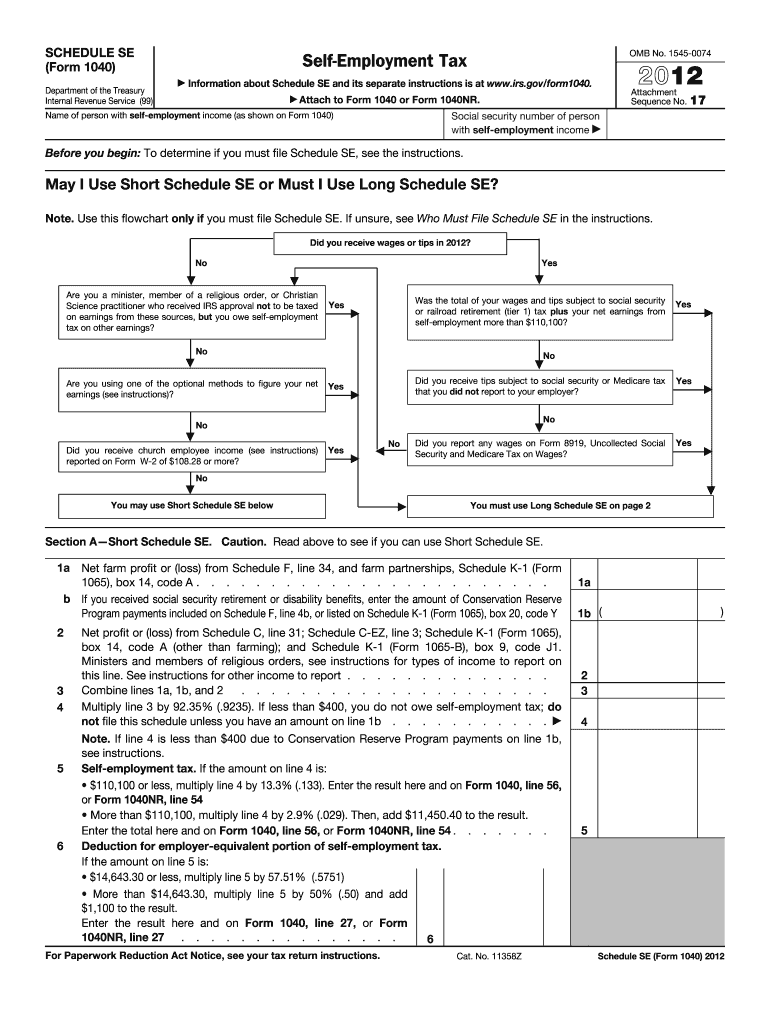
-equivalent portion of self-employment tax. If the amount on line 5 is: $14,643.30 or less, multiply line 5 by 57.51% (.5751) More than $14,643.30, multiply line 5 by 50% (.50) and add $1,100 to the result. Enter the result here and on Form 1040, line 27, or Form 1040NR, line 27 . . . . . . . . . . . . . . . 6 For Paperwork Reduction Act Notice, see your tax return instructions. Cat. No. 11358Z 1a 1b ( ) 2 3 4 5 Schedule SE (Form 1040) 2012 Page 2 Schedule SE (Form 1040) 2012.

Open form follow the instructions

Easily sign the form with your finger

Send filled & signed form or save
How to fill out the IRS 1040 - Schedule SE online
This guide provides detailed instructions on how to complete the IRS 1040 - Schedule SE online, ensuring that users can navigate through the process with clarity and confidence. Whether you are self-employed or earning additional income, accurately completing this form is essential for your tax obligations.
Follow the steps to fill out the IRS 1040 - Schedule SE online.
- Click 'Get Form' button to obtain the form and open it in the editor.
- Begin by entering the name of the person with self-employment income and their social security number as shown on Form 1040. This information is essential for identification purposes.
- Review the requirements to determine whether you need to file using the Short Schedule SE or Long Schedule SE. Follow the flowchart provided to assess your situation.
- If using Short Schedule SE, fill in the lines with your net profit or loss from Schedule F and Schedule C. Ensure to include any relevant payments from the Conservation Reserve Program.
- Combine the totals from your net farm profit or loss and net profit from various sources. Make sure to calculate using the appropriate percentages as instructed for self-employment tax.
- Calculate your self-employment tax based on the figures from previous lines. If necessary, be attentive to the thresholds for contributions to social security and Medicare taxes.
- If you require Long Schedule SE, fill in the sections similar to Short Schedule SE, but ensure to add details required under Part II for optional methods.
- Final steps involve reviewing all entered information for accuracy. Once confirmed, you can save changes, download, print, or share the filled-out form as needed.
Complete your IRS 1040 - Schedule SE online today to ensure your self-employment tax obligations are met accurately.
Experience a faster way to fill out and sign forms on the web. Access the most extensive library of templates available.
Related content
Results 1 - 74 of 74 - Inst 1040 (Schedule SE), Instructions for Schedule SE (Form 1040)...
Feb 8, 2012 - Schedule EIC. Earned Income ... Estimated Tax. 2012 Form N-1 & Instructions...
Get answers to your most pressing questions about US Legal Forms API.
How do you enter exempt notary income?
To enter exempt notary income, first ensure that it qualifies for exemption according to IRS guidelines. Report the exempt income on a separate line on your IRS 1040 - Schedule SE. It’s important to include only the amount that you are allowed to exempt, as this will help you accurately determine your overall tax responsibility. If you need assistance with documentation, platforms like uslegalforms can provide valuable resources.
Where do I put self-employment income?
You put self-employment income on the IRS 1040 - Schedule SE. This form is specifically designed for detailing income earned from self-employment and calculating the associated taxes. Make sure to carefully summarize your income and expenses to present a clear financial picture. This helps the IRS understand your earnings effectively.
How do I add self-employment income to my tax return?
To add self-employment income to your tax return, first compile all your income data from your business activities. Then, fill out the IRS 1040 - Schedule SE with the total amount. Finally, submit this schedule alongside your 1040 form during tax filing. Using platforms like uslegalforms can help streamline the process and ensure all information is filled out correctly.
Where is self-employment income reported on 1040?
Self-employment income is reported on the IRS 1040 - Schedule SE. This schedule specifically addresses self-employed individuals and allows you to detail your earnings. The information included will directly affect your overall tax obligation. By correctly reporting your income here, you ensure that you meet all necessary tax requirements.
Where does Schedule SE go on 1040?
Schedule SE is submitted along with your IRS 1040 tax return, typically attached as a second document. When filing electronically or by mail, ensure that Schedule SE is included in your submission package. This helps the IRS calculate your self-employment tax based on the income reported in that schedule. Proper placement of this document is essential for accurate processing.
How do I calculate my SE tax?
To calculate your self-employment (SE) tax, begin with your net earnings from self-employment, which you report on IRS 1040 - Schedule SE. Use the instructions provided on the form to find the applicable tax rate, which is typically 15.3% of your net earnings. Remember to review any deductible business expenses, as they can lower your taxable income. Accurate calculation helps you avoid surprises during tax season.
Where to report self-employment income on 1040?
You report your self-employment income on the IRS 1040 - Schedule SE, which must be attached to your main 1040 tax return. On this schedule, you calculate your self-employment tax based on your net earnings. This ensures that you are accurately reporting your income and fulfilling your tax obligations. Be sure to summarize your business income correctly to avoid any discrepancies.
How do I record self-employment income?
To record self-employment income, start by tracking all your revenue generated from your business activities. This includes any payments received from clients or customers. You can use a simple spreadsheet or accounting software to keep a digital record. Afterward, when filling out the IRS 1040 - Schedule SE, include the total amount of your self-employment income in the designated section.
How to calculate schedule SE?
Calculating your IRS 1040 - Schedule SE requires gathering your self-employment income and any allowable deductions. Start by establishing your net profit or loss from self-employment, which forms the base of your calculation. The IRS provides worksheets and guidelines to ensure accuracy. For additional assistance, utilizing platforms like uslegalforms can help make the process clearer and more efficient.
What is the maximum income for optional methods?
The maximum income for optional methods under the IRS 1040 - Schedule SE varies from one year to the next. In 2023, this limit is set at $95,400, providing a clear boundary for eligible self-employed individuals. This stipulation helps in simplifying tax calculations for those who qualify. It’s important to remain updated on these limits as they may change with new tax laws.
Use professional pre-built templates to fill in and sign documents online faster. Get access to thousands of forms.
If you believe that this page should be taken down, please follow our DMCA take down process here.
This form is available in several versions. Select the version you need from the drop-down list below.