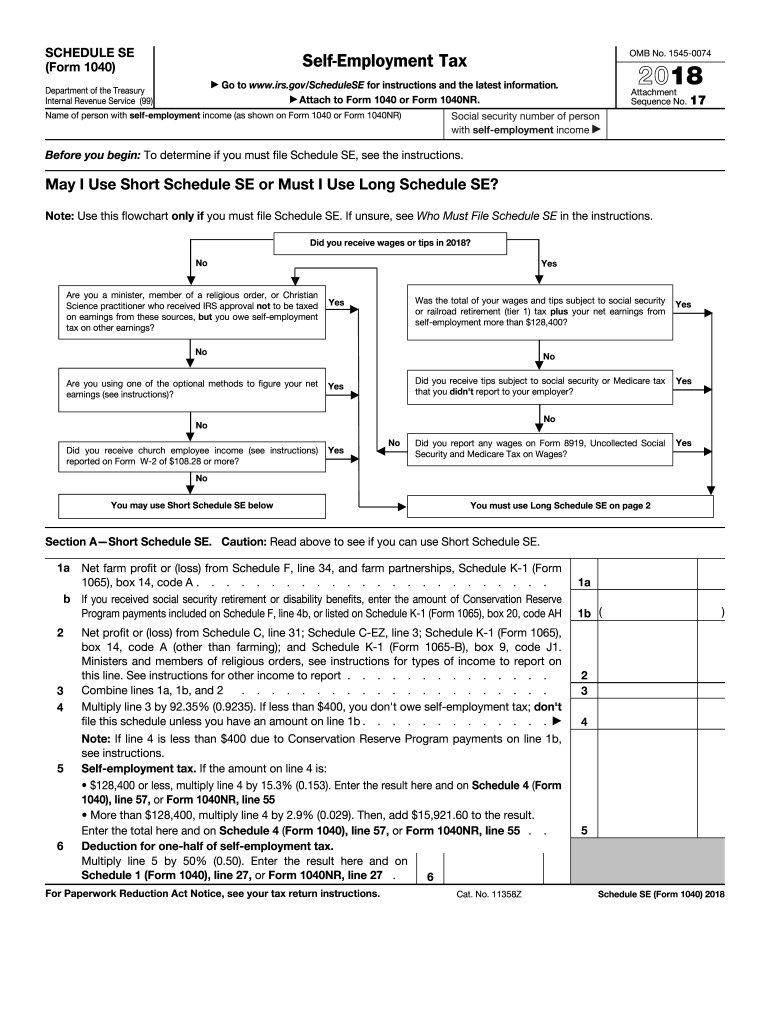
Elf-employment, check here and continue with Part I . . . . . . 1a Net farm profit or (loss) from Schedule F, line 34, and farm partnerships, Schedule K-1 (Form 1065), 1a box 14, code A. Note: Skip lines 1a and 1b if you use the farm optional method (see instructions) b If you received social security retirement or disability benefits, enter the amount of Conservation Reserve Program payments included on Schedule F, line 4b, or listed on Schedule K-1 (Form 1065), box 20, code AH 1b ( 2 Net.
Loading

Open form follow the instructions

Easily sign the form with your finger

Send filled & signed form or save
How to fill out the IRS 1040 - Schedule SE online
Filling out the IRS 1040 - Schedule SE is an important step for individuals with self-employment income. This guide provides clear, step-by-step instructions to assist you in completing this form accurately and efficiently online.
Follow the steps to fill out the IRS 1040 - Schedule SE online.
- Press the ‘Get Form’ button to obtain the form and open it in your preferred online editor.
- Enter the name of the person with self-employment income as shown on Form 1040 or Form 1040NR in the designated field.
- Input the social security number of the person with self-employment income in the appropriate section of the form.
- Determine whether to use Short Schedule SE or Long Schedule SE by answering the questions provided in the flowchart.
- If using Short Schedule SE, complete Section A by entering net farm profit or loss from Schedule F, net profit or loss from Schedule C, and performing the necessary calculations as instructed.
- For Long Schedule SE, proceed to Part I and enter the required income figures as per the guidelines noted on the form.
- Complete all calculations for self-employment tax, including necessary multiplications and checks for thresholds as specified.
- Once completed, review all inputted information carefully for accuracy.
- Finalize the process by saving the changes, downloading the completed form, or printing it for your records.
- Share the form with necessary parties if required.
Start filling out your IRS 1040 - Schedule SE online to ensure all your self-employment income is reported correctly.
Experience a faster way to fill out and sign forms on the web. Access the most extensive library of templates available.
Related content
Dec 10, 2018 - Use Schedule SE (Form 1040) to figure the tax due on net earnings ... For...
Lawrence Red OwlSimulation 1: Completing Form W-4 ... 14A: Using Form 1099-INT to Complete...
Get answers to your most pressing questions about US Legal Forms API.
How is the SE tax calculated?
The self-employment tax (SE tax) is calculated based on your net earnings reported on IRS 1040 - Schedule SE. The tax rate is 15.3% on your earnings, which includes both Social Security and Medicare taxes. Make sure to calculate this based on your actual income for the year and remember the contribution limits. For assistance with calculations, uslegalforms can provide tools and resources tailored for your self-employment needs.
How to calculate schedule SE?
Calculating your IRS 1040 - Schedule SE requires you to gather your total self-employment income and deduct any eligible business expenses. Once you've determined your net earnings, follow the form instructions to compute your SE tax. Review the guide to understand any special adjustments that may apply. If you're unsure, consider using uslegalforms for step-by-step guidance to ensure you complete Schedule SE accurately.
How do you calculate deductible part of SE tax?
To calculate the deductible part of your self-employment tax, complete our IRS 1040 - Schedule SE to find the total SE tax owed. You can then deduct half of your SE tax from your estimated taxable income, effectively reducing your overall tax burden. This deduction is beneficial as it lowers your adjusted gross income, making it crucial to take full advantage of it. For clarity on deductions, uslegalforms provides resources that simplify this process.
How do I calculate my SE tax?
Calculating your self-employment (SE) tax involves completing IRS 1040 - Schedule SE, where you will report your net earnings. The SE tax rate is typically 15.3%, which includes both Social Security and Medicare taxes. After obtaining your net earnings, multiply that figure by the SE tax rate to figure out your total tax owed. Utilize the tools from uslegalforms to simplify this process if you need guidance.
What is the maximum income for optional methods?
The maximum income for optional methods on IRS 1040 - Schedule SE varies each year, but it typically caps at a specific dollar amount that the IRS sets. The optional methods allow certain self-employed individuals to calculate their qualifying net earnings even if their actual income is less. Understanding these limits can help you optimize your tax filings. For complete guidance, uslegalforms can provide resources tailored for your needs.
How do you enter exempt notary income?
To enter exempt notary income on your IRS 1040 - Schedule SE, start by identifying the income that qualifies as exempt. You usually won't include this income in your net earnings from self-employment if it meets specific criteria. Keep your records organized, as you'll need to justify the exempt status if the IRS requests documentation. Consider using uslegalforms to ensure your reporting aligns with IRS requirements.
What does exempt notary income mean?
Exempt notary income refers to income earned from notary services that is not subject to self-employment tax. This situation can occur if specific income types are identified as non-taxable under IRS guidelines. Understanding what qualifies as exempt helps you accurately complete your IRS 1040 - Schedule SE and avoid over-reporting your income. For detailed explanations and examples, consider resources available on USLegalForms.
How do you show exempt income?
To show exempt income, you should document it separately on your IRS 1040 - Schedule C. You can indicate the nature of the income and label it as exempt in your records. Proper documentation enhances clarity and support for your tax return, demonstrating compliance with IRS requirements. If you need assistance with your records, platforms like USLegalForms offer tools that can help you stay organized.
What is exempt from notary income?
Exemptions from notary income typically refer to certain types of income that are not subject to self-employment tax. For instance, if you receive fees for services that are considered non-taxable, such as some governmental fees, that income may be classified as exempt. Always consult IRS guidelines or a tax professional to determine what qualifies for exemption. USLegalForms can provide resources to help clarify these distinctions for you.
Where to report self-employment income on 1040?
Self-employment income is reported on your IRS 1040 - Schedule C, which is then summarized on your Form 1040. This section allows you to itemize your business income, expenses, and deductions effectively. After completing Schedule C, the net profit or loss is transferred to Form 1040. Using accurate records is vital to ensure your self-employment income is reported correctly.
Use professional pre-built templates to fill in and sign documents online faster. Get access to thousands of forms.
If you believe that this page should be taken down, please follow our DMCA take down process here.
This form is available in several versions. Select the version you need from the drop-down list below.