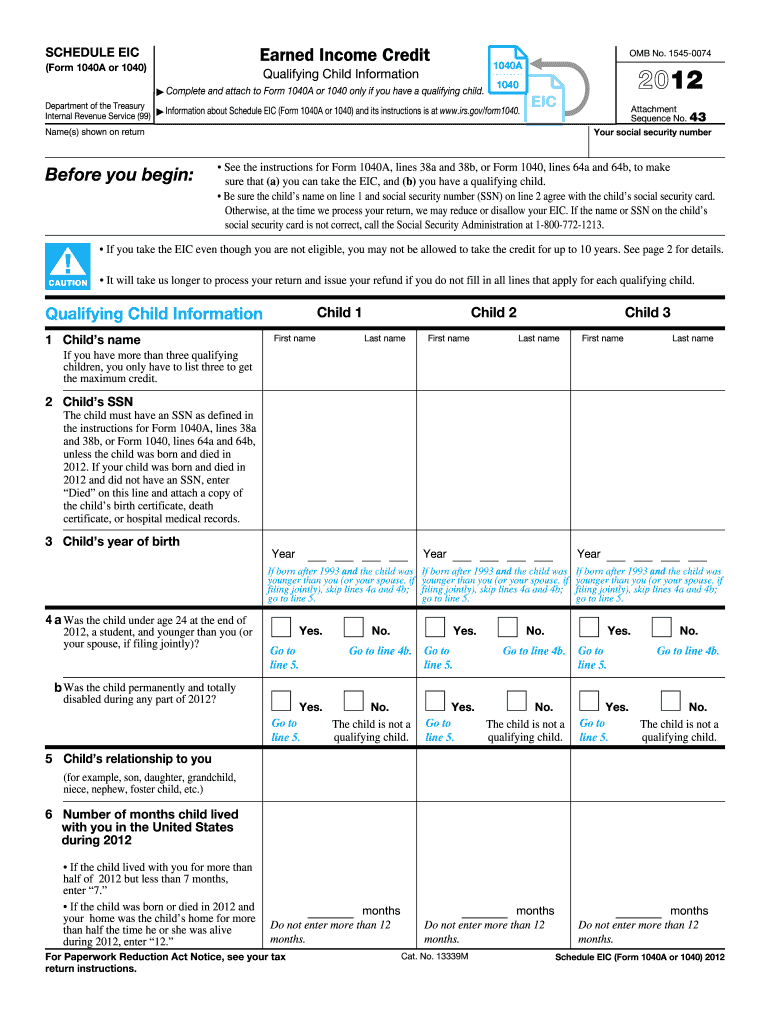
If the child lived with you for more than half of 2012 but less than 7 months, enter 7. If the child was born or died in 2012 and your home was the child s home for more than half the time he or she was alive during 2012, enter 12. For Paperwork Reduction Act Notice, see your tax return instructions. Cat. No. 13339M months Do not enter more than 12 months. Schedule EIC (Form 1040A or 1040) 2012 Page Schedule EIC (Form 1040A or 1040) 2012 2 Purpose of Schedule After you.

Open form follow the instructions

Easily sign the form with your finger

Send filled & signed form or save
How to fill out the IRS 1040 - Schedule EIC online
Filling out the IRS 1040 - Schedule EIC online is essential for individuals seeking to claim the earned income credit for qualifying children. This guide provides clear, step-by-step instructions to help users navigate each section of the form easily.
Follow the steps to fill out the IRS 1040 - Schedule EIC effectively.
- Click ‘Get Form’ button to obtain the form and open it in your preferred editor.
- Begin by ensuring that you meet the eligibility criteria for the earned income credit (EIC). Refer to the instructions related to Form 1040A or Form 1040 to confirm your qualification and the presence of a qualifying child.
- In the 'Qualifying Child Information' section, start by entering the name of your first qualifying child in the designated field, ensuring accuracy against their social security card.
- Enter the child's social security number (SSN) in the specified field. If the child does not have an SSN due to being born and dying in the year, mark “Died” and attach the appropriate documentation.
- Document the year of birth for each qualifying child in the provided field to confirm eligibility.
- Indicate whether the qualifying child was under age 24 and a student by marking ‘Yes’ or ‘No’ in the relevant subsection. Follow up with the next question based on your response.
- State whether the qualifying child was permanently and totally disabled during any part of the year. If so, mark ‘Yes’, otherwise mark ‘No’.
- Specify the child’s relationship to you (e.g., son, daughter, etc.) in the indicated field.
- Indicate the number of months the child lived with you in the United States during the year. Follow instructions carefully if the child lived with you for less than 7 months.
- Once all sections are filled out, review the information for accuracy. Save your changes, and then utilize options to download, print, or share the completed form as needed.
Complete your IRS 1040 - Schedule EIC online today to ensure you unlock your earned income credit!
Experience a faster way to fill out and sign forms on the web. Access the most extensive library of templates available.
Related content
Apr 18, 2025 — After you have figured your earned income credit (EIC), use Schedule EIC...
You may claim the Earned Income Credit on. Form 1040 and add Schedule EIC if you have...
If you meet the condition given in the TIP at the end of your Child Tax Credit Worksheet...
Get answers to your most pressing questions about US Legal Forms API.
How do you calculate EIC on 1040?
Calculating the Earned Income Credit (EIC) on IRS 1040 involves using your earned income and the number of qualifying children you have. First, complete Schedule EIC by gathering this information, which will guide you through the calculation process using provided tables. Many taxpayers find it beneficial to use platforms like UsLegalForms to simplify this process and ensure accurate calculations, maximizing their potential credit.
What line item is EIC on 1040?
On IRS Form 1040, the Earned Income Credit (EIC) appears on Schedule EIC, and the amount is carried over to line 27. This integration allows you to clearly show the credit you want to claim while filing your taxes. Accurate entry here not only helps in correct tax filing but also ensures that you receive the benefits for which you are eligible.
What is Form 1040 schedule EIC?
Form 1040 - Schedule EIC is an IRS form that helps taxpayers claim the Earned Income Credit, a financial benefit for low to moderate-income workers. This schedule provides the IRS with information necessary to assess the taxpayer's eligibility based on their earned income and qualifying children. Using Schedule EIC simplifies the process of understanding and applying for the EIC, ensuring you receive any benefits you qualify for.
How do I enter EIC on my tax return?
To enter the Earned Income Credit (EIC) on your tax return, you will need to complete IRS 1040 - Schedule EIC first. This form determines your eligibility for the EIC based on your income and number of qualifying children. After filling out Schedule EIC, transfer the calculated credit to the appropriate line on your main Form 1040 when you file your taxes.
Can I claim EIC on my taxes?
Yes, you can claim the Earned Income Credit (EIC) on your taxes if you meet the specific income limits and qualifying child criteria. To do this accurately, use IRS 1040 - Schedule EIC to assist in your filing. By claiming EIC, you could reduce your tax burden significantly and possibly receive a larger refund.
When must a schedule EIC be attached to a tax return?
You must attach IRS 1040 - Schedule EIC to your tax return if you are claiming the Earned Income Credit (EIC). This requirement is essential to validate your eligibility for the credit. Ensure you complete and include it in your submission to avoid delays or issues with your refund.
How do I add EITC to my tax return?
To add the Earned Income Tax Credit (EITC) to your tax return, you need to first ensure that you meet the eligibility criteria. Then, complete IRS 1040 - Schedule EIC to calculate the credit amount. Once finalized, input the total from Schedule EIC onto line 27 of your IRS 1040 form to benefit from the credit.
What do I put on line 16 of 1040?
Line 16 on Form 1040 is where you report your total tax before any credits are applied. This amount is calculated based on your tax brackets and overall income. Remember to complete IRS 1040 - Schedule EIC beforehand if you wish to apply for the Earned Income Credit, as the results may affect the tax calculated.
Where does EIC go on 1040?
The Earned Income Credit (EIC) is entered on your IRS 1040 form primarily on line 27. Additionally, you will report the details of the credit on IRS 1040 - Schedule EIC. Ensure you complete Schedule EIC correctly, as it supports your claim for the credit on your main tax form.
How to enter EITC on TurboTax?
To enter the Earned Income Tax Credit (EITC) on TurboTax, start by going to the income section of the software. Follow the prompts until you reach questions about dependents and income. When prompted about EITC, provide the necessary information about your income and qualifying children, as this will help you fill out IRS 1040 - Schedule EIC accurately.
Use professional pre-built templates to fill in and sign documents online faster. Get access to thousands of forms.
If you believe that this page should be taken down, please follow our DMCA take down process here.
This form is available in several versions. Select the version you need from the drop-down list below.