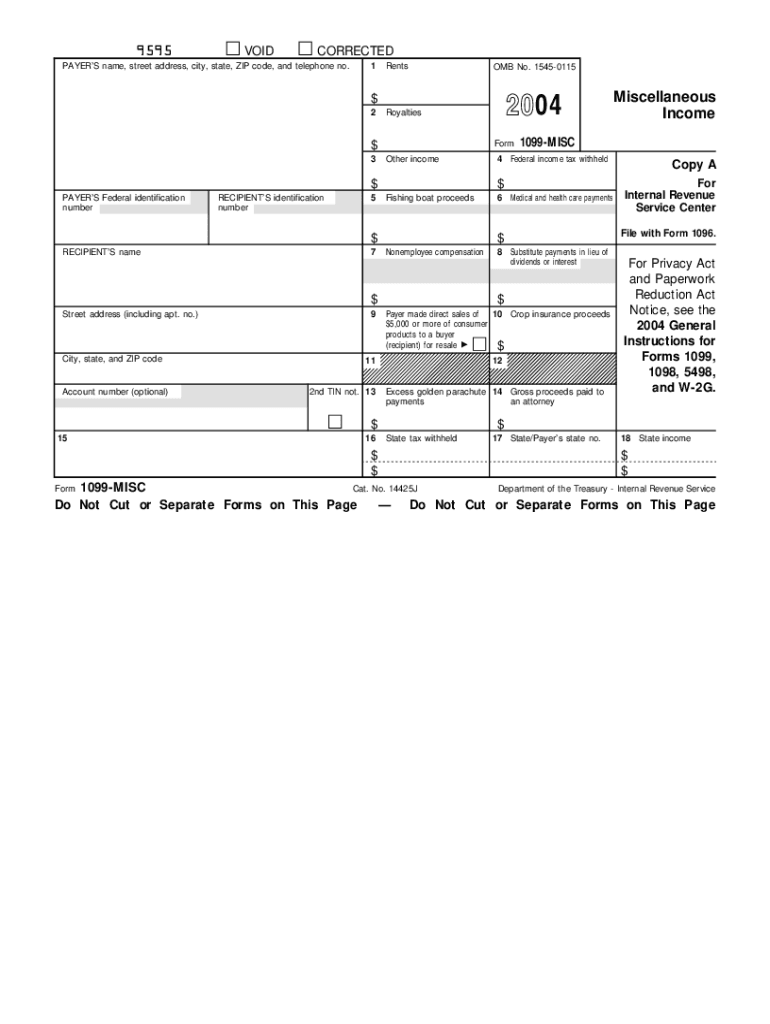
On number 5 Fishing boat proceeds $ RECIPIENT S name 7 9 1099-MISC 4 Federal income tax withheld 6 Medical and health care payments 8 Substitute payments in lieu of dividends or interest $ Payer made direct sales of 10 Crop insurance proceeds $5,000 or more of consumer products to a buyer (recipient) for resale $ City, state, and ZIP code 11 12 Account number (optional) 13 Excess golden parachute 14 Gross proceeds paid to payments an attorney $ 15 16 $ State tax withheld.

Open form follow the instructions

Easily sign the form with your finger

Send filled & signed form or save
How to fill out the IRS 1099-MISC online
Filling out the IRS 1099-MISC form online can seem daunting, but with clear guidance, you can navigate it confidently. This guide will provide step-by-step instructions to help you complete the form accurately and efficiently.
Follow the steps to successfully complete your IRS 1099-MISC form online.
- Click ‘Get Form’ button to obtain the form and open it in the online editor.
- In the section for the payer's information, enter your name, street address, city, state, ZIP code, and telephone number accurately.
- Fill in the payer’s Federal identification number in the designated field.
- Enter the recipient's name and identification number in the provided sections.
- Complete the fields for the income types, such as rents, nonemployee compensation, royalties, and others, entering the appropriate dollar amounts.
- If applicable, enter any federal income tax withheld and the amounts for state taxes in the respective fields.
- Review all information carefully for accuracy to avoid errors that could lead to penalties.
- Once all fields are filled out and reviewed, you can save changes, then choose to download, print, or share the form as needed.
Start filling out your IRS 1099-MISC form online today!
Experience a faster way to fill out and sign forms on the web. Access the most extensive library of templates available.
Related content
Feb 19, 2025 — File Form 1099-MISC for each person to whom you have paid during the...
To complete Form 1099-MISC, use: • The current General Instructions for Certain...
Mar 1, 2017 — Form 1099-K, Payment Card and. Third-Party Network Transactions;. Form...
Get answers to your most pressing questions about US Legal Forms API.
Which TurboTax should I use if I have a 1099?
If you have an IRS 1099-MISC, you should consider using TurboTax Self-Employed or TurboTax Premier. These versions are tailored for individuals who earn income from freelance work or side jobs, ensuring that you can efficiently report your earnings. Using the right version can simplify your tax filing process.
Where do I enter 1099-MISC on my tax return TurboTax?
In TurboTax, you can enter 1099-MISC income under the 'Business Income' section. Simply follow the prompts, and TurboTax will ask you for specific details from your IRS 1099-MISC. This method allows you to easily integrate this income into your overall tax calculation without confusion.
Where do you enter 1099-MISC in TurboTax?
In TurboTax, you can enter your IRS 1099-MISC income by selecting the 'Imports' option or manually typing it into the section labeled for income. Whether you opt for manual entry or import, TurboTax guides you through the fields to ensure accuracy. This user-friendly interface makes it easy to report your 1099-MISC income without hassle.
How will a 1099-MISC affect my tax return?
An IRS 1099-MISC will affect your tax return by increasing your total taxable income. This means you may owe more taxes, depending on your overall financial situation. Understanding this impact is important, as the additional income can place you into a higher tax bracket or change your eligibility for certain credits.
Where do I enter a 1099 on my tax return?
When you file your tax return, you can enter your 1099 income on the appropriate forms, such as Schedule C or Schedule E, depending on your business structure. For IRS 1099-MISC specifically, ensure that you include the amounts on the right lines for self-employment or rental income. This clarity helps you avoid discrepancies with the IRS.
Where do I report 1099-MISC income on my tax return?
You report your IRS 1099-MISC income on Schedule C of your tax return if you are self-employed. If you received the income as a sole proprietor, you’ll include it as part of your total business income. This method ensures that you accurately capture all sources of income, which helps in calculating your taxes correctly.
Do I have to file my 1099-MISC income?
Yes, you must file your IRS 1099-MISC income if you receive payments that total $600 or more in a tax year. This requirement applies to many types of income, such as freelance work or contract services. Ignoring this filing could lead to penalties, so it’s crucial to report your 1099-MISC income accurately.
Is it okay to handwrite 1099 forms?
Handwriting on 1099 forms, like the IRS 1099-MISC, is permissible if done neatly and clearly. However, handwritten forms are more prone to errors and may cause confusion during processing. To avoid these issues, electronic formats from platforms like USLegalForms can enhance accuracy and reduce potential complications.
Can I fill out a 1099-MISC for myself?
You cannot fill out a 1099-MISC for yourself if you are the recipient of the payment. However, if you are the payer, and you made payments to others, you must complete the form for those recipients. For a simplified process, consider using USLegalForms to guide you through the requirements.
What is the proper way to fill out a 1099?
To properly fill out a 1099-MISC, start by entering the payer's and recipient's information, including names, addresses, and taxpayer identification numbers. Then, accurately input the payment amounts in the correct boxes and ensure you have signed the form if required. USLegalForms offers templates that guide you on how to accurately fill it out.
Use professional pre-built templates to fill in and sign documents online faster. Get access to thousands of forms.
If you believe that this page should be taken down, please follow our DMCA take down process here.
This form is available in several versions. Select the version you need from the drop-down list below.