Loading
Form preview
  • US Legal Forms
  • Other Templates
  • Tax Forms
  • Executive Department Treasury IRS Forms
  • Irs 1040 - Schedule E 1997

Get Irs 1040 - Schedule E 1997

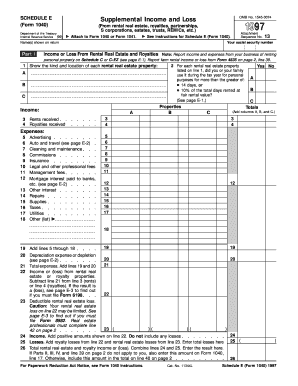
Ons, estates, trusts, REMICs, etc.) Attach to Form 1040 or Form 1041. See Instructions for Schedule E (Form 1040). Name(s) shown on return Part I Attachment Sequence No. 13 Your social security number Income or Loss From Rental Real Estate and Royalties Note: Report income and expenses from your business of renting personal property on Schedule C or C-EZ (see page E-1). Report farm rental income or loss from Form 4835 on page 2, line 39. 1 Show the kind and location of each ren.

How it works

  1. Open form

    Open form follow the instructions

  2. Easily sign form

    Easily sign the form with your finger

  3. Share form

    Send filled & signed form or save

How to fill out the IRS 1040 - Schedule E online

Filling out the IRS 1040 - Schedule E can seem daunting, but with a clear guide, you can navigate the process with confidence. This instruction aims to support users in completing their Schedule E online for accurate reporting of supplemental income and loss from various sources.

Follow the steps to effectively complete your Schedule E.

  1. Press the ‘Get Form’ button to access the IRS 1040 - Schedule E. This will open the form for you to begin filling it out.
  2. In the section for identifying information, enter your name(s) as they appear on your tax return and your social security number. This information is crucial for match verification.
  3. Begin Part I by listing the type and location of each rental real estate property you own. Use separate lines for each property to ensure clarity.
  4. Report the total rents and royalties received in the appropriate fields. Ensure these figures accurately reflect your income for the tax year.
  5. Indicate if you or any family member used any of the rental properties for personal purposes. This is essential for determining the deductibility of expenses.
  6. Detail your expenses related to each property, including items such as advertising, repairs, utilities, and depreciation. Be sure to categorize all expenses accurately.
  7. Calculate your total income or loss by subtracting total expenses from your reported rents or royalties. This calculation is vital for identifying your net taxable income.
  8. If applicable, provide additional details in Parts II, III, and IV, which address income or loss from partnerships, S corporations, estates, and trusts. Fill these out as necessary based on your financial activities.
  9. Finally, review all entries for accuracy. Once confirmed, you can save your changes, download a copy for your records, print the form, or share it with a tax professional if needed.

Start filling out your IRS 1040 - Schedule E online today to ensure accurate reporting of your income and expenses.

Get form

Experience a faster way to fill out and sign forms on the web. Access the most extensive library of templates available.

Related content

About Schedule E (Form 1040), Supplemental Income...
Jan 21, 2025 — Use Schedule E (Form 1040) to report income or loss from rental real...
Learn more
schedule e
SCHEDULE E. Supplemental Income and Loss. (Form 1040 or 1040-SR) (From rental real estate...
Learn more
2017 Publication 527
Feb 23, 2018 — For example, on your 2017 Schedule E you can deduct fees paid in 2017 to...
Learn more

Related links form

IRS 1099-INT 2015 IRS 1099-INT 2014 IRS 1099-INT 2013 IRS 1099-INT 2012

Questions & Answers

Get answers to your most pressing questions about US Legal Forms API.

Contact support

The IRS receives information about your rental income through various channels, including the 1099 forms reported by your tenants or rental management companies. If you fail to report your rental income on the IRS 1040 - Schedule E, you risk triggering an audit. Therefore, it is essential to report your rental income accurately and transparently. Utilizing platforms like uslegalforms can aid in maintaining proper documentation.

The Schedule E income line refers to the section where you report your total rental income on the IRS 1040 - Schedule E form. This total should include all payments received from tenants, including rent, and any related income streams. Accurately reporting this information is crucial, as it directly affects your total tax obligation. Ensuring clarity in this section helps you avoid issues with the IRS.

The income limit for deductions related to Schedule E primarily revolves around the $25,000 rental loss limitation. This limitation starts to phase out when your adjusted gross income exceeds $100,000. Therefore, if you earn more than this threshold, your ability to claim losses on IRS 1040 - Schedule E decreases. Engaging with a tax professional can help clarify these limits for your specific situation.

Schedule E plays a significant role in how your rental income and losses are reflected on your tax return. It determines how rental income is taxed and impacts your overall tax liability. By filing Schedule E along with IRS Form 1040, you document your rental activities, including income and deductions, allowing for greater transparency with the IRS. Therefore, it's critical to fill it out correctly for accurate tax reporting.

The $25,000 rental loss limitation allows certain taxpayers to deduct up to $25,000 in rental property losses against their ordinary income. However, this deduction begins to phase out for taxpayers with an adjusted gross income above $100,000. If you meet the criteria, including using IRS 1040 - Schedule E correctly, this deduction can alleviate some of your tax burdens. It's a beneficial aspect for property owners facing financial challenges.

Any taxpayer who receives rental income can file a Schedule E tax form. This includes individual landlords and property owners who rent out real estate. Different entities, like partnerships and corporations, may also use Schedule E in certain situations. If you earn rental income, utilizing the IRS 1040 - Schedule E is an essential step in your tax filing process.

The rental property depreciation income limit depends on various factors, including the type of property and your income level. Typically, you can deduct depreciation, but it may not exceed your rental income for the year. Using the IRS 1040 - Schedule E can help you calculate your allowable depreciation accurately. This approach ensures you optimize your tax benefits while staying within the law.

To report rental income to the IRS, you will need to use the IRS 1040 - Schedule E form. This form requires you to list all rental income received and any related expenses. It is important to keep detailed records of your rental transactions. By accurately completing Schedule E, you can ensure compliance and potentially minimize your tax obligations.

To report rental income on IRS 1040, you will need to fill out Schedule E, detailing your rental income from properties. After completing Schedule E, you will then transfer the net income or loss to your Form 1040. This structured process ensures that your rental income is accurately reflected in your annual tax return.

On IRS 1040 - Schedule E, you must report all types of income you earn from rental real estate, partnerships, S corporations, estates, trusts, and certain royalties. Ensure that you include any rental income received before expenses. This will provide a clear picture of your earnings and is crucial for accurate tax reporting.

Get This Form Now!

Use professional pre-built templates to fill in and sign documents online faster. Get access to thousands of forms.
If you believe that this page should be taken down, please follow our DMCA take down processhere.
Get IRS 1040 - Schedule E
  • Adoption
  • Bankruptcy
  • Contractors
  • Divorce
  • Home Sales
  • Employment
  • Identity Theft
  • Incorporation
  • Landlord Tenant
  • Living Trust
  • Name Change
  • Personal Planning
  • Small Business
  • Wills & Estates
  • Packages A-Z
  • Affidavits
  • Bankruptcy
  • Bill of Sale
  • Corporate - LLC
  • Divorce
  • Employment
  • Identity Theft
  • Internet Technology
  • Landlord Tenant
  • Living Wills
  • Name Change
  • Power of Attorney
  • Real Estate
  • Small Estates
  • Wills
  • All Forms
  • Forms A-Z
  • Other Templates
  • Legal Hub
  • About Us
  • Help Portal
  • Legal Resources
  • Blog
  • Affiliates
  • Contact Us
  • Delete My Account
  • Site Map
  • Industries
  • Forms in Spanish
  • Localized Forms
  • State-specific Forms
  • Forms Kit
  • Real Estate Handbook
  • All Guides
  • Notarize
  • Incorporation services
  • For Consumers
  • For Small Business
  • For Attorneys
  • USLegal
  • FormsPass
  • pdfFiller
  • signNow
  • altaFlow
  • DocHub
  • Instapage
Form Packages
  • Adoption
  • Bankruptcy
  • Contractors
  • Divorce
  • Home Sales
  • Employment
  • Identity Theft
  • Incorporation
  • Landlord Tenant
  • Living Trust
  • Name Change
  • Personal Planning
  • Small Business
  • Wills & Estates
  • Packages A-Z
Form Categories
  • Affidavits
  • Bankruptcy
  • Bill of Sale
  • Corporate - LLC
  • Divorce
  • Employment
  • Identity Theft
  • Internet Technology
  • Landlord Tenant
  • Living Wills
  • Name Change
  • Power of Attorney
  • Real Estate
  • Small Estates
  • Wills
  • All Forms
  • Forms A-Z
  • Other Templates
Customer Service
  • Legal Hub
  • About Us
  • Help Portal
  • Legal Resources
  • Blog
  • Affiliates
  • Contact Us
  • Delete My Account
  • Site Map
  • Industries
  • Forms in Spanish
  • Localized Forms
  • State-specific Forms
  • Forms Kit
Legal Guides
  • Real Estate Handbook
  • All Guides
Prepared for you
  • Notarize
  • Incorporation services
Our Customers
  • For Consumers
  • For Small Business
  • For Attorneys
Our Sites
  • USLegal
  • FormsPass
  • pdfFiller
  • signNow
  • altaFlow
  • DocHub
  • Instapage
Social Media
Call us now toll free:
+1 833 426 79 33
As seen in:
© Copyright 1999-2026 airSlate Legal Forms, Inc. 17 Station Street, Suite 303, Brookline, MA 02445
  • Your Privacy Choices
  • Terms of Service
  • Privacy Notice
  • Content Takedown Policy
  • Bug Bounty Program
IRS 1040 - Schedule E
This form is available in several versions.
Select the version you need from the drop-down list below.
2021 IRS 1040 - Schedule E
Select form
  • 2021 IRS 1040 - Schedule E
  • 2020 IRS 1040 - Schedule E
  • 2019 IRS 1040 - Schedule E
  • 2018 IRS 1040 - Schedule E
  • 2017 IRS 1040 - Schedule E
  • 2016 IRS 1040 - Schedule E
  • 2015 IRS 1040 - Schedule E
  • 2014 IRS 1040 - Schedule E
  • 2013 IRS 1040 - Schedule E
  • 2012 IRS 1040 - Schedule E
  • 2011 IRS 1040 - Schedule E
  • 2010 IRS 1040 - Schedule E
  • 2009 IRS 1040 - Schedule E
  • 1997 IRS 1040 - Schedule E
Select form