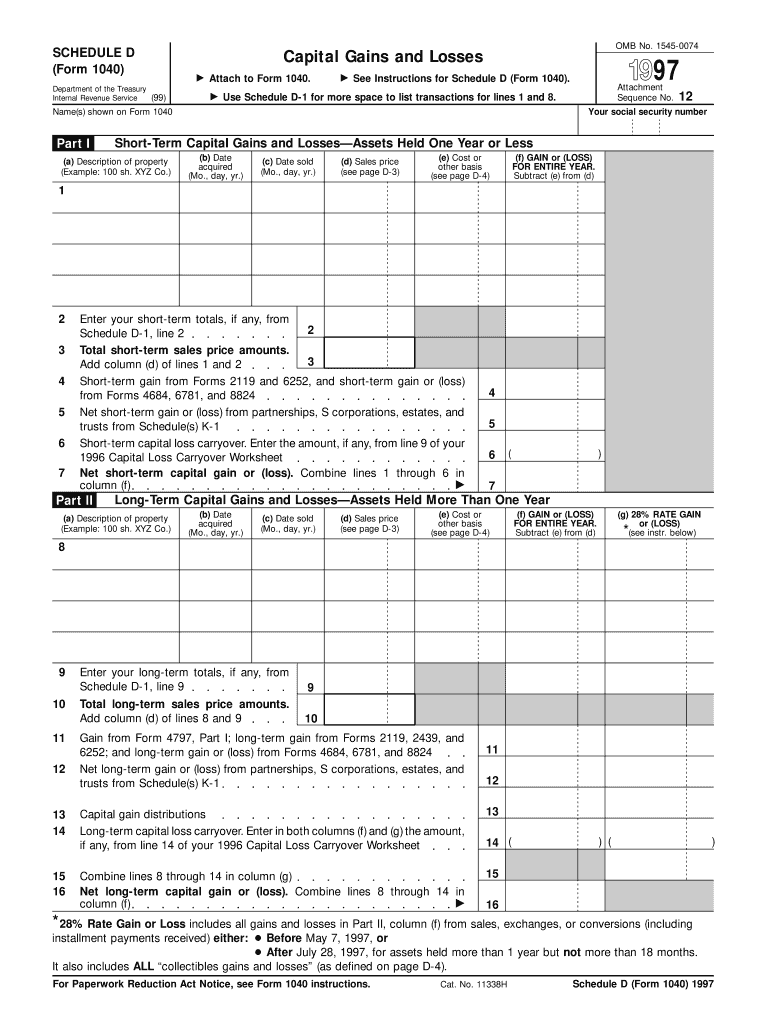
Le D-1 for more space to list transactions for lines 1 and 8. Name(s) shown on Form 1040 Part I 97 See Instructions for Schedule D (Form 1040). 12 Your social security number Short-Term Capital Gains and Losses Assets Held One Year or Less (a) Description of property (Example: 100 sh. XYZ Co.) (b) Date acquired (Mo., day, yr.) (c) Date sold (Mo., day, yr.) (d) Sales price (see page D-3) (e) Cost or other basis (see page D-4) (f) GAIN or (LOSS) FOR ENTIRE YEAR. Subtract (e) from (d.
Loading

Open form follow the instructions

Easily sign the form with your finger

Send filled & signed form or save
How to fill out the IRS 1040 - Schedule D online
Filling out the IRS 1040 - Schedule D, which is used for reporting capital gains and losses, can be straightforward with the right guidance. This guide will walk users through each section and field of the form to ensure accurate completion.
Follow the steps to successfully complete Schedule D online.
- Use the ‘Get Form’ button to obtain the form and open it in the editor.
- Fill in your name as shown on Form 1040 and your social security number at the top of Schedule D.
- In Part I, report short-term capital gains and losses. List each asset, providing the description, date acquired, date sold, sales price, and cost or other basis.
- Calculate your short-term gain or loss by subtracting the cost or basis from the sales price for each transaction, and enter the total in column (f).
- Proceed to Part II for long-term capital gains and losses. Repeat the same process by listing each long-term asset along with its details similar to Part I.
- Calculate your long-term gain or loss and total it in column (f) of Part II.
- In Part III, summarize your totals from Parts I and II. If you have a gain, enter it on Form 1040, line 13. If it's a loss, refer to the instructions for further handling.
- Complete Part IV if applicable, to determine your tax computation using maximum capital gains rates.
- Finally, once all sections of the form are completed, you can save changes, download, print, or share the form as needed.
Start filling out your Schedule D online today to ensure accurate reporting of your capital gains and losses.
Experience a faster way to fill out and sign forms on the web. Access the most extensive library of templates available.
Related content
Mar 25, 2025 — Use Schedule D (Form 1040) to report the following: The sale or exchange...
by D SCHEDULE · Cited by 1 — Complete the Qualified Dividends and Capital Gain Tax...
19. Enter the loss, if any, from line 21 of your 2017 Schedule D (Form 1040). (Estates and...
Get answers to your most pressing questions about US Legal Forms API.
What is IRS Schedule D used for?
IRS Schedule D is primarily used to report capital gains and losses from the sale of various assets such as stocks, bonds, and real estate. By filing Schedule D with your Form 1040, you inform the IRS about your investment transactions for the year. This form helps you calculate your net gain or loss, which is crucial for your overall tax return.
Where is Schedule D on the Tax Act?
In the Tax Act software, you will typically find the IRS 1040 - Schedule D under the forms section related to investment income and capital gains. You can navigate to the section for reporting capital transactions, and Schedule D is usually listed alongside Form 8949 and other related tax forms. If you encounter difficulties, refer to the software's help resources for guidance.
Where do I get my Schedule D?
You can obtain the IRS 1040 - Schedule D from the official IRS website, where all tax forms are available for download. Many tax preparation software platforms also provide this form as part of their service. Alternatively, if you use a solution like U.S. Legal Forms, you can find pre-filled templates and guides to assist you with the filing process.
Should I use Schedule D or form 8949?
You should use Form 8949 first to list and detail your capital asset transactions. After completing Form 8949, you will then summarize those totals on the IRS 1040 - Schedule D. This two-step approach allows for clearer documentation and ensures you report your capital gains and losses correctly.
Who must file Schedule D Form 1040?
Individuals who have capital gains or losses from the sale of assets must file Schedule D Form 1040. This commonly includes individuals who have sold stocks, bonds, or real estate during the tax year. If you meet these criteria, it is essential to include the IRS 1040 - Schedule D in your tax filing to accurately report your financial activities.
What is the difference between Schedule D and form 4797?
Schedule D focuses on capital gains and losses from sales of capital assets, while Form 4797 is used for reporting the sale of business property, including depreciable property. If you are selling investments or personal property, you will use the IRS 1040 - Schedule D. It is important to choose the correct form to ensure compliance with tax regulations.
What is the difference between Schedule D and form 8949?
The IRS 1040 - Schedule D summarizes your capital gains and losses from the sale of assets, while Form 8949 is used to report each individual sale. Essentially, you complete Form 8949 first to detail your transactions, and then carry the totals to Schedule D. This process helps the IRS see a clear overview of your capital transactions.
What is an example of a Schedule D?
An example of Schedule D includes reporting your sale of 100 shares of stock. You acquired the shares for $2,000 and sold them for $1,200, resulting in a capital loss of $800. This information would be entered into your IRS 1040 - Schedule D, reflecting your investment activity and related tax implications.
Can I show my stock market loss in income tax?
Yes, you can show your stock market loss on your income tax return. Capital losses can offset capital gains, and if your losses exceed your gains, you can use them to reduce your taxable income up to the allowable limit. This process is essential when filling out the IRS 1040 - Schedule D.
What is the $3000 loss rule?
The $3000 loss rule allows taxpayers to deduct capital losses up to $3,000 against their other income for the tax year. If your losses exceed this amount, you can carry the remaining losses into future years. Understanding this rule helps in maximizing your tax benefits when completing IRS 1040 - Schedule D.
Use professional pre-built templates to fill in and sign documents online faster. Get access to thousands of forms.
If you believe that this page should be taken down, please follow our DMCA take down process here.
This form is available in several versions. Select the version you need from the drop-down list below.