. . . . . . . . . . . . . . . . . . 16 If line 16 is a gain, enter the amount from line 16 on Form 1040, line 13, or Form 1040NR, line 14. Then go to line 17 below. If line 16 is a loss, skip lines 17 through 20 below. Then go to line 21. Also be sure to complete line 22. If line 16 is zero, skip lines 17 through 21 below and enter -0- on Form 1040, line 13, or Form 1040NR, line 14. Then go to line 22. 17 Are lines 15 and 16 both gains? Yes. Go to line 18. No.
Loading

Open form follow the instructions

Easily sign the form with your finger

Send filled & signed form or save
How to fill out the IRS 1040 - Schedule D online
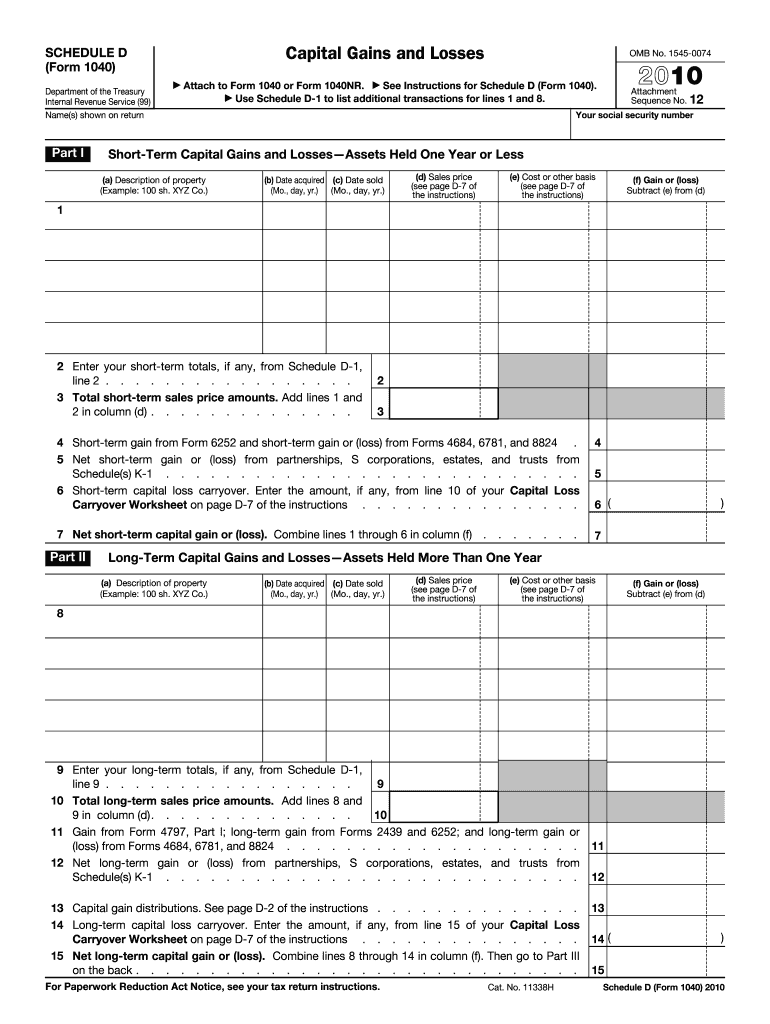
Filling out the IRS 1040 - Schedule D is essential for reporting capital gains and losses for the tax year. This guide will provide a step-by-step approach to help users complete the form accurately and efficiently online.
Follow the steps to fill out your Schedule D accurately online.
- Press the ‘Get Form’ button to access the IRS 1040 - Schedule D document and open it in your preferred editor.
- In Part I, enter your name(s) as shown on your tax return and your social security number in the designated fields.
- For short-term capital gains and losses, complete columns (a) through (f) for each asset held for one year or less, providing a description, acquisition date, sale date, sales price, cost basis, and gain or loss.
- Calculate your total short-term gains or losses. Add any totals from Schedule D-1, lines 1 and 2, and enter the amounts as instructed.
- In Part II, repeat the process for long-term capital gains and losses for assets held for more than one year, filling out columns (a) through (f) again.
- Sum your long-term sales price amounts from the corresponding columns.
- In Part III, combine your totals from Part I and Part II in line 16 to determine your overall net gain or loss.
- Follow the instructions for lines 17 through 22 based on whether your result is a gain, loss, or zero, ensuring you complete all applicable fields.
- Once completed, save your changes, download, print, or share the form as necessary, ensuring you retain a copy for your records.
Start completing your IRS 1040 - Schedule D online today!
Experience a faster way to fill out and sign forms on the web. Access the most extensive library of templates available.
Related content
Mar 25, 2025 — Use Schedule D (Form 1040) to report the following: The sale or exchange...
by D SCHEDULE · Cited by 1 — Complete the Qualified Dividends and Capital Gain Tax...
19. Enter the loss, if any, from line 21 of your 2017 Schedule D (Form 1040). (Estates and...
Get answers to your most pressing questions about US Legal Forms API.
How do you report capital gains and losses?
To report capital gains and losses, complete Schedule D and input your transactions chronologically. After calculating your total gains or losses, transfer the relevant figures to your IRS 1040 - Schedule D. This ensures a clear representation of your financial activity to the IRS. Proper reporting of capital gains can lead to possible tax savings, making it essential to do thoroughly and accurately.
What is Schedule D filing requirement?
You are required to file Schedule D if you sold stocks, bonds, or other capital assets during the tax year, as these transactions impact your IRS 1040 - Schedule D. Additionally, if you received capital gains distributions from a mutual fund, you must also report them. Filing this schedule correctly is vital for determining your tax liability. Always check the IRS guidelines to ensure you meet all filing requirements.
How do I report capital gains and losses on my tax return?
To report capital gains and losses on your tax return, complete Schedule D and attach it to your IRS 1040 - Schedule D. First, list your transactions, including any stocks or property sold during the tax year. Then, summarize your total gains or losses and transfer those figures to your Form 1040. This process helps ensure that your tax filings are comprehensive and compliant with IRS regulations.
Where do capital gains and losses go on 1040?
On your IRS 1040, capital gains and losses are reported on Schedule D, which then transfers the total amounts to your main tax form. Schedule D feeds into your Form 1040, allowing you to clearly show the impact of your investments on your overall tax situation. This enhances transparency in reporting to the IRS, making it simpler for you to track your finances. Accurate reporting helps ensure compliance and reduces the risk of errors.
What is a Schedule D capital gains and losses?
Schedule D is a form that you must complete when reporting capital gains and losses on your IRS 1040 - Schedule D. This document details the sale of stocks, bonds, and other assets, and helps determine how your gains or losses affect your taxes. It's essential for ensuring that you accurately report your financial activities to the IRS. Completing Schedule D is a critical step in managing your tax obligations effectively.
How much losses can you write off against capital gains?
You can use capital losses to offset capital gains on your IRS 1040 - Schedule D. If your total capital losses exceed your total gains, you can deduct the losses from other income, up to $3,000 per year for individual filers. This means you can effectively lower your taxable income and reduce your overall tax liability. If your losses are greater than $3,000, you can carry forward the remainder to future years.
Is Schedule D considered income?
Schedule D itself is not considered income; rather, it lists your capital gains and losses from investments. However, if you have capital gains, they are counted as income and may be subject to taxes. Thus, accurately reporting this information on your IRS 1040 - Schedule D is critical for proper tax filing.
What is the $3000 capital loss rule?
The $3000 capital loss rule allows taxpayers to deduct capital losses from their total income, which can help reduce the tax burden. If your capital losses exceed your capital gains, you can claim up to $3000 per year on your IRS 1040 - Schedule D. This provision can be quite beneficial for tax planning.
What is the difference between Schedule D and form 8949?
Schedule D summarizes your overall capital gains and losses, while Form 8949 is used to provide details about each individual transaction. Understanding this distinction is important, as Schedule D references the information you provide on Form 8949. Accurately completing both is essential for your IRS 1040 - Schedule D.
How do I enter Schedule D in TurboTax?
To successfully enter Schedule D in TurboTax, start by selecting the 'Income' tab. After that, locate the section dedicated specifically to 'Capital Gains and Losses.' By following the on-screen instructions, you can ensure that your IRS 1040 - Schedule D is filled out accurately.
Use professional pre-built templates to fill in and sign documents online faster. Get access to thousands of forms.
If you believe that this page should be taken down, please follow our DMCA take down process here.
This form is available in several versions. Select the version you need from the drop-down list below.