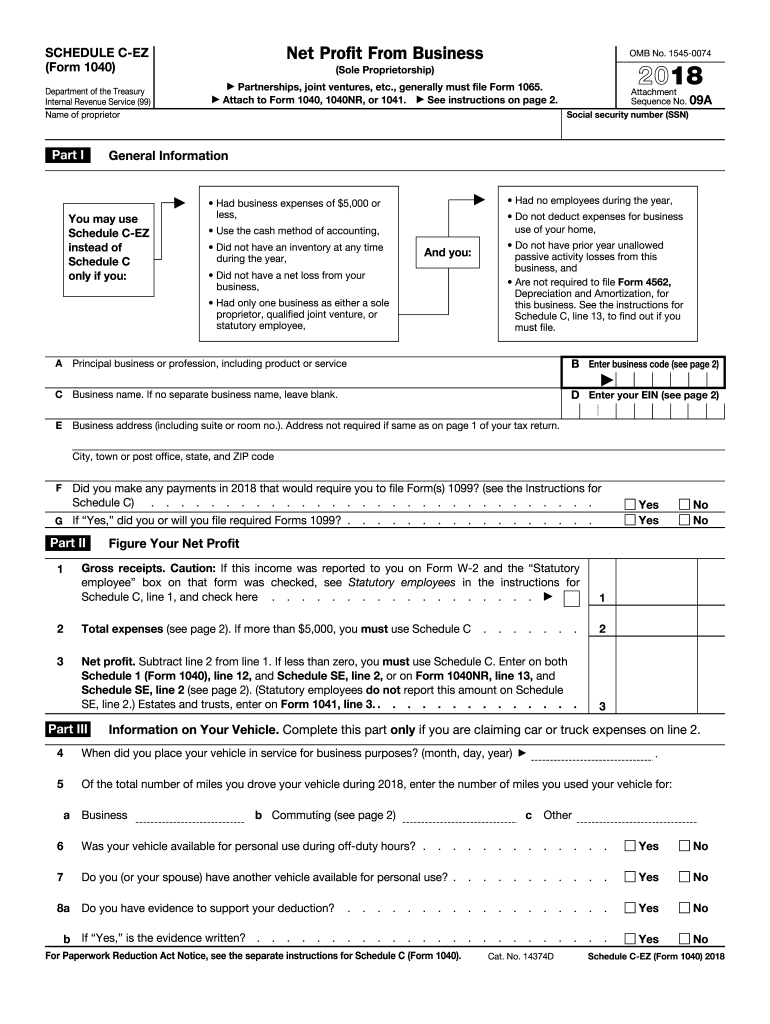
Use) have another vehicle available for personal use? . . . . . . . . . . . Yes No 8a Do you have evidence to support your deduction? . . . . . . . . Yes No . . . . . . . . Yes No b If Yes, is the evidence written? . . . . . . . . . . . . . . . . . . . . . . . . . . . For Paperwork Reduction Act Notice, see the separate instructions for Schedule C (Form 1040). Cat. No. 14374D Schedule C-EZ (Form 1040) 2018 Page 2 Schedule C.
Loading

Open form follow the instructions

Easily sign the form with your finger

Send filled & signed form or save
How to fill out the IRS 1040 - Schedule C-EZ online
Filling out the IRS 1040 - Schedule C-EZ can help simplify your tax reporting process for small business income. This guide will walk you through each step of the form to ensure you complete it accurately and efficiently.
Follow the steps to fill out your Schedule C-EZ online.
- Click ‘Get Form’ button to obtain the form and open it in your online editor.
- In Part I, enter your name as the proprietor along with your social security number. Identify your principal business or profession by entering the business code and name. If applicable, include your employer identification number (EIN) and business address.
- Answer the question regarding any payments you made that require you to file Form(s) 1099. Indicate whether you will file the required forms.
- In Part II, report your gross receipts on line 1. Ensure this includes all income received from your business during the year, irrespective of reported income on Form 1099-MISC.
- Enter total business expenses on line 2. Include all deductible expenses such as advertising, car expenses, professional services, etc. Don’t exceed $5,000 in total expenses to qualify for Schedule C-EZ.
- Calculate and enter your net profit on line 3 by subtracting line 2 (total expenses) from line 1 (gross receipts). If the result is less than zero, you will need to use Schedule C.
- If you are claiming vehicle expenses, complete Part III. Enter the date your vehicle was placed in service for business and specify the total miles driven, segregating business miles from commuting miles.
- Final confirm all entries before saving changes. Once complete, download, print, or share your Schedule C-EZ form as necessary.
Begin filling out your forms online today to ensure timely and accurate tax reporting.
Experience a faster way to fill out and sign forms on the web. Access the most extensive library of templates available.
Related content
Jul 7, 2025 — Use Schedule C (Form 1040) to report income or loss from a business you...
1. Gross receipts or sales. See instructions for line 1 and check the box if this income...
Dec 21, 2011 — Income tax. D. File Schedule C or C-EZ with your Form 1040 for the year...
Get answers to your most pressing questions about US Legal Forms API.
Where can I find a 1040 EZ form?
While the IRS 1040-EZ form is no longer available after the 2019 tax year, its features are integrated into the standard 1040 form. You can access the current 1040 form on the IRS website. For additional convenience, platforms like US Legal Forms may offer guidance and templates that facilitate the filing process. Stay informed to ensure you use the correct forms for your tax filings.
What is 1040 EZ Schedule C?
The term '1040 EZ Schedule C' is often confused, but it refers to the simplicity of reporting income for self-employed individuals. However, the IRS 1040 - Schedule C-EZ, a simpler version, is no longer available. Taxpayers must fill out the full Schedule C to report business income instead. Consider using US Legal Forms for easy access to the necessary documents and instructions.
Who provides a schedule C?
The IRS provides the Schedule C form and all related guidelines for completing it correctly. Additionally, various tax preparation services, including online platforms like US Legal Forms, also offer the form along with tools to aid in its completion. Check with these resources if you need assistance understanding how to navigate the process. They can guide you in minimizing your tax obligations effectively.
Does everyone have a Schedule C tax form?
Not everyone needs to file a Schedule C tax form. Only self-employed individuals or sole proprietors are required to complete this form to report their business earnings. If you're an employee and receive a W-2, you won't need to file this form. However, if you earn income from freelance work or run a small business, it’s essential to fill out the IRS 1040 - Schedule C.
What is 1040 schedule C for?
The IRS 1040 - Schedule C is used by self-employed individuals to report their business income and expenses. This form allows you to deduct eligible business costs, which can lower your taxable income significantly. Accurate completion of Schedule C is essential for understanding your business's financial performance. Many people find using templates from platforms like US Legal Forms helpful for precision.
Where do I get a 1040 Schedule C form?
You can obtain the IRS 1040 - Schedule C form directly from the IRS website. They provide a downloadable PDF version that you can print and fill out at your convenience. Alternatively, some tax preparation software and services, including US Legal Forms, might offer this form as part of their services. Make sure you’re using the most recent version for accurate reporting.
Is Schedule C EZ still available?
The IRS 1040 - Schedule C-EZ is no longer available starting from the 2019 tax year. Instead, taxpayers are now required to use the full Schedule C form when reporting their business income and expenses. This change accommodates the IRS's need for more detailed reporting. Be sure to check the latest IRS guidelines for any updates.
Can speeding tickets be claimed on Schedule C?
Generally, you cannot claim a speeding ticket as a business expense on Schedule C. The IRS does not allow deductions for personal fines and penalties, regardless of the context. However, by using IRS 1040 - Schedule C-EZ, you can easily report valid business expenses related to your work.
When can you use 1040 EZ?
The 1040EZ form has been officially retired since 2019. However, taxpayers can use the regular 1040 form to file their taxes, and if they qualify, they can simplify their self-employment reporting with IRS 1040 - Schedule C-EZ. Look for straightforward instructions on UsLegalForms for help.
Is Schedule C EZ still used?
As of now, Schedule C-EZ is still in use, but only in conjunction with the IRS 1040 form. It's beneficial for those with simpler business operations, allowing easier income reporting. Always ensure you meet the eligibility requirements to take advantage of this streamlined process.
Use professional pre-built templates to fill in and sign documents online faster. Get access to thousands of forms.
If you believe that this page should be taken down, please follow our DMCA take down process here.