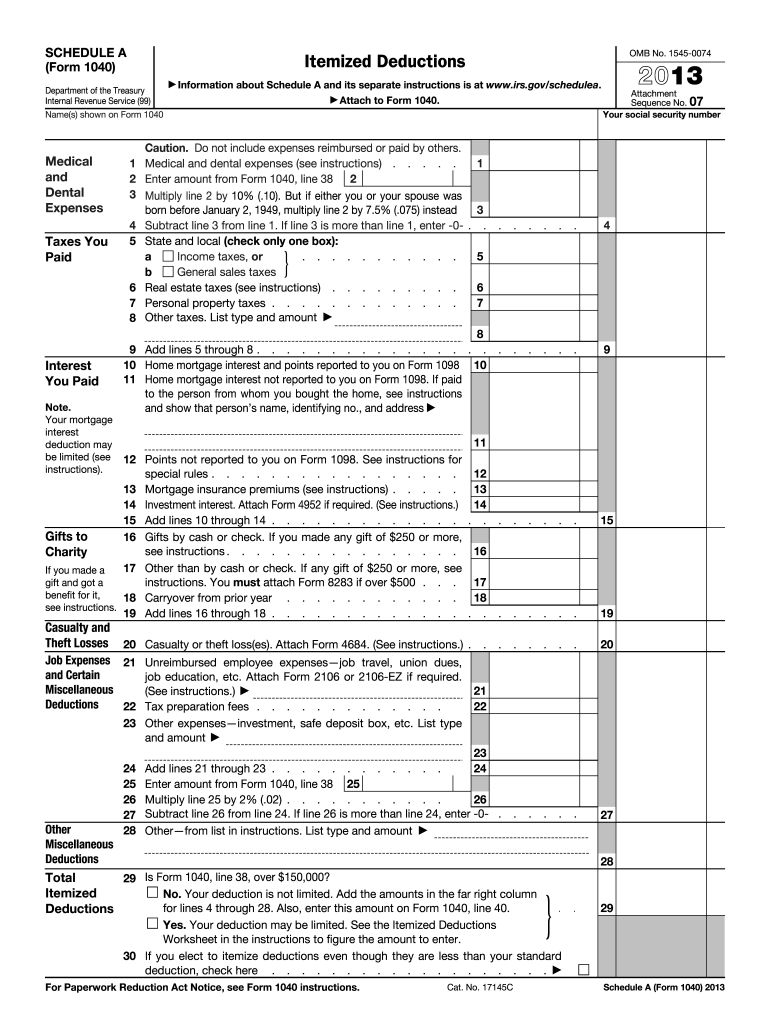
T column for lines 4 through 28. Also, enter this amount on Form 1040, line 40. Deductions . Yes. Your deduction may be limited. See the Itemized Deductions Worksheet in the instructions to figure the amount to enter. 30 If you elect to itemize deductions even though they are less than your standard deduction, check here . . . . . . . . . . . . . . . . . . . For Paperwork Reduction Act Notice, see Form 1040 instructions. Cat. No. 17145C . 29 Schedule A (Form 1040) 2013.
Loading

Open form follow the instructions

Easily sign the form with your finger

Send filled & signed form or save
How to fill out the IRS 1040 - Schedule A online
Filing your taxes can be a challenging process, especially when it comes to itemizing deductions on Form 1040 - Schedule A. This guide will provide you with clear and detailed steps to help you fill out the form accurately and efficiently online.
Follow the steps to complete your IRS 1040 - Schedule A online
- Click ‘Get Form’ button to obtain the form and open it in the editor.
- Begin by entering your name and the name of your partner as shown on Form 1040 at the top of the schedule.
- Next, move to the medical and dental expenses section. Enter the total amount of qualifying medical and dental expenses on line 1.
- On line 2, input the amount from Form 1040, line 38. This figure is crucial as it determines the limit on your deductible medical expenses.
- Calculate 10% of the amount on line 2 by multiplying it by 0.10. If you or your partner were born before January 2, 1949, use 7.5% instead.
- Subtract the result from line 3 from the total on line 1, and if line 3 exceeds line 1, enter '0' on line 4.
- Proceed to the Taxes You Paid section. Choose between state and local income taxes or general sales taxes by checking the appropriate box on line 5.
- Input the amounts for real estate taxes on line 6, personal property taxes on line 7, and any other applicable taxes on line 8.
- Sum the amounts from lines 5 through 8 and enter the total on line 9.
- In the Home mortgage interest section, enter the mortgage interest reported to you on Form 1098 on line 10, and any additional amounts you have for interest not reported on line 11.
- Continue documenting points on line 12, mortgage insurance premiums on line 13, and any investment interest on line 14.
- Add the totals from lines 10 through 14 and enter that amount on line 15.
- In the Gifts to Charity section, detail cash/check gifts on line 16 and other gifts on line 17, ensuring to follow the instructions regarding reporting gifts over $250.
- Collect the totals of lines 16 through 18 and input them on line 19.
- Record any casualty or theft losses on line 20 and include any unreimbursed employee expenses in line 21.
- Enter applicable tax preparation fees on line 22, followed by any other expenses on line 23.
- Sum the amounts on lines 21 through 23 and record this total on line 24.
- Refer to the instructions to calculate the percentage deduction and finalize your totals on lines 25 to 30.
- Review all entries closely for accuracy, save your changes, and either download, print, or share your completed form as necessary.
Start filling out your IRS 1040 - Schedule A online today to maximize your deductions!
Experience a faster way to fill out and sign forms on the web. Access the most extensive library of templates available.
Related content
Use Schedule A (Form 1040 or 1040-SR) to figure your itemized deductions. In most cases...
by A SCHEDULE · Cited by 3 — Schedule A of Form 1040 is for itemized deductions...
A For the first dependent identified with an ITIN and listed as a qualifying child for the...
Get answers to your most pressing questions about US Legal Forms API.
What is the extra standard deduction for seniors over 65?
The extra standard deduction for seniors over 65 is an additional amount that can be added to the standard deduction figures. This extra amount is designed to provide more tax relief to those aged 65 and older, helping them manage their financial burdens. By leveraging this extra deduction, you can maximize your savings on the IRS 1040 - Schedule A.
What is the standard deduction chart for seniors over 65?
The standard deduction chart for seniors over 65 varies annually and usually increases with inflation adjustments. Seniors may benefit from a higher deduction than younger taxpayers, allowing for substantial savings. To accurately calculate your deduction and benefit from it, refer to the IRS guidelines or use our platform for assistance with your IRS 1040 - Schedule A.
Which of the following is deductible as interest on Schedule A?
Deductible interest on Schedule A typically includes mortgage interest and certain investment interest expenses. However, personal credit card interest and other consumer loans are generally not deductible. It's important to carefully analyze which interest payments can lower your tax burden when filling out your IRS 1040 - Schedule A.
How much can a senior citizen make without paying taxes?
The amount that a senior citizen can earn without paying taxes varies depending on the individual's filing status and income sources. For many, the threshold is the sum of the standard deduction plus any additional deduction for being over 65. You should consult IRS guidelines or consider using our platform to navigate these details effectively when completing your IRS 1040 - Schedule A.
Do people over 65 get an additional standard deduction?
Yes, individuals over 65 are eligible for an additional standard deduction when filing their taxes. This deduction provides further tax relief and is especially beneficial for seniors on a fixed income. When filing your IRS 1040 - Schedule A, this extra deduction can boost your savings and support your financial well-being.
What is Schedule A medical expenses for IRS?
Schedule A for medical expenses allows you to include various qualifying medical costs that exceed a certain percentage of your adjusted gross income. Eligible expenses can include hospital bills, prescription medications, and long-term care insurance premiums. By accurately reporting these on your IRS 1040 - Schedule A, you can significantly reduce your overall tax liability.
What items can be deducted on Schedule A?
Schedule A allows taxpayers to itemize deductions like medical expenses, mortgage interest, state and local taxes, and charitable contributions. By itemizing these deductions, you may lower your taxable income more than taking the standard deduction on IRS 1040 - Schedule A. This approach often maximizes your tax benefits depending on your financial situation.
What is the 2121 standard deduction over 65?
The 2121 standard deduction for individuals over 65 is a specific amount that taxpayers can subtract from their income, thereby reducing their taxable income. This deduction is beneficial for seniors, as it increases their overall tax savings. It's important to remember that this deduction impacts your IRS 1040 - Schedule A calculations, making it a significant aspect of your tax returns.
Where can I get IRS Form 1040?
You can get IRS Form 1040 from the official IRS website or through various tax preparation software. Additionally, many libraries and post offices provide physical copies of this form. When preparing to file your IRS 1040 - Schedule A, make sure to download or obtain the most current version of Form 1040.
Does everyone have a 1040 Schedule 1?
Not everyone will need to file Schedule 1 alongside their IRS Form 1040. This schedule is only necessary for individuals with additional income or adjustments not listed on the primary 1040. If you are focusing on itemizing deductions with the IRS 1040 - Schedule A, ensure you check if Schedule 1 is required for your specific situation.
Use professional pre-built templates to fill in and sign documents online faster. Get access to thousands of forms.
If you believe that this page should be taken down, please follow our DMCA take down process here.
This form is available in several versions. Select the version you need from the drop-down list below.