Get Irs 1023-ez 2014-2026
How it works
-

Open form follow the instructions
-

Easily sign the form with your finger
-

Send filled & signed form or save
How to fill out the IRS 1023-EZ online
The IRS 1023-EZ is a streamlined application used to obtain recognition of exemption under section 501(c)(3) of the Internal Revenue Code. This guide provides a comprehensive overview of the steps needed to fill out the form online, making the process accessible for all users, regardless of their legal experience.
Follow the steps to complete the IRS 1023-EZ online
- Click ‘Get Form’ button to obtain the form and access it in the editor.
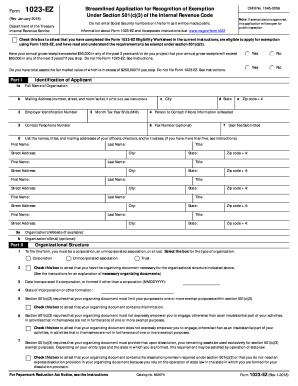
- In Part I, provide your organization's identifying information. Fill in the full name of your organization, its mailing address, employer identification number, contact telephone number, and the names and titles of your officers, directors, and/or trustees.
- Continue in Part I by selecting your organizational structure. Check the appropriate box indicating whether you are a corporation, unincorporated association, or trust. Ensure that you have the necessary organizing documents for your chosen structure.
- In Part II, confirm that your organizing documentstates your exempt purposes per section 501(c)(3). You will also need to attest that your document does not allow activities that do not further exempt purposes and includes a dissolution provision.
- Move to Part III where you will describe your specific activities. Enter the appropriate NTEE code that reflects your organization's activities and check all applicable boxes that represent your exempt purposes.
- Next, review the restrictions and prohibitions listed in Part III. Attest that you have not conducted any activities that violate these guidelines.
- In Part IV, classify your organization as a private foundation or a public charity by checking the appropriate box. Ensure that you meet the requirements to qualify for public charity status if applicable.
- If applicable, complete Part V to apply for reinstatement after automatic revocation. Choose the appropriate box based on your situation.
- Finally, sign the application in Part VI. Type the name of the authorized signer, their title, and the date of signing.
- Once all sections are completed, save changes, and choose the option to download, print, or share your completed form.
Start filling out your IRS 1023-EZ application online today to streamline your application for exemption.
Related links form
A 501(c)(3) refers to a specific type of nonprofit organization recognized by the IRS as tax-exempt, while Form 1023 is the application used to obtain this status. Essentially, 501(c)(3) status is the end goal, and completing Form 1023 or the simplified 1023-EZ is the process to achieve it. By filing the correct form, your organization can receive these benefits, which include tax-deductible donations and potential grants. Understanding these differences helps you navigate the introduction of your nonprofit effectively.