Loading
Form preview
  • US Legal Forms
  • Other Templates
  • Tax Forms
  • Tennessee Tax Forms
  • Tn Rv-f1300401 2012

Get Tn Rv-f1300401 2012-2026

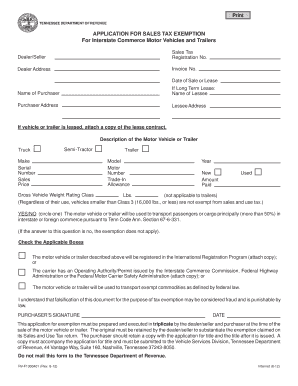
TENNESSEE DEPARTMENT OF REVENUE APPLICATION FOR SALES TAX EXEMPTION For Interstate Commerce Motor Vehicles and Trailers Dealer/Seller Sales Tax Registration No. Dealer Address Invoice No. Date of Sale or Lease Name of Purchaser If Long Term Lease Name of Lessee Purchaser Address Lessee Address If vehicle or trailer is leased attach a copy of the lease contract. If the answer to this question is no the exemption does not apply. Check the Applicabl.

How it works

  1. Open form

    Open form follow the instructions

  2. Easily sign form

    Easily sign the form with your finger

  3. Share form

    Send filled & signed form or save

How to fill out the TN RV-F1300401 online

Filling out the TN RV-F1300401 form is an essential step for securing a sales tax exemption for vehicles involved in interstate commerce. This guide provides clear, user-friendly instructions for completing the form online, ensuring you understand each component and how to accurately provide your information.

Follow the steps to complete the TN RV-F1300401 online.

  1. Press the ‘Get Form’ button to access the TN RV-F1300401 form and open it in your online editor.
  2. Begin by entering the dealer or seller's sales tax registration number in the designated field. This number is critical for filing and should accurately reflect the seller's registration status.
  3. Fill in the dealer address, invoice number, and date of sale or lease. Ensure all information is up-to-date and corresponds with the transaction details.
  4. Provide the name of the purchaser. If applicable, include the name of the lessee as well if the vehicle is being leased for a long term.
  5. Input the purchaser's address and, if applicable, the lessee's address in the respective fields. This information helps in identifying the parties involved in the transaction.
  6. For leased vehicles or trailers, attach a copy of the lease contract. Ensure that this document is properly attached before proceeding.
  7. Describe the motor vehicle or trailer, specifying whether it is a semi-tractor or truck. Fill in the make, model, serial number, and sales price accurately.
  8. Indicate the gross vehicle weight rating class in pounds, ensuring compliance with the exemption regulations applicable based on weight criteria.
  9. Answer the question regarding the vehicle's primary use in transporting passengers or cargo in interstate or foreign commerce. Circle ‘YES’ or ‘NO’ as applicable.
  10. Check the relevant boxes to indicate additional information such as whether the vehicle will be registered in the International Registration Program or if it will transport exempt commodities.
  11. Provide your signature as the purchaser along with the date of signing at the bottom of the form. This demonstrates your agreement with the application.
  12. Once you have filled out the form, ensure to save your changes, download, print, or share the completed application as necessary for your records.

Complete the TN RV-F1300401 form online today to secure your sales tax exemption.

Get form

Experience a faster way to fill out and sign forms on the web. Access the most extensive library of templates available.
Get form

Related content

APPLICATION FOR SALES TAX EXEMPTION For ...
I understand that falsification of this document for the purpose of tax exemption may be...
Learn more

Related links form

177 2330 Mpsaz Canvas PROPERTY MANAGEMENT INTER-DEPARTMENTAL EQUIPMENT TRANSFER ... - Atu Trading Partner - NTS Communications

Questions & Answers

Get answers to your most pressing questions about US Legal Forms API.

Contact support

Filling out the TN vehicle title requires you to complete the necessary sections on the title document. If you need additional guidance, the TN RV-F1300401 form provides clear instructions to help you through the process. Make sure to include accurate information about the vehicle's make, model, and identification number. After you’ve completed the title, submit it to your local county office for registration.

Transferring a camper title in Tennessee involves filling out the appropriate sections of the TN RV-F1300401 form. You will need to provide details about the buyer and the seller, as well as the camper itself. It’s important to ensure that you have all required signatures, including any lienholder's consent if applicable. Once completed, submit the form to your local county clerk's office to finalize the transfer.

To apply for sales tax exemption in Tennessee, you'll need to complete the TN RV-F1300401 form. This form is essential for various organizations and entities that qualify for sales tax exempt status. Ensure you gather all necessary documentation that supports your exemption claim. After filling out the form, submit it to the appropriate state department for processing.

Whether you need to file a TN tax return depends on your individual circumstances. If you have a source of income in Tennessee, you likely need to file a return. It's advisable to check with a tax professional or utilize resources available on the US Legal Forms platform, which can guide you through the process, including any necessary TN RV-F1300401 filings.

The frequency of filing sales tax returns in Tennessee depends on your sales volume. Generally, most businesses must file either monthly or quarterly. You can determine your filing frequency when you register, and it's essential to stay on top of your deadlines to ensure your TN RV-F1300401 is submitted on time.

Yes, if you sell tangible personal property or taxable services in Tennessee, you must register for sales tax. This registration process is necessary before filing your TN RV-F1300401. It ensures that you collect and remit the appropriate sales tax to the state, which is vital for compliance.

Filing a TN sales tax return is a straightforward process. You can easily complete it online through the Tennessee Department of Revenue's website. Make sure to have your sales data handy, as you will input your gross sales, exemptions, and taxable sales. If you prefer, you can also file by mail using the appropriate forms, which include the TN RV-F1300401.

To acquire an agricultural tax exemption in Tennessee, you need to apply through the local Department of Revenue. It's important to meet certain criteria regarding your agricultural activities. If your tax exemption pertains to operations or expenses related to the TN RV-F1300401, check out resources from uslegalforms for templates that can help you adequately prepare your application. This will support you in obtaining your exemption efficiently.

Getting a tax exempt number in Tennessee requires you to fill out the application specific to tax exempt status. Make sure to describe the type of exemption you are seeking and provide necessary documentation. By incorporating insights from uslegalforms when submitting your application related to your TN RV-F1300401, you can streamline the entire process and ensure compliance.

To obtain a title for your camper in Tennessee, you will need to submit the required paperwork to the Tennessee Department of Revenue. This includes proof of ownership and identification, along with any fees required. If your camper relates to the TN RV-F1300401 form, ensuring all documents are correctly filled out will simplify the process. Using a service like uslegalforms can provide templates to support accurate completion.

Get This Form Now!

Use professional pre-built templates to fill in and sign documents online faster. Get access to thousands of forms.
Get form
If you believe that this page should be taken down, please follow our DMCA take down processhere.
Get TN RV-F1300401
Get form
  • Adoption
  • Bankruptcy
  • Contractors
  • Divorce
  • Home Sales
  • Employment
  • Identity Theft
  • Incorporation
  • Landlord Tenant
  • Living Trust
  • Name Change
  • Personal Planning
  • Small Business
  • Wills & Estates
  • Packages A-Z
  • Affidavits
  • Bankruptcy
  • Bill of Sale
  • Corporate - LLC
  • Divorce
  • Employment
  • Identity Theft
  • Internet Technology
  • Landlord Tenant
  • Living Wills
  • Name Change
  • Power of Attorney
  • Real Estate
  • Small Estates
  • Wills
  • All Forms
  • Forms A-Z
  • Other Templates
  • Legal Hub
  • About Us
  • Help Portal
  • Legal Resources
  • Blog
  • Affiliates
  • Contact Us
  • Delete My Account
  • Site Map
  • Industries
  • Forms in Spanish
  • Localized Forms
  • State-specific Forms
  • Forms Kit
  • Real Estate Handbook
  • All Guides
  • Notarize
  • Incorporation services
  • For Consumers
  • For Small Business
  • For Attorneys
  • USLegal
  • FormsPass
  • pdfFiller
  • signNow
  • altaFlow
  • DocHub
  • Instapage
Form Packages
  • Adoption
  • Bankruptcy
  • Contractors
  • Divorce
  • Home Sales
  • Employment
  • Identity Theft
  • Incorporation
  • Landlord Tenant
  • Living Trust
  • Name Change
  • Personal Planning
  • Small Business
  • Wills & Estates
  • Packages A-Z
Form Categories
  • Affidavits
  • Bankruptcy
  • Bill of Sale
  • Corporate - LLC
  • Divorce
  • Employment
  • Identity Theft
  • Internet Technology
  • Landlord Tenant
  • Living Wills
  • Name Change
  • Power of Attorney
  • Real Estate
  • Small Estates
  • Wills
  • All Forms
  • Forms A-Z
  • Other Templates
Customer Service
  • Legal Hub
  • About Us
  • Help Portal
  • Legal Resources
  • Blog
  • Affiliates
  • Contact Us
  • Delete My Account
  • Site Map
  • Industries
  • Forms in Spanish
  • Localized Forms
  • State-specific Forms
  • Forms Kit
Legal Guides
  • Real Estate Handbook
  • All Guides
Prepared for you
  • Notarize
  • Incorporation services
Our Customers
  • For Consumers
  • For Small Business
  • For Attorneys
Our Sites
  • USLegal
  • FormsPass
  • pdfFiller
  • signNow
  • altaFlow
  • DocHub
  • Instapage
Social Media
Call us now toll free:
+1 833 426 79 33
As seen in:
© Copyright 1999-2026 airSlate Legal Forms, Inc. 17 Station Street, Ste. 203, Brookline, MA 02445
  • Your Privacy Choices
  • Terms of Service
  • Privacy Notice
  • Content Takedown Policy
  • Bug Bounty Program