Loading
Form preview
  • US Legal Forms
  • Other Templates
  • Tax Forms
  • Minnesota Tax Forms
  • Mn Dor St3 2009

Get Mn Dor St3 2009

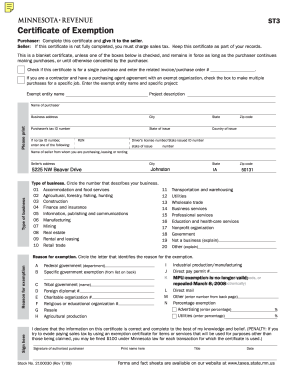
ST3 Certificate of Exemption Purchaser: Complete this certificate and give it to the seller. Seller: If this certificate is not fully completed, you must charge sales tax. Keep this certificate as.

How it works

  1. Open form

    Open form follow the instructions

  2. Easily sign form

    Easily sign the form with your finger

  3. Share form

    Send filled & signed form or save

How to fill out the MN DoR ST3 online

The MN DoR ST3 form, known as the Certificate of Exemption, allows purchasers to claim exemptions from sales tax under specific circumstances. This guide will provide comprehensive step-by-step instructions to assist users in filling out the form correctly online.

Follow the steps to complete the MN DoR ST3 form online efficiently.

  1. Click 'Get Form' button to obtain the certificate and open it in the editor.
  2. In the 'Purchaser' section, fill in your name and business address. Ensure that you complete all fields, including city, state, tax ID number, and zip code.
  3. Indicate whether this certificate is for a single purchase by checking the appropriate box and entering the related invoice or purchase order number, if applicable.
  4. If applicable, indicate if you are a contractor with a purchasing agent agreement. Check the box for multiple purchases and provide the exempt entity name and project description.
  5. Complete the 'Seller Information' section by entering the seller's name, address, city, and type of business.
  6. Circle the number that best describes the type of business you are involved in from the provided list, ensuring it corresponds accurately to your business activities.
  7. In the 'Reason for exemption' section, circle the corresponding letter that identifies your reason for claiming exemption and fill in any additional necessary details.
  8. Sign the certificate as the authorized purchaser and print your name, title, and date of signing accurately.
  9. Finally, save your changes, then download and print the completed form for your records. Ensure to share the completed certificate with the seller, but do not send it to the Department of Revenue.

Complete your MN DoR ST3 form online today to ensure your purchases are processed correctly!

Get form

Experience a faster way to fill out and sign forms on the web. Access the most extensive library of templates available.

Related content

MINNESOTA REVENUE - Certificate of Exemption
You must apply for and receive an ES# from the Department of Revenue. Enter the number on...
Learn more
Minnesota Certificate of Exemption, Form ST3
A completed Form ST3 is provided by colleges, universities, and the System Office to...
Learn more
PERQT2 SERVICE GU'liDS
DII&'1ng DOr.al. ruDDiaa. POS I/O Error .... ag. di.played. POS uncaught exception...
Learn more

Related links form

The Puducherry Real Estate (agreement For Sale) Rules, 2016 The Puducherry Real Estate (regulation And Development) Rules, 2016 Tax Return Disclosure Request - Consent Forms - Individuals CONSENT TO DISCLOSURE OF TAX RETURN INFORMATION.doc

Questions & Answers

Get answers to your most pressing questions about US Legal Forms API.

Contact support

The ST3 form MN, known as the MN DoR ST3, is a crucial document for businesses in Minnesota seeking to buy goods without incurring sales tax. This form acts as a certification that the purchaser qualifies for tax exemption due to their business operations, typically for resale purposes. Understanding and using the ST3 correctly can significantly improve financial efficiency for businesses.

The MN ST19 form is a specific exemption certificate used in Minnesota that provides exemption for certain types of purchases, particularly for nonprofit organizations. Unlike the MN DoR ST3, which is primarily for resale, the ST19 is intended to benefit qualifying nonprofits. Using this form, eligible organizations can avoid paying sales tax on purchases related to their exempt purposes.

The ST3 form in New Jersey serves a similar purpose as the MN DoR ST3 but is designated for tax-exempt purchases within that state. This form allows businesses in New Jersey to make exempt purchases, particularly for resale. While it is vital to understand the variations by state, the fundamental principle remains the same: it allows qualified buyers to skip sales tax on eligible purchases.

To obtain a MN resale certificate, you will need to complete the MN DoR ST3 form. This document allows you to buy items for resale without paying sales tax. Make sure to file the form correctly and provide necessary business details. You can find the form on the Minnesota Department of Revenue website or through platforms like uslegalforms for a straightforward process.

To fill out the ST3 form MN, begin by providing your business's legal name and address at the top of the form. Next, clarify the reason for tax exemption, typically resale or use in production. Ensure you accurately describe the goods you will buy without sales tax. Finally, sign and date the form to validate your request, and present it to your seller.

In Minnesota, certain entities can qualify for tax exemption, including nonprofit organizations, governmental entities, and some educational institutions. These groups must meet specific criteria to receive tax-exempt status. If you believe your organization may qualify, it's wise to consult the MN DoR ST3 for detailed eligibility requirements and guidelines.

A tax exempt plate in Minnesota is a special license plate issued to qualified organizations, such as nonprofits, that exempts them from certain vehicle taxes. This plate aids in identifying vehicles that qualify for tax exemptions under state law. To obtain such a plate, you will need to provide verification of your organization's tax-exempt status to the appropriate authorities. For detailed support, refer to resources available through MN DoR ST3.

The ST3 tax exempt form allows eligible purchasers to buy goods or services without paying sales tax in Minnesota. This form is typically used by organizations that qualify for sales tax exemptions, such as charities or government agencies. Correctly filling out the ST3 form is essential to ensure compliance and avoid unnecessary tax payments. More details can be found through the MN DoR ST3.

Filling out a MN vehicle title requires you to provide essential information about the vehicle and its new owner. This includes details such as the vehicle identification number, buyer's information, and odometer reading. Make sure to double-check all entries for accuracy. For comprehensive instructions, visit resources related to MN DoR ST3.

The Minnesota tax opt out form allows certain individuals or businesses to opt out of specific tax programs offered in the state. This form helps users manage their tax obligations more effectively. If you believe you qualify for opting out, consult the Minnesota Department of Revenue or explore online forms available via the MN DoR ST3.

Get This Form Now!

Use professional pre-built templates to fill in and sign documents online faster. Get access to thousands of forms.
If you believe that this page should be taken down, please follow our DMCA take down processhere.
Get MN DoR ST3
  • Adoption
  • Bankruptcy
  • Contractors
  • Divorce
  • Home Sales
  • Employment
  • Identity Theft
  • Incorporation
  • Landlord Tenant
  • Living Trust
  • Name Change
  • Personal Planning
  • Small Business
  • Wills & Estates
  • Packages A-Z
  • Affidavits
  • Bankruptcy
  • Bill of Sale
  • Corporate - LLC
  • Divorce
  • Employment
  • Identity Theft
  • Internet Technology
  • Landlord Tenant
  • Living Wills
  • Name Change
  • Power of Attorney
  • Real Estate
  • Small Estates
  • Wills
  • All Forms
  • Forms A-Z
  • Other Templates
  • Legal Hub
  • About Us
  • Help Portal
  • Legal Resources
  • Blog
  • Affiliates
  • Contact Us
  • Delete My Account
  • Site Map
  • Industries
  • Forms in Spanish
  • Localized Forms
  • State-specific Forms
  • Forms Kit
  • Real Estate Handbook
  • All Guides
  • Notarize
  • Incorporation services
  • For Consumers
  • For Small Business
  • For Attorneys
  • USLegal
  • FormsPass
  • pdfFiller
  • signNow
  • altaFlow
  • DocHub
  • Instapage
Form Packages
  • Adoption
  • Bankruptcy
  • Contractors
  • Divorce
  • Home Sales
  • Employment
  • Identity Theft
  • Incorporation
  • Landlord Tenant
  • Living Trust
  • Name Change
  • Personal Planning
  • Small Business
  • Wills & Estates
  • Packages A-Z
Form Categories
  • Affidavits
  • Bankruptcy
  • Bill of Sale
  • Corporate - LLC
  • Divorce
  • Employment
  • Identity Theft
  • Internet Technology
  • Landlord Tenant
  • Living Wills
  • Name Change
  • Power of Attorney
  • Real Estate
  • Small Estates
  • Wills
  • All Forms
  • Forms A-Z
  • Other Templates
Customer Service
  • Legal Hub
  • About Us
  • Help Portal
  • Legal Resources
  • Blog
  • Affiliates
  • Contact Us
  • Delete My Account
  • Site Map
  • Industries
  • Forms in Spanish
  • Localized Forms
  • State-specific Forms
  • Forms Kit
Legal Guides
  • Real Estate Handbook
  • All Guides
Prepared for you
  • Notarize
  • Incorporation services
Our Customers
  • For Consumers
  • For Small Business
  • For Attorneys
Our Sites
  • USLegal
  • FormsPass
  • pdfFiller
  • signNow
  • altaFlow
  • DocHub
  • Instapage
Social Media
Call us now toll free:
+1 833 426 79 33
As seen in:
© Copyright 1999-2026 airSlate Legal Forms, Inc. 17 Station Street, Ste. 203, Brookline, MA 02445
  • Your Privacy Choices
  • Terms of Service
  • Privacy Notice
  • Content Takedown Policy
  • Bug Bounty Program
MN DoR ST3
This form is available in several versions.
Select the version you need from the drop-down list below.
2019 MN DoR ST3
Select form
  • 2019 MN DoR ST3
  • 2017 MN DoR ST3
  • 2015 MN DoR ST3
  • 2013 MN DoR ST3
  • 2012 MN DoR ST3
  • 2010 MN DoR ST3
  • 2009 MN DoR ST3
Select form