Loading
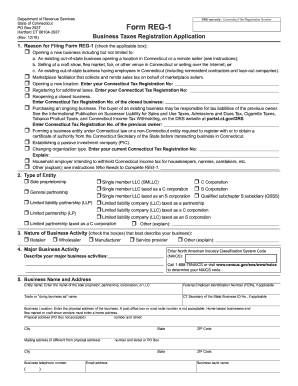
Get Ct Drs Reg-1 2018
How it works
-

Open form follow the instructions
-

Easily sign the form with your finger
-

Send filled & signed form or save
How to fill out the CT DRS REG-1 online
Filling out the Connecticut Tax Registration Application, known as the REG-1 form, can be an essential step in starting or managing a business in Connecticut. This guide provides clear and comprehensive instructions to help users fill out the form accurately and efficiently.
Follow the steps to complete your application with confidence.
- Press the 'Get Form' button to access the REG-1 form and open it in the editor.
- Begin by selecting the reason for filing Form REG-1. Check the box that applies to your situation, such as opening a new business or registering for sales tax.
- Indicate the type of entity you are registering. Select the checkbox corresponding to your business structure, such as a sole proprietorship or corporation.
- Describe the nature of your business activity. Check all applicable boxes and ensure you provide a brief description of your primary business activities along with the NAICS code.
- Enter your business name and physical address. Include your Federal Employer Identification Number (FEIN) if applicable and ensure that the physical address does not include a PO box.
- List all owners, partners, corporate officers, or members of the LLC. Provide their names, titles, addresses, and dates of birth. Attach additional sheets if necessary.
- Complete sections regarding income tax withholding, sales and use taxes, business entity tax, and any other relevant tax inquiries. Answer each question based on your specific circumstances.
- Enter the applicable registration fee amount, ensuring that you account for any additional fees based on the taxes you are registering for.
- Review the declaration section carefully. Ensure that the application is signed by the authorized person and include their contact information.
- After completing the form, save your changes, download it for your records, and consider printing or sharing it as required.
Start completing your CT DRS REG-1 application online today to ensure your business is properly registered.
Get form
Experience a faster way to fill out and sign forms on the web. Access the most extensive library of templates available.
To access your 1099-G online in Connecticut, visit the Connecticut Department of Revenue Services website and log into your account. Navigate to the appropriate section for tax forms to find your 1099-G. Alternatively, uslegalforms can help you understand how to retrieve your tax documents easily and efficiently.
Get This Form Now!
Use professional pre-built templates to fill in and sign documents online faster. Get access to thousands of forms.