Loading
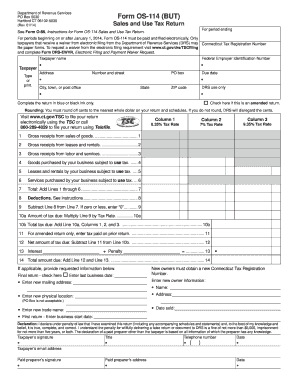
Get Ct Drs Os-114 2014
How it works
-

Open form follow the instructions
-

Easily sign the form with your finger
-

Send filled & signed form or save
How to fill out the CT DRS OS-114 online
Filling out the CT DRS OS-114 form online can streamline your sales and use tax reporting. This guide will provide detailed, step-by-step instructions to help you complete the form accurately and efficiently.
Follow the steps to complete the CT DRS OS-114 online successfully.
- Press the ‘Get Form’ button to access the CT DRS OS-114 form and open it in your preferred editor.
- Enter the required information in the Taxpayer Name field. Provide the legal name of the person or entity responsible for submitting the form.
- Identify your Taxpayer Type by selecting the appropriate category for your business.
- Fill in the Connecticut Tax Registration Number, which is essential for identification in the system.
- Provide your Federal Employer Identification Number (EIN) in the designated field.
- Enter your business address, including the number and street name, PO Box (if applicable), city, town, state, and ZIP code.
- Indicate the correct Due Date for the form submission to ensure timeliness.
- If applicable, check the box to indicate that this is an amended return.
- Complete Lines 1 through 6 with your gross receipts for labor, goods, leases, and services purchased subject to use tax, ensuring to round off cents to the nearest whole dollar.
- Add Lines 1 through 6 to calculate the Total. Enter the result on Line 7.
- List any deductions in Line 8 according to the accompanying instructions.
- Subtract Line 8 from Line 7 to find the Mount Subject to Tax on Line 9.
- Calculate the amount of tax due by multiplying Line 9 by the appropriate tax rate, and enter the figure in Line 10a.
- Sum the tax due amounts in Columns 1, 2, and 3, entering the total on Line 10b.
- If this is an amended return, report the tax paid on the prior return on Line 11.
- Subtract Line 11 from Line 10b to get the Net Amount of Tax Due on Line 12.
- Include interest and penalties on Line 13 if necessary, and add them to Line 12 for Total Amount Due on Line 14.
- If applicable, provide any additional requested information such as the final return indicator, new mailing address, and changes to ownership.
- Declare the accuracy of your submission by signing and dating the form, ensuring to include your email address.
- Review all provided information for accuracy, then save your changes, download a copy, print the form, or share it as required.
Complete your CT DRS OS-114 form online today to ensure compliance and streamline the filing process.
Get form
Experience a faster way to fill out and sign forms on the web. Access the most extensive library of templates available.
Related links form
In Connecticut, you must file an estate tax return if the gross estate exceeds a certain threshold, which can be determined each year. This requirement ensures compliance with state tax laws and accurate reporting of estate values. Use the CT DRS OS-114 to navigate the filing process and meet your obligations effectively.
Get This Form Now!
Use professional pre-built templates to fill in and sign documents online faster. Get access to thousands of forms.