Loading
Form preview
  • US Legal Forms
  • Other Templates
  • Tax Forms
  • Connecticut Tax Forms
  • Ct Drs Ct-w3 2013

Get Ct Drs Ct-w3 2013

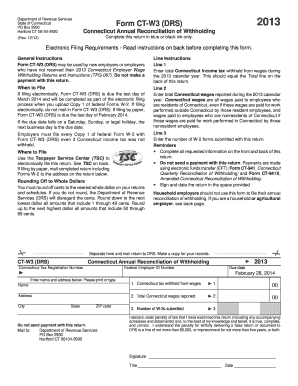
Cut tax withheld from wages 1. 00 Address 2. Total Connecticut wages reported 2. 00 3. Number of W-2s submitted 3. City State ZIP code Do not send payment with this return. Mail to: Department of Revenue Services PO Box 2930 Hartford CT 06104-2930 I declare under penalty of law that I have examined this return (including any accompanying schedules and statements) and, to the best of my knowledge and belief, it is true, complete, and correct. I understand the penalty.

How it works

  1. Open form

    Open form follow the instructions

  2. Easily sign form

    Easily sign the form with your finger

  3. Share form

    Send filled & signed form or save

How to fill out the CT DRS CT-W3 online

Filling out the CT DRS CT-W3 form is an essential task for employers in Connecticut who need to reconcile withholding tax. This guide will provide you with detailed, step-by-step instructions to help you accurately complete the form online.

Follow the steps to fill out your CT DRS CT-W3 form online.

  1. Press the ‘Get Form’ button to access the CT DRS CT-W3 document and open it in your editing tool.
  2. Begin by entering your Connecticut tax registration number and federal employer ID number in the designated spaces. Ensure that these numbers are accurate, as they are essential for your submission.
  3. In Line 1, input the total Connecticut income tax withheld from wages during the specified calendar year. This figure should correspond with the total found on the back of the form.
  4. For Line 2, enter the total Connecticut wages reported during the same calendar year. Remember that this includes all wages paid to both residents and nonresidents based on where the work was performed.
  5. In Line 3, provide the number of W-2 forms you are submitting along with this return. You must include every W-2 form even if no Connecticut income tax was withheld.
  6. Review all the information you have entered to ensure accuracy. It is important to complete all requested information on both sides of the return.
  7. Sign and date the return in the provided space to confirm that the information is true and complete to the best of your knowledge.
  8. Save your completed form. You can choose to download, print, or share it for your records. If you are filing electronically, do not mail a paper copy of the CT-W3.

Complete your CT DRS CT-W3 form online today for a seamless filing experience.

Get form

Experience a faster way to fill out and sign forms on the web. Access the most extensive library of templates available.

Related content

Form CT-W3
Jan 31, 2025 — Household employers should not use this form to file their annual...
Learn more
2023-2024 Withholding Forms
Connecticut State Department of Revenue Services ; CT-W3, 2024 Connecticut Annual...
Learn more
MT3DMS-A-Modular-Three-Dimensional-Multispecies...
by C Zheng · 1999 · Cited by 2113 — Zheng, Chunmiao, 1962-. MT3DMS: a modular...
Learn more

Related links form

OH DTE 1 2002 OH DTE 100 2016 OH DTE 100 2011 OH DTE 100 EX 2012

Questions & Answers

Get answers to your most pressing questions about US Legal Forms API.

Contact support

You can obtain your CT tax forms directly from the CT DRS website, which offers a variety of downloadable forms for different tax purposes. If you prefer a more comprehensive solution, platforms like US Legal Forms provide easy access to all necessary tax forms, including filing instructions that guide you through each step.

To acquire a CT sales tax number, businesses must register with the CT DRS, providing information about the nature of the business. This number is essential for collecting sales tax from customers. Using US Legal Forms, you can find all the forms needed for registration, streamlining the process and reducing any potential errors.

To obtain a CT state tax ID number, you must complete a registration application with the CT DRS. This process can often be done online and is necessary for businesses and employers in Connecticut to manage tax obligations. Platforms like US Legal Forms can assist you in navigating the application process to ensure you meet all requirements properly.

Choosing the correct withholding code in CT requires understanding each employee's tax situation. Common codes relate to specific exemptions or statuses that affect withholding amounts. By consulting the CT DRS guidelines and utilizing US Legal Forms, you can efficiently determine the appropriate code for each employee.

To register for CT withholding tax, you must complete the online registration process through the CT DRS website. Once registered, you will receive a withholding account number that is necessary for filing and payment. US Legal Forms simplifies this process by providing access to necessary forms and guidance for compliance with Connecticut's tax laws.

The amount of CT state tax that should be withheld depends on your employee's wages, filing status, and allowances claimed. The CT DRS offers tables and formulas to help employers calculate the precise withholding amount. It’s important to routinely check for updates and verify your calculations to comply with state tax regulations.

To set up tax withholding, you need to gather your employee’s information and complete the appropriate state and federal forms. The CT DRS provides guidelines to assist with calculating the correct amount of tax to withhold. By using platforms like US Legal Forms, you can easily access tools and forms to streamline your tax withholding setup, ensuring compliance with state guidelines.

The CT W3 form serves as a summary of all income tax withholdings for your employees. It helps the Connecticut Department of Revenue Services, or CT DRS, track and manage state tax collections efficiently. By submitting the CT W3 form, you ensure that your tax records are accurate and up-to-date, which is essential for compliance.

On your tax withholding form, you should accurately enter your personal information, including your name, address, Social Security number, and filing status. It's essential to provide information about your exemptions and any additional amounts you want withheld. Using the CT DRS CT-W3 helps you ensure that all necessary fields are correctly filled out, keeping your tax filings in order. Accessing clear guidelines on your withholding form can streamline the process.

The W-2s CT W3 annual reconciliation is the process of verifying that all withheld taxes from your employees' wages match the amounts reported on their W-2 forms. This reconciliation is required by the state to ensure accurate tax collection and reporting. Completing the CT DRS CT-W3 in conjunction with your W-2s confirms that everything aligns correctly. This diligence contributes to a smooth filing process and prevents issues with tax authorities.

Get This Form Now!

Use professional pre-built templates to fill in and sign documents online faster. Get access to thousands of forms.
If you believe that this page should be taken down, please follow our DMCA take down processhere.
Get CT DRS CT-W3
  • Adoption
  • Bankruptcy
  • Contractors
  • Divorce
  • Home Sales
  • Employment
  • Identity Theft
  • Incorporation
  • Landlord Tenant
  • Living Trust
  • Name Change
  • Personal Planning
  • Small Business
  • Wills & Estates
  • Packages A-Z
  • Affidavits
  • Bankruptcy
  • Bill of Sale
  • Corporate - LLC
  • Divorce
  • Employment
  • Identity Theft
  • Internet Technology
  • Landlord Tenant
  • Living Wills
  • Name Change
  • Power of Attorney
  • Real Estate
  • Small Estates
  • Wills
  • All Forms
  • Forms A-Z
  • Other Templates
  • Legal Hub
  • About Us
  • Help Portal
  • Legal Resources
  • Blog
  • Affiliates
  • Contact Us
  • Delete My Account
  • Site Map
  • Industries
  • Forms in Spanish
  • Localized Forms
  • State-specific Forms
  • Forms Kit
  • Real Estate Handbook
  • All Guides
  • Notarize
  • Incorporation services
  • For Consumers
  • For Small Business
  • For Attorneys
  • USLegal
  • FormsPass
  • pdfFiller
  • signNow
  • altaFlow
  • DocHub
  • Instapage
Form Packages
  • Adoption
  • Bankruptcy
  • Contractors
  • Divorce
  • Home Sales
  • Employment
  • Identity Theft
  • Incorporation
  • Landlord Tenant
  • Living Trust
  • Name Change
  • Personal Planning
  • Small Business
  • Wills & Estates
  • Packages A-Z
Form Categories
  • Affidavits
  • Bankruptcy
  • Bill of Sale
  • Corporate - LLC
  • Divorce
  • Employment
  • Identity Theft
  • Internet Technology
  • Landlord Tenant
  • Living Wills
  • Name Change
  • Power of Attorney
  • Real Estate
  • Small Estates
  • Wills
  • All Forms
  • Forms A-Z
  • Other Templates
Customer Service
  • Legal Hub
  • About Us
  • Help Portal
  • Legal Resources
  • Blog
  • Affiliates
  • Contact Us
  • Delete My Account
  • Site Map
  • Industries
  • Forms in Spanish
  • Localized Forms
  • State-specific Forms
  • Forms Kit
Legal Guides
  • Real Estate Handbook
  • All Guides
Prepared for you
  • Notarize
  • Incorporation services
Our Customers
  • For Consumers
  • For Small Business
  • For Attorneys
Our Sites
  • USLegal
  • FormsPass
  • pdfFiller
  • signNow
  • altaFlow
  • DocHub
  • Instapage
Social Media
Call us now toll free:
+1 833 426 79 33
As seen in:
© Copyright 1999-2026 airSlate Legal Forms, Inc. 17 Station Street, Ste. 203, Brookline, MA 02445
  • Your Privacy Choices
  • Terms of Service
  • Privacy Notice
  • Content Takedown Policy
  • Bug Bounty Program
CT DRS CT-W3
This form is available in several versions.
Select the version you need from the drop-down list below.
2022 CT DRS CT-W3
Select form
  • 2022 CT DRS CT-W3
  • 2021 CT DRS CT-W3
  • 2020 CT DRS CT-W3
  • 2019 CT DRS CT-W3
  • 2018 CT DRS CT-W3
  • 2017 CT DRS CT-W3
  • 2015 CT DRS CT-W3
  • 2014 CT DRS CT-W3
  • 2013 CT DRS CT-W3
  • 2012 CT DRS CT-W3
  • 2011 CT DRS CT-W3
Select form