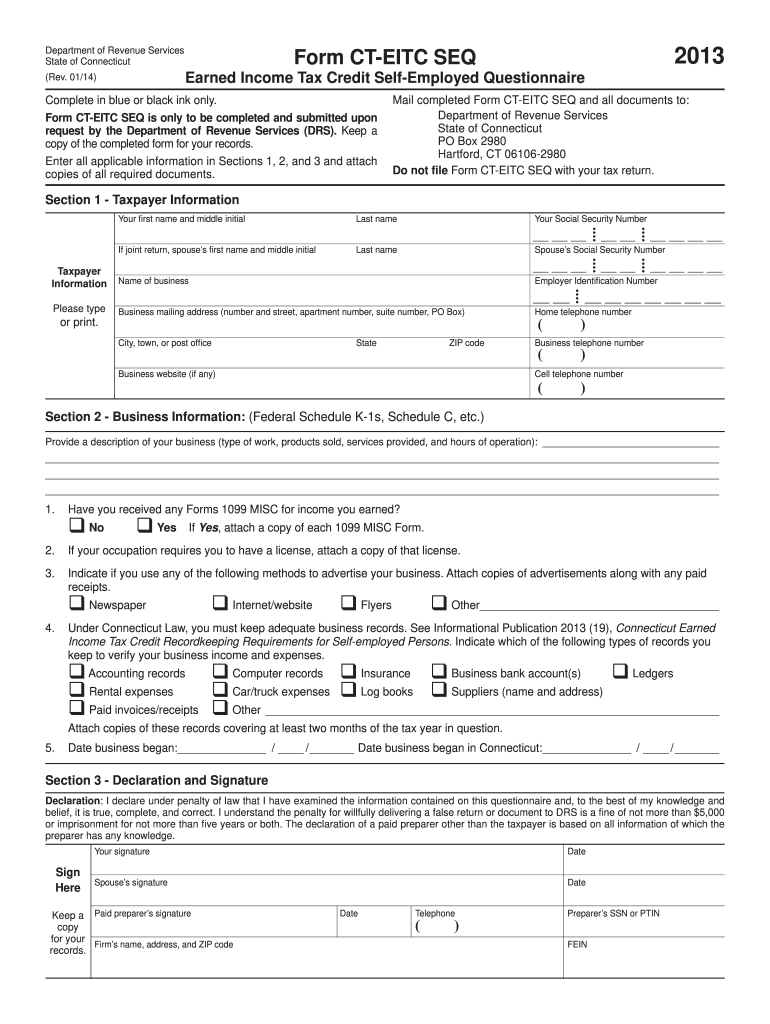
5. Date business began: / / Date business began in Connecticut: / / Section 3 - Declaration and Signature Declaration: I declare under penalty of law that I have examined the information contained on this questionnaire and, to the best of my knowledge and belief, it is true, complete, and correct. I understand the penalty for willfully delivering a false return or document to DRS is a ne of not more than $5,000 or imprisonment for not m.
Loading

Open form follow the instructions

Easily sign the form with your finger

Send filled & signed form or save
How to fill out the CT DRS CT-EITC SEQ online
Filling out the CT DRS CT-EITC SEQ form is an important step for self-employed individuals seeking to claim the Earned Income Tax Credit in Connecticut. This guide will walk you through each section of the form to ensure that you provide the necessary information accurately and completely.
Follow the steps to complete the CT DRS CT-EITC SEQ form online.
- Click ‘Get Form’ button to obtain the form and open it in the editor.
- In Section 1, enter your personal details such as your first name, middle initial, last name, and Social Security Number. If applicable, include your spouse's information as well.
- Provide your business information: Name, mailing address, Employer Identification Number (EIN), and telephone numbers. Include the business website if you have one.
- Move to Section 2 and describe your business, including the type of work you do and products or services offered. Ensure to answer questions regarding receipt of Forms 1099 MISC and licenses.
- Indicate your advertising methods and attach any corresponding documents. Be thorough in your documentation regarding business records.
- For date fields, provide the dates for when your business began and when it began in Connecticut. This information is required for eligibility.
- In Section 3, read the declaration carefully, then provide your signature and date, along with the signature of your spouse if applicable. Ensure you include the signature of any paid preparer if someone assisted you with filling out the form.
- Finally, review all entered information for accuracy. Once complete, save the changes, and consider your options to download, print, or share the form as needed.
Complete your CT DRS CT-EITC SEQ form online today to take advantage of the Earned Income Tax Credit.
Experience a faster way to fill out and sign forms on the web. Access the most extensive library of templates available.
Related content
Connecticut State Department of Revenue Services ; Form CT-EITC SEQ. Form, 2024 Earned...
by R Pomp · 2020 — would require the employer to report an employee's Connecticut wages...
Get answers to your most pressing questions about US Legal Forms API.
What are the requirements for earned income credit?
The requirements for claiming the Earned Income Credit (EIC) include having earned income from employment and meeting specific income thresholds. You must also have valid Social Security numbers for yourself and any qualifying children. Familiarizing yourself with the CT DRS CT-EITC SEQ guidelines will help ensure you meet all necessary conditions.
How do I enter EIC on my tax return?
To enter the Earned Income Credit (EIC) on your tax return, locate the section for credits on your tax form. You will need to follow the instructions provided, which may direct you to fill out additional schedules. Ensure you conform with the guidelines of the CT DRS CT-EITC SEQ to avoid mistakes.
What is the income limit for CT earned income tax credit?
The income limit for the Connecticut Earned Income Tax Credit (EITC) varies based on your filing status and number of qualifying children. For the most accurate figures, it is advisable to check the latest information from the CT DRS CT-EITC SEQ site. Meeting these income thresholds is essential to ensure you qualify for the credit.
What disqualifies you from earned income credit?
Disqualifications from the Earned Income Credit (EIC) can arise from high income levels, lack of qualifying dependents, or filing status complications. Additionally, having claimed the EIC incorrectly in previous years can lead to future disallowances. Staying informed about the current regulations of the CT DRS CT-EITC SEQ is crucial for maintaining eligibility.
Why would I not qualify for the earned income tax credit?
You may not qualify for the Earned Income Tax Credit (EIC) if your income is above the taxable limit set for the year. Moreover, if you do not have a qualifying child or fail to meet residency requirements, your eligibility may be affected. Each situation varies, so it is essential to review the specific criteria outlined by the CT DRS CT-EITC SEQ program.
How do I upload EITC documents to CT?
To upload your EITC documents to Connecticut, you can visit the CT DRS website and follow their guidelines for submitting documentation. The process typically involves gathering your income documents and tax forms. Ensure that all files are complete before uploading, as this will help prevent any processing delays.
Why would I be disallowed from EIC?
You might be disallowed from EIC due to incomplete documentation or discrepancies in your tax return. The CT DRS CT-EITC SEQ program requires accurate information to process your claim. If your reported income does not align with IRS records, you may face disqualification. Always ensure that you provide complete and honest information.
What can disqualify you from EIC?
Several factors can disqualify you from claiming the Earned Income Credit (EIC). If your investment income exceeds the specified limit, you may lose eligibility. Additionally, filing status also plays a role. For example, if you are married and file separately, you cannot claim the EIC.
What is a CT EITC?
The CT EITC, or Connecticut Earned Income Tax Credit, is a state-specific version of the federal EITC designed to offer financial support to eligible Connecticut residents. This program aims to assist low-to-moderate income working families by reducing their tax burden and providing additional refunds. Understanding the details of the CT DRS CT-EITC SEQ can help you take full advantage of this benefit. You can explore resources through uslegalforms for personalized guidance.
Who qualifies for the EIC?
To qualify for the Earned Income Credit, you generally need to have earned income, which includes wages, salaries, or self-employment income. Additionally, you must meet certain income thresholds and, in most cases, have children or dependents. The exact requirements may vary, so it is advisable to check specific guidelines related to CT DRS CT-EITC SEQ for clarity on income limits and qualifying criteria. Use reliable resources to ensure eligibility and maximize benefits.
Use professional pre-built templates to fill in and sign documents online faster. Get access to thousands of forms.
If you believe that this page should be taken down, please follow our DMCA take down process here.
This form is available in several versions. Select the version you need from the drop-down list below.