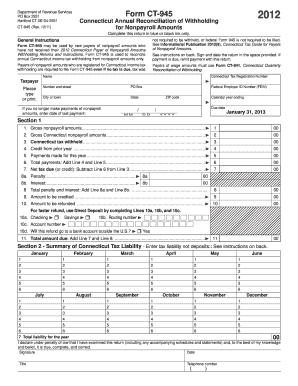
G Savings 10b. Routing number 10c. Account number 10d. Will this refund go to a bank account outside the U.S.? Yes 11. Total amount due: Add Line 7 and Line 8. .......................................................................... 11 00 Section 2 - Summary of Connecticut Tax Liability - Enter tax liability not deposits:: See instructions on back. January February March April May June 1 1 1 1 1 1 2 2 2 2 2 2 3 3 3 3 3 3 4 4 4.
Open form follow the instructions
Easily sign the form with your finger
Send filled & signed form or save
How to fill out the CT DRS CT-945 online
Filling out the CT DRS CT-945 form is essential for payers of nonpayroll amounts who need to reconcile their Connecticut income tax withholding. This guide provides clear instructions to help you complete the form accurately and efficiently online.
Follow the steps to complete the CT DRS CT-945 form online.
- Click ‘Get Form’ button to begin the process and access the form online.
- Enter your Connecticut Tax Registration Number, name, and address in the spaces provided.
- Input your Federal Employer Identification Number (FEIN) and the calendar year ending date.
- For Section 1, fill in gross nonpayroll amounts, gross Connecticut nonpayroll amounts, Connecticut tax withheld, credit from the prior year, and total payments made for the year in their respective fields.
- Calculate the total payments by adding the credit from Line 4 and payments made in Line 5, entering the result in Line 6.
- Determine the net tax due by subtracting Line 6 from Line 3 and enter it on Line 7, or proceed to complete Lines 9 and 10 if no tax is due.
- If applicable, complete Lines 8a and 8b for any late payment penalties or interest due, then sum these to enter in Line 8.
- If you are requesting a refund, fill in Lines 10a, 10b, and 10c for direct deposit information, and specify the amount to be refunded in Line 10.
- Add the amounts from Line 7 and Line 8 to determine the total amount due in Line 11.
- After checking all entries for accuracy, sign and date the form in the spaces provided.
- Once completed, save the changes, and you can download, print, or share the form as needed.
Start filling out the CT DRS CT-945 online now for a seamless filing experience.
Experience a faster way to fill out and sign forms on the web. Access the most extensive library of templates available.
Related content
Jan 31, 2024 — Form CT-945 is for the annual reconciliation of nonpayroll withholding...
CT-8109, 2024 Connecticut Withholding Tax Payment Form for Nonpayroll Amounts, 12/2024 ;...
The operating instructions are an integral part of the product and contain important in...
Get answers to your most pressing questions about US Legal Forms API.
What is a CT 945 form?
The CT 945 form is an annual withholding tax report filed with the Connecticut Department of Revenue Services. This form summarizes the total income tax withheld by employers throughout the year. Using the CT DRS CT-945 form allows for efficient management of your tax obligations and compliance with state laws.
What is the CT E withholding code?
The CT E withholding code is designed for employees who claim exemption from withholding in Connecticut. Using this code means you expect to owe no federal income tax for the current year. Be sure to confirm your eligibility before selecting this code on your CT DRS CT-945 form.
What is the format for CT registration number?
The format for a Connecticut registration number typically consists of ten digits, such as 123-45-6789. Ensure to double-check this format when completing the CT DRS CT-945 form or when making any tax-related payments. Maintaining correct information is crucial for accurate record-keeping and reporting.
How do I know what tax withholding should I choose?
To choose the right tax withholding, evaluate your annual income, dependents, and any potential deductions. Tools like the CT DRS CT-945 calculator can guide you in determining the optimal withholding amount based on your specific circumstances. Don't hesitate to reach out for expert advice if you're uncertain.
Which withholding code should I choose in CT?
Choosing the correct withholding code in Connecticut involves understanding your employment status and overall income levels. It’s essential to consult the latest CT DRS documentation or a tax professional to select the appropriate code that reflects your tax situation accurately.
Who do I write my CT state tax check to?
You should write your CT state tax check to the ‘Connecticut Department of Revenue Services’ when making payments. Including your Social Security number or CT registration number on the check will help ensure proper credit to your account. Remember, accuracy is key to avoid delays or issues.
What withholding form type should I use?
To determine the correct withholding form type, consider the specifics of your earnings and applicable regulations. The CT DRS CT-945 is primarily used for reporting annual withholding tax, so ensure this form aligns with your financial activities for the year.
Should I do 0 or 1 withholding?
The choice between 0 or 1 withholding on your CT DRS CT-945 depends on your unique financial situation. If you want extra taxes withheld to cover potential tax liabilities, opt for 0. However, if you prefer a more standard approach, choosing 1 might be more suitable.
Is CT tax registration number the same as EIN?
Although a CT tax registration number and an EIN may seem similar, they serve different functions. The EIN is used for federal tax identification, while the CT tax registration number pertains specifically to state tax purposes. Being aware of these distinctions can help ensure accurate compliance with both federal and state requirements, including forms like CT DRS CT-945.
Who needs to file CT 945?
Businesses that withhold taxes from employee wages need to file CT 945. This form is specifically for reporting and remitting those withheld amounts. If you are responsible for withholding taxes, it is essential to understand your obligations and ensure timely filing with the CT DRS CT-945.
Use professional pre-built templates to fill in and sign documents online faster. Get access to thousands of forms.
If you believe that this page should be taken down, please follow our DMCA take down process here.
This form is available in several versions. Select the version you need from the drop-down list below.