Loading

Open form follow the instructions

Easily sign the form with your finger

Send filled & signed form or save
How to fill out the KS TR-215 online
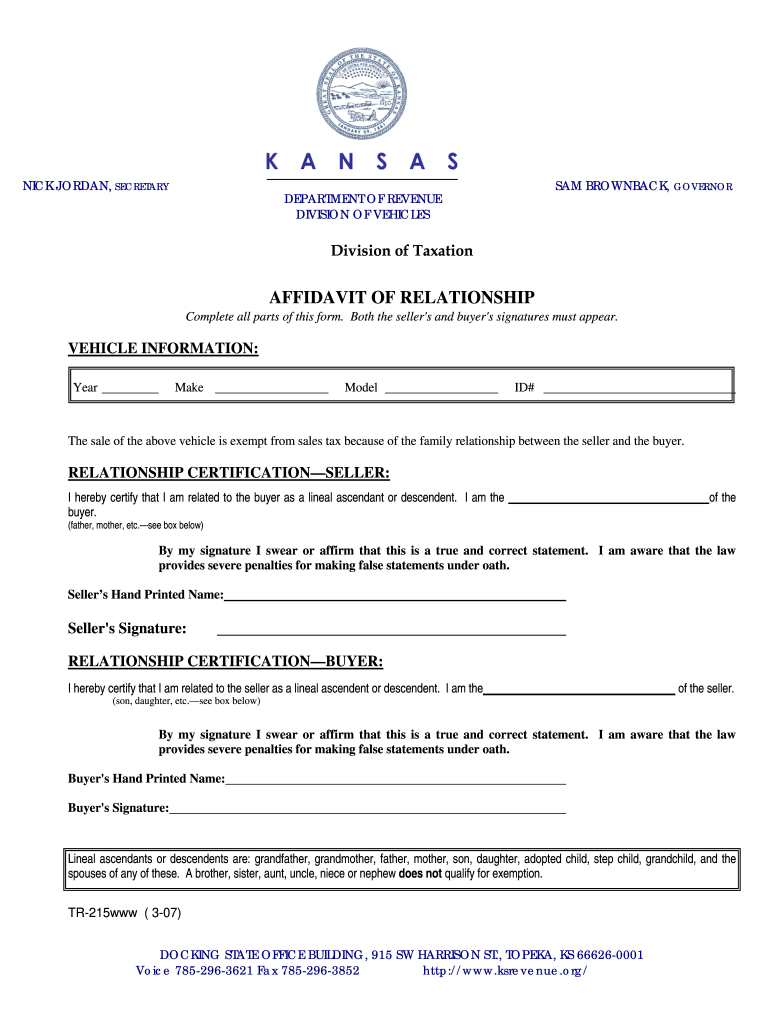
The KS TR-215 is a form used to certify the relationship between a seller and buyer for the purpose of claiming a sales tax exemption on a vehicle. This guide provides a clear and supportive approach to filling out the form online, ensuring that users can easily complete all required sections.
Follow the steps to complete the KS TR-215 form online.
- Press the ‘Get Form’ button to access the KS TR-215 form and open it in your browser for editing.
- Begin by filling out the vehicle information section. You will need to provide the year, make, model, and identification number (ID#) of the vehicle being sold.
- In the relationship certification section for the seller, select the appropriate designation to describe your relationship to the buyer, such as 'father' or 'mother.' Then, provide your hand-printed name and signature.
- Next, in the relationship certification section for the buyer, similarly select the appropriate designation to describe your relationship to the seller. Include your hand-printed name and signature in this section.
- Review the completed form for accuracy and completeness. Make sure that both signatures are present, as this is essential for the form to be valid.
- Once you have confirmed that all information is correct, you can save changes, download, print, or share the KS TR-215 form as needed.
Complete your KS TR-215 form online today to ensure a smooth transaction.
Experience a faster way to fill out and sign forms on the web. Access the most extensive library of templates available.
Related content
This form is for sales tax exemption due to a family relationship (lineal...
Theatre majors and minors must receive a grade of “C” or higher in all courses taken...
KS = ks/ko, the dimensionless ratio of ks (the well screen hydraulic conductivity) to ko...
Get answers to your most pressing questions about US Legal Forms API.
How to file sales tax for Kansas?
To file sales tax for Kansas, you need to gather sales information and complete the appropriate forms. The KS TR-215 provides clear instructions on how to report your sales accurately. You can file your sales tax online or by mail, depending on your preference. Keeping precise records simplifies this process, ensuring compliance.
What documents do I need to register my car in Kansas?
When registering your car in Kansas, you need several documents, including the bill of sale, proof of identity, and a completed application form. The KS TR-215 may highlight additional documentation required for certain situations. Make sure all your paperwork is complete to avoid delays in registration. Check local regulations for specifics.
How to write a bill of sale for a car in Kansas?
To write a bill of sale for a car in Kansas, include details about the vehicle, such as make, model, and VIN. The KS TR-215 can assist in clarifying the requirements for this document. Ensure both the buyer and seller sign the bill to make it legally binding. This document is crucial for the vehicle registration process.
How to file for a lost title in Kansas?
To file for a lost title in Kansas, you must complete the appropriate application forms. The KS TR-215 may provide guidance in understanding your obligations during this process. You will need to submit any required documents, such as identification and proof of ownership. Once submitted, you can receive a replacement title.
Do I need a sales tax permit in Kansas?
Yes, you need a sales tax permit in Kansas if you plan to sell taxable goods or services. The KS TR-215 form serves as an important document for this process. By obtaining this permit, you ensure compliance with state tax regulations. Make sure to complete the registration before you start your business.
What documents are needed to transfer a car title in Kansas?
To transfer a car title in Kansas, you will need several documents. Most importantly, have the completed Kansas title, the bill of sale, and proof of identity ready. Additionally, you may need to submit a KS TR-215 form when applicable, ensuring that all paperwork is accurate and complete.
Is there a family exemption for vehicle sales tax in Kansas?
Yes, Kansas does allow a family exemption for vehicle sales tax in specific situations. Typically, this exemption applies when a vehicle is transferred within immediate family members, such as from parents to children. It's advisable to check with your local tax office to ensure you meet all requirements for the exemption.
How to fill out the back of a Kansas vehicle title?
When filling out the back of a Kansas vehicle title, start with the seller's information in the transfer section, then provide the buyer's details. It's important to include the sale date and your signatures. This step is crucial for the legal transfer of ownership and helps in preventing future issues.
How do you fill out the back of a Kansas car title?
Filling out the back of a Kansas car title requires careful attention. You need to complete the transfer section, which includes details like the buyer's name, address, and date of sale. Be sure to sign and date the title appropriately to comply with Kansas regulations, ensuring a smooth transfer of ownership.
How to do a joint car title?
To complete a joint car title in Kansas, both parties should fill out the KS TR-215 form accurately. Ensure that you list both names clearly, as this will help avoid issues down the line. After the form is filled out, submit it along with any required fees to your local county treasurer's office.
Use professional pre-built templates to fill in and sign documents online faster. Get access to thousands of forms.
If you believe that this page should be taken down, please follow our DMCA take down process here.
This form is available in several versions. Select the version you need from the drop-down list below.