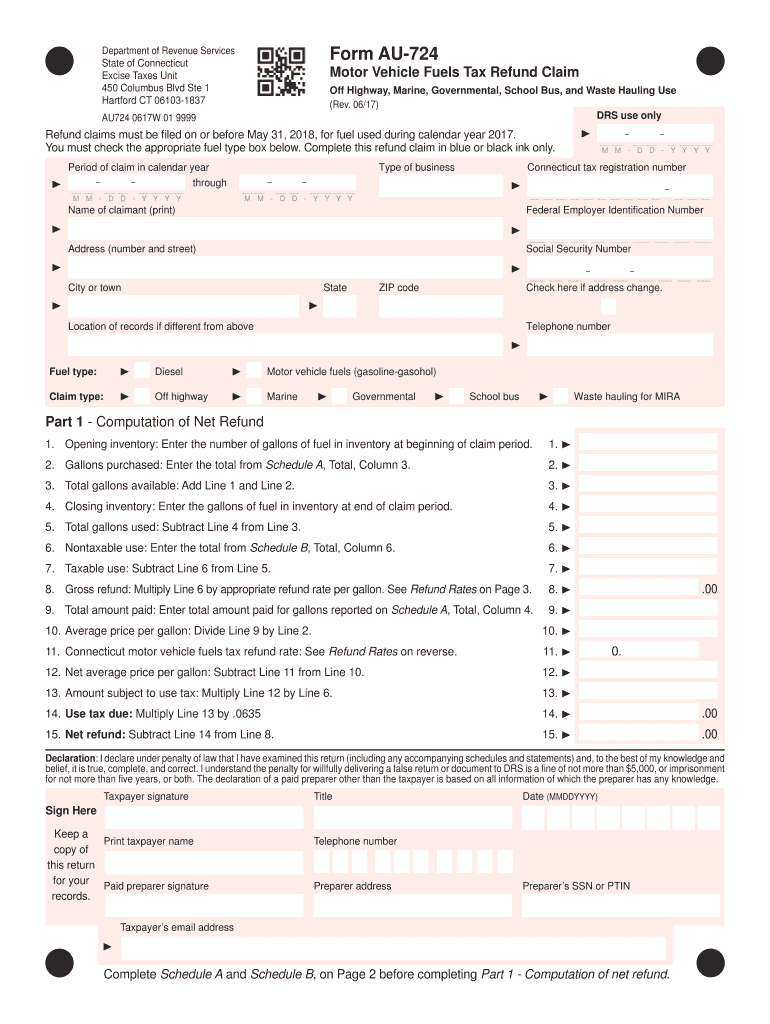
Tal, School Bus, and Waste Hauling Use (Rev. 06/17) DRS use only AU724 0617W 01 9999 Refund claims must be filed on or before May 31, 2018, for fuel used during calendar year 2017. You must check the appropriate fuel type box below. Complete this refund claim in blue or black ink only. Period of claim in calendar year through Type of business M M - D D - Y Y Y Y Connecticut tax registration number M M - D D - Y Y Y Y M M - D D - Y Y Y Y Name of claimant (print) Federal Empl.
Loading

Open form follow the instructions

Easily sign the form with your finger

Send filled & signed form or save
How to fill out the CT AU-724 online
This guide provides clear and concise instructions on filling out the CT AU-724 online. The form is essential for claiming a motor vehicle fuels tax refund for specific types of fuel usage in Connecticut.
Follow the steps to successfully complete the CT AU-724 online.
- Press the ‘Get Form’ button to access the CT AU-724 form and open it in your preferred document editor.
- Indicate the period of claim in calendar year by entering the start and end dates in the designated fields.
- Select the appropriate fuel type by checking the corresponding box for diesel or motor vehicle fuels (gasoline-gasohol).
- Provide your Connecticut tax registration number, Federal Employer Identification Number, or Social Security Number as required in the respective fields.
- Complete the claimant information section by printing your name, address, city or town, state, and ZIP code accurately.
- If your address has changed, check the box indicating this change.
- Fill in the location of records if different from the provided address, as well as a contact telephone number.
- In Part 1, start with the computation of the net refund by entering the opening inventory of gallons of fuel at the beginning of the claim period.
- Enter the total gallons purchased, gathered from Schedule A, in the provided field.
- Calculate total gallons available by adding the opening inventory and gallons purchased.
- Document closing inventory by entering the gallons of fuel remaining at the end of the claim period.
- Determine total gallons used by subtracting the closing inventory from total gallons available.
- Enter the total from Schedule B for nontaxable use of fuel.
- Calculate taxable use by subtracting nontaxable use from total gallons used.
- For gross refund, multiply the nontaxable use amount by the refund rate per gallon.
- Record the total amount paid for the gallons reported on Schedule A.
- Calculate the average price per gallon by dividing the total amount paid by the gallons purchased.
- Enter the applicable Connecticut motor vehicle fuels tax refund rate based on the type of fuel used.
- Calculate the net average price per gallon by deducting the refund rate from the average price per gallon.
- Multiply the net average price by nontaxable gallons to determine the amount subject to use tax.
- Calculate use tax due by multiplying the taxable amount by the applicable tax rate.
- Compute the net refund by subtracting the use tax due from the gross refund.
- Lastly, declare under penalty of law that your provided information is accurate, sign and date the form.
- Once completed, save your changes, then download, print, or share the CT AU-724 form as needed.
Start completing your CT AU-724 refund claim online today!
Experience a faster way to fill out and sign forms on the web. Access the most extensive library of templates available.
Related content
Form AU-724 is a Motor Vehicle Fuels Tax Refund Claim for specific uses, including off...
Background: Increased utilization of computed tomography (CT) scans for evaluation of...
For patients undergoing. CT, this includes a personalized examination, one that provides...
Get answers to your most pressing questions about US Legal Forms API.
What is the diesel tax in CT?
As of now, Connecticut imposes a diesel tax on diesel fuel sold in the state, which contributes to transportation infrastructure. This tax is subject to change, so it's wise to check current rates. For accurate record-keeping related to diesel purchases, you can use CT AU-724 templates provided by Uslegalforms.
How to fill out a title when selling a car in Connecticut?
To fill out a title for selling a car in Connecticut, you must complete the seller's section on the back of the title, including the buyer's name and address. Be sure to record the odometer reading and sign where indicated. The CT AU-724 form can guide you in ensuring all requirements are met to facilitate a smooth transfer.
Who must file a Connecticut estate tax return?
In Connecticut, an estate tax return is required if the gross estate exceeds a certain threshold. Typically, the executor or administrator of the estate is responsible for filing. To help navigate this process, review the CT AU-724 regulations for clarity on what qualifies as a gross estate and when to file, ensuring compliance and proper management of estate taxes.
How do I register for CT withholding tax?
Registering for CT withholding tax involves completing an online or paper registration form. You'll need to provide business details, including your federal employer identification number. After registration, keep in mind the CT AU-724 guidelines to ensure your withholding practices align with state requirements. This registration is essential for businesses with employees in Connecticut.
What is the process for filing an extension?
To file an extension in Connecticut, begin by requesting Form CT-1040 EXT and filling it out completely. Submit the form to the appropriate state agency, along with any required payments. Following the CT AU-724 steps ensures you adhere to state regulations while gaining extra time to submit your tax return, reducing stress during tax season.
How much CT state tax should be withheld?
The amount of state tax withheld in Connecticut depends on your income and filing status. Generally, employers use the withholding tables or formulas provided by the state to determine the appropriate amount. To ensure compliance with CT AU-724 guidelines, it’s beneficial to review your withholding status periodically, especially after changes in personal circumstances.
How do I file a CT extension?
Filing a CT extension is easy when you follow the proper steps. You need to complete Form CT-1040 EXT and submit it to the Connecticut Department of Revenue Services. By adhering to the CT AU-724 procedures, you can secure additional time to prepare your tax return without penalties. Don't forget to include any estimated tax payments due.
Which withholding code should I choose in CT?
The withholding code you should choose in Connecticut depends on your filing status and number of exemptions. Referencing the latest CT AU-724 guidelines will help you determine the best option for your situation. Using the correct code ensures an accurate withholding amount from your wages, which is essential for effective tax planning.
How do I set up tax withholding?
To set up tax withholding in Connecticut, you'll need to complete a withholding certificate. This form lets your employer know how much to withhold from your paycheck based on your circumstances. It's crucial to provide accurate information to align with CT AU-724 requirements. Our platform can guide you through each step to simplify the process.
Where to mail a Connecticut extension payment?
When mailing your Connecticut extension payment, send it to the Connecticut Department of Revenue Services at their designated address. Ensure that you include your tax identification number and any relevant forms with your check. It's important to stay updated on the CT AU-724 guidance to ensure timely and accurate payments.
Use professional pre-built templates to fill in and sign documents online faster. Get access to thousands of forms.
If you believe that this page should be taken down, please follow our DMCA take down process here.
This form is available in several versions. Select the version you need from the drop-down list below.