Loading
Form preview
  • US Legal Forms
  • Other Templates
  • Tax Forms
  • Colorado Tax Forms
  • Co Sales & Use Tax Return

Get Co Sales & Use Tax Return

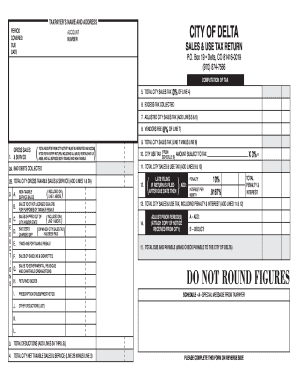
81416-0019 (970) 874-7566 COMPUTATION OF TAX 5. TOTAL CITY SALES TAX (3% OF LINE 4) 6. EXCESS TAX COLLECTED 7. ADJUSTED CITY SALES TAX (ADD LINES 5 & 6) 8. VENDORS FEE (0% OF LINE 7) 1. GROSS SALES & SERVICE ( ) TOTAL RECEIPTS FROM CITY ACTIVITY MUST BE REPORTED AND ACCOU NTED FOR IN EVERY RETURN, INCLUDING ALL SALES, RENTALS AND LE ASES, AND ALL SERVICES BOTH TAXABLE AND NON-TAXABLE. 2B. TOTAL CITY GROSS TAXABLE SALES & SERVICE (ADD LINES 1 & 2A) A. B. D E D U C T I O N S C. ( ).

How it works

  1. Open form

    Open form follow the instructions

  2. Easily sign form

    Easily sign the form with your finger

  3. Share form

    Send filled & signed form or save

How to fill out the CO Sales & Use Tax Return online

The CO Sales & Use Tax Return is a crucial document for reporting sales tax obligations in the state of Colorado. This guide provides a comprehensive overview of how to accurately complete this form online, ensuring compliance and efficient filing.

Follow the steps to accurately complete the CO Sales & Use Tax Return online.

  1. Press the ‘Get Form’ button to access the CO Sales & Use Tax Return form. This will allow you to open the form in an online editing tool.
  2. Begin by entering your name and address in the designated fields at the top of the form. Make sure to include your account number clearly to ensure your return is processed correctly.
  3. Specify the period covered by this return. Clearly indicate the tax period for which you are reporting.
  4. Enter your total gross sales and service receipts in line 1. This should include all taxable and non-taxable sales.
  5. In section 2, list any deductions from your gross sales. This includes bad debts collected, sales to licensed dealers for resale, and any non-taxable sales.
  6. Calculate your total city gross taxable sales and services by adding lines 1 and 2A of section 2.
  7. Compute the total city sales tax due by taking 3% of line 4 and entering this amount in line 5.
  8. Note any excess tax collected in line 6. This is important for accurate reporting and compliance.
  9. Add the total city sales tax from line 5 and any excess from line 6 to complete line 7.
  10. If applicable, apply any vendor's fees in line 8, which should be calculated as 0% of line 7.
  11. Fill in your total city sales and use tax by adding line 9 and line 10.
  12. If filing late, be aware of penalties and interest as listed in section 12. Include these amounts as necessary.
  13. After completing the form, review your entries for accuracy, and then save your changes. You may then download, print, or share your completed form as needed.

Take action now to file your CO Sales & Use Tax Return accurately and on time.

Get form

Experience a faster way to fill out and sign forms on the web. Access the most extensive library of templates available.
Get form

Related content

Sales & Use Tax | Department of Revenue - Taxation
The Colorado Department of Revenue has published the simplified sales and use tax...
Learn more
Sales 90 Sales and Use Tax Refund Requirements
A seller's claim for refund is submitted when the vendor paid sales tax to the Colorado...
Learn more
New Jersey Sales & Use Tax Guide for Automobile...
Form C-1003-ST must be completed and filed along with the automobile dealer's sales tax...
Learn more

Related links form

NY DTF CT-3 2012 NY DTF CT-3 2011 NY DTF CT-3 2010 NY DTF CT-3 2009

Questions & Answers

Get answers to your most pressing questions about US Legal Forms API.

Contact support

Yes, intercompany sales may be subject to sales tax depending on the nature of the transaction and state regulations. Reporting these sales correctly on the CO Sales & Use Tax Return is essential to meet tax obligations. It’s important to understand the specifics of your transactions to determine taxability. Consulting with a tax advisor can clarify any uncertainties.

Yes, intercompany accounting can significantly impact tax situations. Transactions between affiliated companies can create tax implications that need to be addressed on tax returns, including the CO Sales & Use Tax Return. Navigating these complexities requires accurate reporting and analysis. Utilizing a platform like UsLegalForms can streamline the process.

Sales tax is imposed on retail sales of tangible personal property, while use tax applies to items purchased out-of-state for use in Colorado. Both taxes are reported on the CO Sales & Use Tax Return. Knowing the difference helps businesses determine their tax responsibilities correctly. Adhering to these distinctions can prevent unexpected tax liabilities.

A sales and use tax return is a document filed with the state to report sales tax collected and to calculate any use tax owed. This return is critical for businesses operating in Colorado, as it ensures proper payment of taxes. Filing the CO Sales & Use Tax Return accurately helps businesses avoid penalties and interest. Keeping track of all taxable transactions is vital for completing this return.

Yes, intercompany expenses can be tax deductible if they meet certain criteria. To be deductible, these expenses must be necessary and ordinary for business operations. The CO Sales & Use Tax Return must reflect these expenses correctly to ensure compliance. It’s essential to maintain detailed documentation to support these deductions.

Generally, sales and use taxes are not deductible on federal income tax returns. However, businesses may deduct these taxes as a business expense when calculating their taxable income. It is important to distinguish between personal and business-related purchases. Consult your tax advisor to understand how it affects your CO Sales & Use Tax Return.

To claim a refund on your Colorado sales tax, you must file a specific refund claim form with the Colorado Department of Revenue. It is important to provide documentation showing the overpayment or erroneous tax collected. Make sure to keep thorough records for your CO Sales & Use Tax Return to streamline this process. For further assistance, consider USLegalForms for solutions.

The Missouri consumer use tax is similar to the Colorado consumer use tax; it is imposed on items bought outside the state but used within Missouri. This tax applies to goods purchased without sales tax for personal or business use in Missouri. To understand how this might affect your CO Sales & Use Tax Return, reach out to a local tax expert.

In Colorado, use tax applies to tangible personal property purchased for storage, use, or consumption in the state. If you buy an item without paying sales tax and later use it in Colorado, you typically owe use tax. This ensures fair taxation and supports local businesses. To simplify your reporting, consider using USLegalForms for guidance with your CO Sales & Use Tax Return.

No, you cannot deduct both state income tax and sales tax in one tax year. However, you can choose to deduct the one that is more beneficial for you on your federal tax return. This decision might affect your overall tax strategy, especially relevant when planning your CO Sales & Use Tax Return.

Get This Form Now!

Use professional pre-built templates to fill in and sign documents online faster. Get access to thousands of forms.
Get form
If you believe that this page should be taken down, please follow our DMCA take down processhere.
Get CO Sales & Use Tax Return
Get form
  • Adoption
  • Bankruptcy
  • Contractors
  • Divorce
  • Home Sales
  • Employment
  • Identity Theft
  • Incorporation
  • Landlord Tenant
  • Living Trust
  • Name Change
  • Personal Planning
  • Small Business
  • Wills & Estates
  • Packages A-Z
  • Affidavits
  • Bankruptcy
  • Bill of Sale
  • Corporate - LLC
  • Divorce
  • Employment
  • Identity Theft
  • Internet Technology
  • Landlord Tenant
  • Living Wills
  • Name Change
  • Power of Attorney
  • Real Estate
  • Small Estates
  • Wills
  • All Forms
  • Forms A-Z
  • Other Templates
  • Legal Hub
  • About Us
  • Help Portal
  • Legal Resources
  • Blog
  • Affiliates
  • Contact Us
  • Delete My Account
  • Site Map
  • Industries
  • Forms in Spanish
  • Localized Forms
  • State-specific Forms
  • Forms Kit
  • Real Estate Handbook
  • All Guides
  • Notarize
  • Incorporation services
  • For Consumers
  • For Small Business
  • For Attorneys
  • USLegal
  • FormsPass
  • pdfFiller
  • signNow
  • altaFlow
  • DocHub
  • Instapage
Form Packages
  • Adoption
  • Bankruptcy
  • Contractors
  • Divorce
  • Home Sales
  • Employment
  • Identity Theft
  • Incorporation
  • Landlord Tenant
  • Living Trust
  • Name Change
  • Personal Planning
  • Small Business
  • Wills & Estates
  • Packages A-Z
Form Categories
  • Affidavits
  • Bankruptcy
  • Bill of Sale
  • Corporate - LLC
  • Divorce
  • Employment
  • Identity Theft
  • Internet Technology
  • Landlord Tenant
  • Living Wills
  • Name Change
  • Power of Attorney
  • Real Estate
  • Small Estates
  • Wills
  • All Forms
  • Forms A-Z
  • Other Templates
Customer Service
  • Legal Hub
  • About Us
  • Help Portal
  • Legal Resources
  • Blog
  • Affiliates
  • Contact Us
  • Delete My Account
  • Site Map
  • Industries
  • Forms in Spanish
  • Localized Forms
  • State-specific Forms
  • Forms Kit
Legal Guides
  • Real Estate Handbook
  • All Guides
Prepared for you
  • Notarize
  • Incorporation services
Our Customers
  • For Consumers
  • For Small Business
  • For Attorneys
Our Sites
  • USLegal
  • FormsPass
  • pdfFiller
  • signNow
  • altaFlow
  • DocHub
  • Instapage
Social Media
Call us now toll free:
+1 833 426 79 33
As seen in:
© Copyright 1999-2026 airSlate Legal Forms, Inc. 17 Station Street, Ste. 203, Brookline, MA 02445
  • Your Privacy Choices
  • Terms of Service
  • Privacy Notice
  • Content Takedown Policy
  • Bug Bounty Program