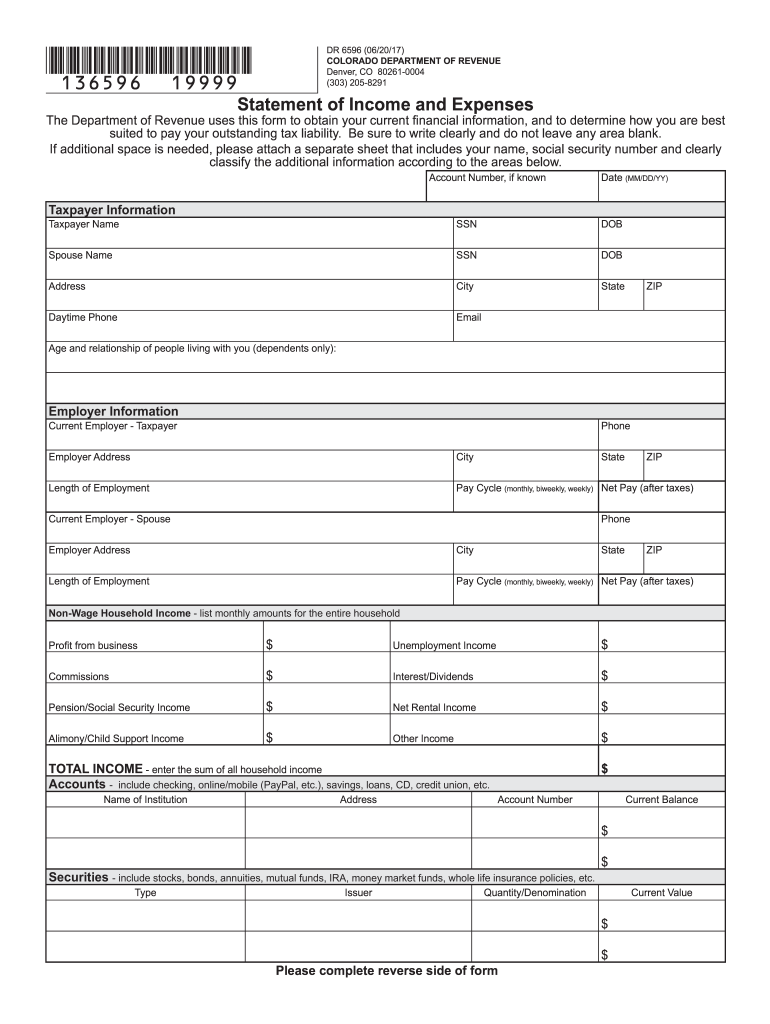
Financial information, and to determine how you are best suited to pay your outstanding tax liability. Be sure to write clearly and do not leave any area blank. If additional space is needed, please attach a separate sheet that includes your name, social security number and clearly classify the additional information according to the areas below. Account Number, if known Taxpayer Information Date (MM/DD/YY) Taxpayer Name SSN DOB Spouse Name SSN DOB Address City State Daytime Phone.
Loading

Open form follow the instructions

Easily sign the form with your finger

Send filled & signed form or save
How to fill out the CO DR 6596 online
The CO DR 6596 form is essential for providing the Colorado Department of Revenue with your current income and expense information. This guide will walk you through the process of completing the form online, ensuring that you accurately report your financial details to determine your ability to pay any outstanding tax liabilities.
Follow the steps to successfully complete the CO DR 6596 online.
- Click ‘Get Form’ button to obtain the form and open it in the editor.
- Begin by entering your taxpayer information. Fill in your date, name, social security number, date of birth, and address. Include your daytime phone number and email address.
- Next, list the age and relationship of any dependents living with you in the designated section.
- In the employer information section, input details about your current employment, including your employer’s name, phone number, address, length of employment, pay cycle, and your net pay after taxes. Repeat this for your spouse's employer, if applicable.
- Provide information about non-wage household income by listing monthly amounts for all applicable sources such as business profit, unemployment income, commissions, and more.
- List all bank accounts and their balances. Include checking, savings, and any online/mobile accounts under the accounts section.
- Next, report on securities by detailing the type, issuer, quantity or denomination, and current value.
- Complete the real estate section by describing properties you own, including their current values and any mortgages owed. Indicate whether each property is your primary residence.
- Fill out the motor vehicles section with details about your cars or other vehicles, including their make, model, financing information, and values.
- Enter your monthly living expenses. Ensure these amounts are reasonable for your household size, and convert any irregular payment schedules to a monthly basis.
- Finally, provide any additional information required regarding expected changes to your income, expenses, or employment that may impact your financial situation.
- To finalize, both the taxpayer and spouse should sign the form under penalty of perjury, declaring that the information provided is true and complete.
- Once all sections are completed, save your changes, download, print, or share the form as needed.
Start filling out your CO DR 6596 online to report your financial information easily and accurately.
Experience a faster way to fill out and sign forms on the web. Access the most extensive library of templates available.
Related content
The Department of Revenue uses this form to determine if the tax levy or standard...
Dr. CO Sreekala is an accomplished physicist and educator based in Kerala, India. She...
Chemical Stability: This product is stable in closed containers at room temperature...
Get answers to your most pressing questions about US Legal Forms API.
Does everyone get the TABOR refund?
Not everyone automatically receives the TABOR refund in Colorado. Eligibility depends on income levels and other criteria set by the state. To understand if you qualify for the TABOR refund and to receive pertinent updates, refer to the details outlined in CO DR 6596.
Is retirement income taxable in Colorado?
In Colorado, retirement income may not be entirely tax-exempt. Certain sources, such as pensions and retirement savings account distributions, may be taxable. Familiarizing yourself with the particulars of CO DR 6596 can help clarify the tax status of your retirement income.
What is the $800 refund in Colorado?
The $800 refund in Colorado represents a financial relief initiative designed to assist residents during challenging times. If you qualify based on the CO DR 6596 guidelines, you will receive this refund as a direct deposit or check. This refund can help cover everyday expenses, bringing some ease to your financial situation.
Who gets the Colorado sales tax refund?
The Colorado sales tax refund is available to eligible residents who meet the established income criteria. This program assists those who may face higher tax burdens due to recent changes in Colorado tax laws. By checking your eligibility under CO DR 6596, you can ensure you benefit from this refund.
Who is eligible for the Colorado rebate check?
To be eligible for the Colorado rebate check, you must meet specific income and residency requirements established by the state. If you fall within the parameters outlined in CO DR 6596, you may receive a rebate check as part of the state's effort to ease financial burdens.
Does Colorado tax disability income?
In general, Colorado does not tax Social Security disability benefits. However, certain types of disability income may be subject to state taxes. Understanding your specific situation related to CO DR 6596 can help you determine your tax obligations.
What is the $800 Colorado tax refund?
The $800 Colorado tax refund refers to the one-time payment provided to eligible taxpayers in Colorado. This initiative aims to support residents financially and stimulate local economies. If you qualify under the guidelines set by CO DR 6596, you might receive this refund directly from the state.
Why is my tax return not eligible for efile?
There are several reasons why your tax return might not be eligible for efile. It could include specific exclusions, such as certain types of income or situations outlined in the CO DR 6596 documentation. To address this issue, check the eligibility criteria outlined by the Colorado Department of Revenue and consider using US Legal Forms to find resources and guidance tailored to your situation.
Is Colorado ready to efile?
Colorado typically announces its readiness for efiling through the Department of Revenue's website. Keep an eye on their updates to ensure you're aware of when they start accepting efile submissions. Understanding the CO DR 6596 implications can also help you prepare your documents and efile them promptly.
Why can't I efile my Colorado tax return?
Your inability to efile your Colorado tax return could stem from several factors. Common issues include missing data, state-specific efile requirements, and form eligibility. Be sure to review the CO DR 6596 guidelines closely, as adhering to specific instructions can ease the efile process.
Use professional pre-built templates to fill in and sign documents online faster. Get access to thousands of forms.
If you believe that this page should be taken down, please follow our DMCA take down process here.