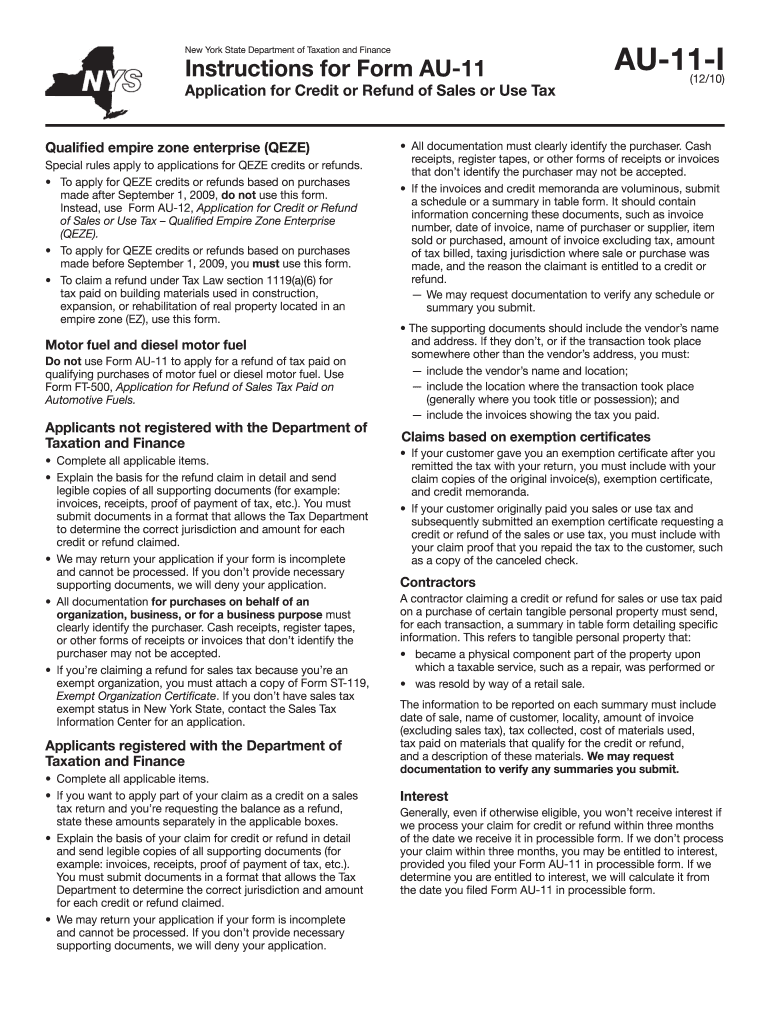
Redits or refunds. To apply for QEZE credits or refunds based on purchases made after September 1, 2009, do not use this form. Instead, use Form AU-12, Application for Credit or Refund of Sales or Use Tax Qualified Empire Zone Enterprise (QEZE). To apply for QEZE credits or refunds based on purchases made before September 1, 2009, you must use this form. To claim a refund under Tax Law section 1119(a)(6) for tax paid on building materials used in construction, expansion, or r.
Loading

Open form follow the instructions

Easily sign the form with your finger

Send filled & signed form or save
How to fill out the NY AU-11-I online
The NY AU-11-I form is essential for applying for a credit or refund of sales or use tax in New York. This guide provides clear, step-by-step instructions to help users navigate the online filling process efficiently and accurately.
Follow the steps to complete the NY AU-11-I online.
- Press the ‘Get Form’ button to obtain the NY AU-11-I form and open it in the online editor.
- Review the form carefully to understand its requirements. Ensure you know whether you are applying as a qualified empire zone enterprise or if you need to attach additional documentation.
- Fill in your name, address, and any other required identification information accurately in the designated fields.
- Detail the basis for your credit or refund claim in the provided section. Be thorough in your explanation and prepare to attach necessary documents, like invoices and proof of payment.
- If applicable, specify any amounts you wish to claim as a credit on a sales tax return and the balance you wish to request as a refund, indicating these amounts separately.
- Attach legible copies of supporting documents confirming your claim. Ensure all receipts clearly identify the purchaser and include necessary details.
- If you are working with an outside representative, fill in their name and contact information, and ensure they have submitted the necessary authorization using Form POA-1.
- Review all entered information for accuracy and completeness to avoid application processing delays.
- After verifying that all sections are filled out correctly, proceed to save your changes, download, print, or share the completed form as required.
Complete your NY AU-11-I form online today for a seamless credit or refund request process.
Experience a faster way to fill out and sign forms on the web. Access the most extensive library of templates available.
Related content
Generally, you must submit your application within three years from the date the tax was...
Access the authentic Official Journal of the European Union, EU law, EU case-law...
Este símbolo tem o propósito de alertar o usuário sobre a presença de “tensões...
Get answers to your most pressing questions about US Legal Forms API.
What address do I send my NY state taxes to?
The address you send your New York state taxes to depends on the form you are filing and whether you are including a payment. Typically, this information is clearly stated on the form instructions. Ensure that you send it to the correct address to avoid delays. For future reference, using US Legal Forms can help you find and confirm the appropriate addresses for any tax-related submissions.
What form do I use to change my address on my New York State income tax?
To change your address for New York State income tax purposes, use Form IT-201 or the appropriate form for your tax filing status. You can also use the online services provided by the New York Department of Taxation and Finance. Ensure that you fill out your new address correctly to avoid any delays or issues with your tax returns. US Legal Forms can offer additional templates and resources for this process.
How long is ST 120 good for?
The NY ST 120 form is valid as long as your exempt status remains unchanged. Typically, it does not have an expiration date, but it is wise to review it periodically. If your organization's status or exemption reason changes, you should update the form. For assistance with maintaining compliance and ensuring validity, consider using US Legal Forms for ongoing support.
How to fill out NY ST 120 form?
To complete the NY ST 120 form, gather your tax information and ensure you have your ID number and appropriate details on hand. Follow the instructions on the form carefully to input all required information, including your income sources and deductions. Double-check your entries for accuracy before submitting the form. Using US Legal Forms can help you ensure that your NY ST 120 is filled out correctly and submitted on time.
How do I become exempt from sales tax in NY?
To become exempt from sales tax in New York, you need to apply for a sales tax exemption certificate through the NY AU-11-I form. This process requires you to provide details regarding your qualifying purchases and the nature of your business or organization. Once you obtain the certificate, present it to your suppliers when making purchases to avoid sales tax. Consider using US Legal Forms to easily access and complete the necessary documents.
Can I claim tax back from shopping in New York?
You can claim tax back from shopping in New York only if you meet certain criteria, such as being a non-resident or if the purchases are for resale purposes. For tourists, claiming tax back may involve specific forms and documentation that prove eligibility. To better understand your options, consider checking out uslegalforms, which provides in-depth support for claims related to NY AU-11-I.
How do I file a New York sales tax return?
To file a New York sales tax return, you first need to gather your sales data and complete the appropriate state forms, usually forms ST-100 or ST-101. You have the option to file online or by mail, depending on what suits you best. The uslegalforms platform offers templates and assistance to help you navigate the requirements of NY AU-11-I, making the process easier.
Who is the responsible person for sales tax in NY?
In New York, the business owner is typically considered the responsible person for sales tax collection and payment. This individual must ensure compliance with all sales tax laws and regulations. If you are unsure about your obligations, consulting uslegalforms can provide clarity and guidance regarding the responsibilities outlined in NY AU-11-I.
How do I claim sales on my tax return?
When claiming sales on your tax return, you'll need to report your total sales and any sales tax collected on your sales tax return forms. Be sure to gather all sales receipts to support your claims. For a structured approach, you can explore options on uslegalforms, which can streamline your tax filing, ensuring you meet the criteria of NY AU-11-I.
How do I claim my New York state sales tax back?
To claim your New York state sales tax back, you must fill out a request form after following specific guidelines outlined by the NY Department of Taxation and Finance. Ensure you have receipts and any documentation that proves your eligibility for a refund. Tools on uslegalforms can simplify this process and ensure you comply with the NY AU-11-I requirements.
Use professional pre-built templates to fill in and sign documents online faster. Get access to thousands of forms.
If you believe that this page should be taken down, please follow our DMCA take down process here.