Loading
Get Co Dr 0100a 2014
How it works
-

Open form follow the instructions
-

Easily sign the form with your finger
-

Send filled & signed form or save
How to fill out the CO DR 0100A online
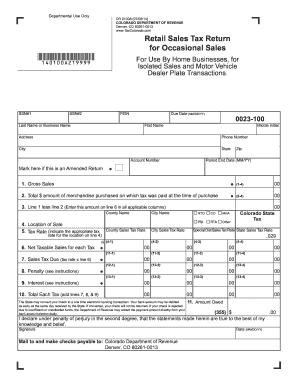
The CO DR 0100A form is essential for reporting retail sales tax for occasional sales. This guide provides a detailed, user-friendly approach to completing the form online, ensuring you meet all necessary requirements and deadlines.
Follow the steps to accurately complete the CO DR 0100A
- Click 'Get Form' button to obtain the form and open it in the online editor.
- Enter your last name or business name in the designated field. This information is important for identification purposes.
- Fill in your first name and middle initial if applicable. Make sure all names match official identification documents.
- Provide your social security number (SSN) or federal employer identification number (FEIN) as required.
- Indicate the due date for the form using the MM/DD/YY format. This is crucial for timely submission.
- Input your complete address, including city, state, and zip code. This ensures the document reaches you promptly.
- List the gross sales amount for the period on line 1. This is the total revenue generated from your sales.
- On line 2, enter the total dollar amount of merchandise purchased on which tax was paid at the time of purchase.
- Calculate line 3 by subtracting line 2 from line 1. Enter this amount on line 6 in all applicable columns.
- Specify the location of sale on line 4. This is important for determining the correct tax rate.
- Indicate the applicable tax rate using the dropdown options provided based on the location of sale.
- Fill out the net taxable sales for each tax on line 6 based on your calculated values.
- Calculate the sales tax due on line 7 by multiplying the tax rate by the net taxable sales.
- If applicable, enter any penalties or interest on lines 8 and 9, as instructed.
- Add lines 7, 8, and 9 together to determine the total amount owed on line 10.
- Sign and date the form at the bottom. Ensure you declare under penalty of perjury that the information is accurate.
- Review all entries for accuracy. Save changes, download, print, or share the completed form as needed.
Complete your CO DR 0100A form online today for efficient and hassle-free submission.
Get form
Experience a faster way to fill out and sign forms on the web. Access the most extensive library of templates available.
Related links form
Filing a protest with the Colorado Department of Revenue involves sending a detailed letter or form stating your disagreement with a tax decision. Make sure to include supporting documents and file within the designated timeframe. Utilizing the CO DR 0100A can streamline this process by outlining essential steps and requirements to follow.
Get This Form Now!
Use professional pre-built templates to fill in and sign documents online faster. Get access to thousands of forms.