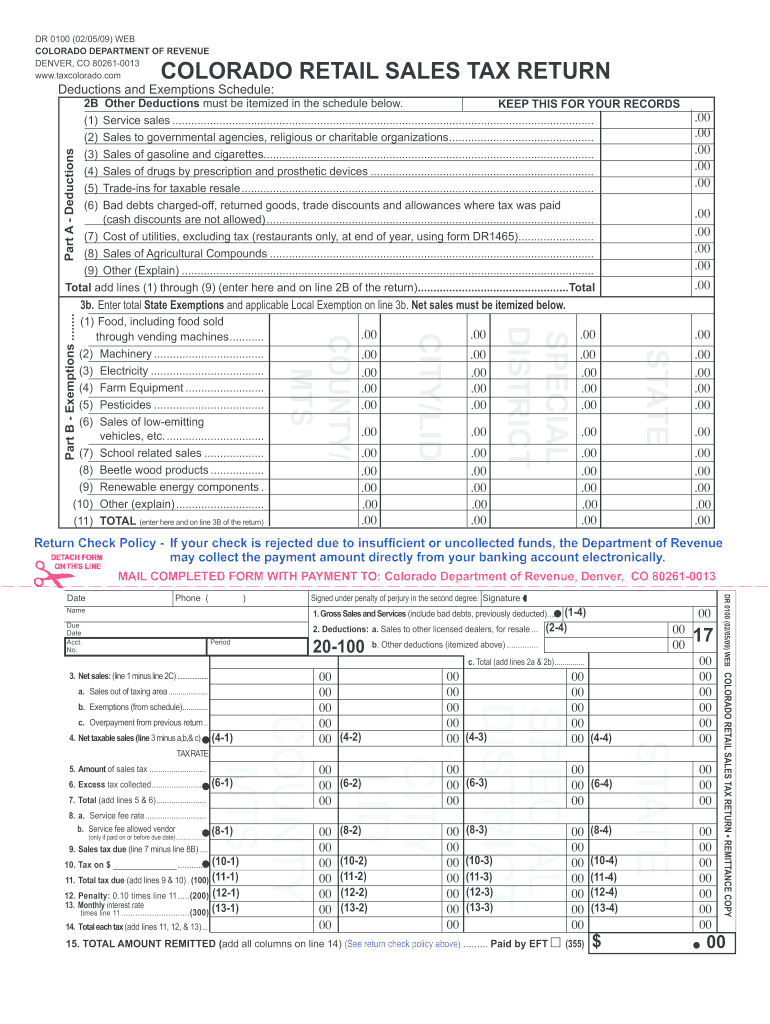
Ons: All entries of state and local taxes on this sales tax return must be rounded to the nearest dollar. You will still collect and keep track of exact amounts of sales tax. Books, records and statements or invoices to buyers must reflect actual tax amounts. It is only when you fill out this return that you round the numbers you are reporting. Your sales tax remittance must not differ from the exact amount of tax collected by more than 50 cents. Round amounts under 50 cents down to 0 (zero) cen.
Loading

Open form follow the instructions

Easily sign the form with your finger

Send filled & signed form or save
How to fill out the CO DoR DR 010 online
Filling out the CO DoR DR 010, the Colorado Retail Sales Tax Return, can seem daunting. This guide provides a clear and supportive approach to help you successfully complete the form online, ensuring compliance with state requirements.
Follow the steps to accurately complete your sales tax return.
- Press the ‘Get Form’ button to access the form and open it in the editor.
- Enter your account specific information including the date, phone number, name, due date, account number, and filing period in the designated fields.
- In line 1, input the total amount of money received from all sales and services, making sure to exclude the sales tax collected.
- Fill out line 2A with the amount of sales made to other licensed dealers and keep documentation for verification.
- On line 2B, enter any other deductions and itemize them on the copy you retain for your records.
- Calculate your net sales amount and enter it in line 3, ensuring that if this amount is zero, you explore using the Sales Tax ZeroFile service.
- Proceed to enter any applicable sales exemptions in line 3B, providing the details of exemptions as required.
- For lines 4 to 6, compute your net taxable sales and the associated taxes collected by multiplying the amounts by the appropriate tax rates.
- Enter information for lines 8A and 8B, which pertain to service fee deductions based on timely payments.
- Fill in penaltive amounts, including any penalties for late filing in line 12, and interest in line 13 if applicable.
- Review all calculated totals and ensure that the total amount remitted matches what is displayed on line 15.
- Once all fields are accurately filled, you can save changes, print the form, or share it as necessary.
Complete your CO DoR DR 010 online today for a seamless tax filing experience.
Experience a faster way to fill out and sign forms on the web. Access the most extensive library of templates available.
Related content
The "Colorado Withholding Worksheet for Employers" (DR 1098) prescribes the method for...
Devido aos nociceptores serem neurônios com sinapses químicas, sua saída é codificado...
Conecte essa TV LED Smart Philips à Internet e descubra um novo mundo de televisão...
Get answers to your most pressing questions about US Legal Forms API.
How to file a protest Colorado Department of Revenue?
Filing a protest with the Colorado Department of Revenue involves submitting a written statement outlining your disagreement with a tax assessment. Ensure you include all relevant details and supporting documentation when you file the protest. For detailed procedures and templates related to CO DoR DR 010, uslegalforms offers valuable resources to aid you in this process.
What is a Dr. 0100 form in Colorado?
A Dr. 0100 form in Colorado is primarily used for tax filings that pertain to business income or various tax liabilities. This form is an integral part of complying with Colorado Department of Revenue regulations. For a step-by-step guide to completing the Dr. 0100 and ensuring compliance with CO DoR DR 010, consider the tools available on uslegalforms.
How do I file a 8332?
To file IRS Form 8332, you must follow specific instructions, which allow a non-custodial parent to claim a child as a dependent. This process often intersects with state tax issues, including those related to the Colorado Department of Revenue. For comprehensive guidance on filing Form 8332 and CO DoR DR 010 considerations, explore the resources available on uslegalforms.
What's the purpose of the green disclosure form in Colorado?
The green disclosure form in Colorado is used to ensure that taxpayers are informed about their tax rights and responsibilities. This form helps promote transparency in the tax process. If you are dealing with CO DoR DR 010, the uslegalforms platform can provide additional insight into how to utilize the green disclosure form effectively.
Who can be included in a Colorado composite return?
A Colorado composite return can include income for non-residents or part-year residents who earn income in Colorado. This allows the tax obligations of these individuals to be combined, simplifying the tax filing process. Learn more about the specifics of filing a composite return and the CO DoR DR 010 requirements through uslegalforms.
How do I contact the Colorado Department of Revenue for taxes?
To contact the Colorado Department of Revenue regarding taxes, you can visit their official website for comprehensive information and resources. They provide phone and email contact options as well. For inquiries related to CO DoR DR 010, utilizing the guidance from uslegalforms can help streamline your communication.
What is a DR case in Colorado?
A DR case in Colorado refers to a dispute related to tax issues under the jurisdiction of the Colorado Department of Revenue. These cases often involve various tax laws and filing requirements. If you need assistance navigating these complexities, consider exploring resources on the uslegalforms platform tailored to CO DoR DR 010 cases.
Do I need to mail form Dr. 1778 Colorado?
Yes, if you are required to file form Dr. 1778 in Colorado, you need to mail it to the address specified in the filing instructions. This form is essential for certain tax situations, including corrections or adjustments. Ensure you understand the relationship between this form and the CO DoR DR 010, as both are integral to maintaining accurate tax records.
Where to mail Colorado estimated tax payments?
Colorado estimated tax payments should be mailed to the designated address on the forms provided by the Colorado Department of Revenue. Double-check this address on the official website, particularly when dealing with the CO DoR DR 010, to avoid any confusion. Following the correct mailing instructions can streamline the payment process and reduce errors.
Where do I mail my estimated tax payments to?
Mail your estimated tax payments to the address outlined in the Colorado Department of Revenue guidelines. This address may differ depending on whether you are attaching a form or making a direct payment. For more precise information, it is advisable to review the details related to the CO DoR DR 010 to ensure timely processing of your payments.
Use professional pre-built templates to fill in and sign documents online faster. Get access to thousands of forms.
If you believe that this page should be taken down, please follow our DMCA take down process here.