Loading
Get Ak Dor 597 2013-2026
How it works
-

Open form follow the instructions
-

Easily sign the form with your finger
-

Send filled & signed form or save
How to fill out the AK DoR 597 online
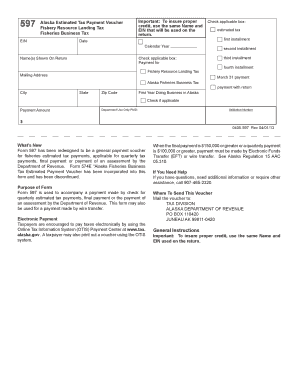
The AK DoR 597 form is essential for submitting estimated tax payments related to fisheries in Alaska. This guide provides clear, step-by-step instructions to help users navigate the online form efficiently.
Follow the steps to complete the AK DoR 597 online
- Click ‘Get Form’ button to access the AK DoR 597 online and open it within the designated editor.
- Enter your Employer Identification Number (EIN) in the designated field. Ensure that this matches the EIN you will use on your tax return for proper credit.
- Fill in the date and the calendar year for which you are making the payment.
- Select the appropriate boxes regarding the type of payment you are making, including options for estimated tax installments and final payments.
- Provide the name(s) as shown on the tax return in the relevant section, along with your mailing address including city, state, and zip code.
- Indicate if it is your first year doing business in Alaska by checking the applicable box, if relevant.
- Enter the payment amount you are submitting, along with the validation number if required.
- Review all the filled information carefully to ensure accuracy and completeness.
- Once completed, you can save your changes, download, print, or share the form as needed.
Complete your AK DoR 597 document online today to ensure timely processing of your tax payments.
Related links form
A small business's tax obligations depend on its structure and revenue. Generally, if your business is structured as a corporation, it will be taxed based on its profits beyond a certain threshold, while sole proprietorships report income on their personal taxes. Understanding these thresholds is vital for compliance. For further information on small business taxes, refer to AK DoR 597.