Loading
Form preview
  • US Legal Forms
  • Form Library
  • Tax Forms
  • California Tax Forms
  • Ca Substitute W-9 2006

Get Ca Substitute W-9 2006-2026

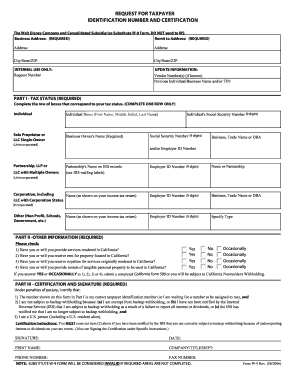
(REQUIRED) Address: Address: City/State/ZIP: City/State/ZIP: INTERNAL USE ONLY: Request Number UPDATE INFORMATION: Vendor Number(s) (if known) Previous Individual/Business Name and/or TIN: PART I - TAX STATUS (REQUIRED) Complete the row of boxes that correspond to your tax status. (COMPLETE ONE ROW ONLY) Individual Individual Name (First Name, Middle Initial, Last Name) Sole Proprietor or LLC Single-Owner Business Owner's Name (Required) (Unincorporated) Individual's Social Security.

How it works

  1. Open form

    Open form follow the instructions

  2. Easily sign form

    Easily sign the form with your finger

  3. Share form

    Send filled & signed form or save

How to fill out the CA Substitute W-9 online

The CA Substitute W-9 form is an essential document for providing taxpayer identification information. Filling out this form accurately ensures compliance with tax regulations and facilitates proper processing of payments.

Follow the steps to complete the CA Substitute W-9 online:

  1. Click the ‘Get Form’ button to obtain the form and open it in the editor.
  2. Enter your business address in the designated section. This information is required to ensure accurate identification and processing of the form.
  3. Provide your remit to address, also marked as required. Ensure this address is correct to avoid any issues with receiving payments.
  4. In Part I, select the correct tax status by completing the row that corresponds to your entity type. Complete only one row to avoid confusion.
  5. Fill in your name as it appears on your income tax return if you are an individual, or enter your business name if applicable. Be sure to include your Social Security Number or Employer ID Number as required.
  6. In Part II, answer the questions regarding services rendered or property located in California. If applicable, check 'Yes' or 'Occasionally' depending on your situation.
  7. Complete Part III by certifying that the information provided is accurate. Ensure your signature, date, printed name, and contact details are included.
  8. Review the completed form for accuracy. Once verified, you can save your changes, download the form, print it, or share it as needed.

Complete the CA Substitute W-9 online today to ensure timely processing of your tax information.

Get form

Experience a faster way to fill out and sign forms on the web. Access the most extensive library of templates available.
Get form

Related content

Instructions for the Requester of Form W-9...
Mar 13, 2024 — If you use a substitute form, you are required to provide the Form W-9...
Learn more
W-9 Substitute Form
This form is required to add your company to Caltech's supplier database and payment...
Learn more
RPio222 Manual do Proprietário
alternada (CA) pode ser acessada com facilidade. Se houver algum problema ou defeito...
Learn more

Related links form

NC NC-4P 2012 NC NC-5 2002 NC NCDVA-9 2009 NC OIC 100 2015

Questions & Answers

Get answers to your most pressing questions about US Legal Forms API.

Contact support

To report a 1099-S on your tax return, transfer the information from the 1099-S to your Form 1040, typically on Schedule D or Form 8949 if applicable. When dealing with real estate transactions, having a CA Substitute W-9 can help clarify your reportable amounts. Accurate reporting ensures compliance and helps you avoid potential issues with the IRS.

To file a substitute 1099-S, you fill out the form with details of the transaction, including the information obtained from a CA Substitute W-9. Make sure you gather all relevant details similar to the regular 1099-S. After completing the form, send it to the IRS and provide copies to the involved parties to meet your reporting obligations.

Yes, a W-9 can be submitted electronically if the requester accepts electronic submissions. Using a CA Substitute W-9 form allows for easier online processing and record-keeping. Just ensure that the final document is signed and securely sent to maintain the integrity of your information.

Filing a W-9 form involves filling out the form with your name, business name, and taxpayer identification number. After completing the CA Substitute W-9, you provide it to the requesting entity, such as a client or employer. Remember, do not submit it directly to the IRS; instead, ensure the requester keeps it for their records.

When you sell a timeshare, you report the sale on your tax return by using IRS Form 1099-S. If the transaction meets reporting thresholds, make sure you have a CA Substitute W-9 filled out to provide the necessary information for reporting. This ensures accurate reporting and compliance, simplifying your tax process.

9 form collects taxpayer information for reporting purposes, while a CA Substitute W9 is a version tailored specifically for use in California. The substitute W9 accommodates statespecific requirements and can be beneficial for those conducting business within the state. Understanding these differences helps you choose the right form when working with vendors or subcontractors.

To give a subcontractor a 1099, you first need to collect their information using a CA Substitute W-9 form. Once you gather the necessary details, you complete the 1099 form based on payments made to them. Ensure you send the 1099 to the IRS and provide a copy to your subcontractor by the required deadlines to stay compliant.

A substitute 1099 form serves as an alternative to the standard IRS 1099 form, providing necessary income reporting. These substitutes can help tailor the information to specific reporting needs while still maintaining compliance with IRS guidelines. To complement this process, a CA Substitute W-9 can help facilitate accurate data entry before issuing any 1099 forms.

In the W9 form, the number you enter typically represents your tax classification, such as an individual or a business entity. If you are filling out a CA Substitute W-9, it’s crucial to select the option that accurately reflects your status to avoid any complications during tax reporting.

When filling out a W9 for a school organization, begin with the school’s name as the legal entity. Include the school’s address, the appropriate TIN, and select the correct entity type, such as a government entity. Using the CA Substitute W-9 can simplify this process, ensuring you meet all requirements easily.

Get This Form Now!

Use professional pre-built templates to fill in and sign documents online faster. Get access to thousands of forms.
Get form
If you believe that this page should be taken down, please follow our DMCA take down processhere.
Get CA Substitute W-9
Get form
  • Adoption
  • Bankruptcy
  • Contractors
  • Divorce
  • Home Sales
  • Employment
  • Identity Theft
  • Incorporation
  • Landlord Tenant
  • Living Trust
  • Name Change
  • Personal Planning
  • Small Business
  • Wills & Estates
  • Packages A-Z
  • Affidavits
  • Bankruptcy
  • Bill of Sale
  • Corporate - LLC
  • Divorce
  • Employment
  • Identity Theft
  • Internet Technology
  • Landlord Tenant
  • Living Wills
  • Name Change
  • Power of Attorney
  • Real Estate
  • Small Estates
  • Wills
  • All Forms
  • Forms A-Z
  • Form Library
  • Legal Hub
  • About Us
  • Help Portal
  • Legal Resources
  • Blog
  • Affiliates
  • Contact Us
  • Delete My Account
  • Site Map
  • Industries
  • Forms in Spanish
  • Localized Forms
  • State-specific Forms
  • Forms Kit
  • Real Estate Handbook
  • All Guides
  • Notarize
  • Incorporation services
  • For Consumers
  • For Small Business
  • For Attorneys
  • USLegal
  • FormsPass
  • pdfFiller
  • signNow
  • altaFlow
  • DocHub
  • Instapage
Form Packages
  • Adoption
  • Bankruptcy
  • Contractors
  • Divorce
  • Home Sales
  • Employment
  • Identity Theft
  • Incorporation
  • Landlord Tenant
  • Living Trust
  • Name Change
  • Personal Planning
  • Small Business
  • Wills & Estates
  • Packages A-Z
Form Categories
  • Affidavits
  • Bankruptcy
  • Bill of Sale
  • Corporate - LLC
  • Divorce
  • Employment
  • Identity Theft
  • Internet Technology
  • Landlord Tenant
  • Living Wills
  • Name Change
  • Power of Attorney
  • Real Estate
  • Small Estates
  • Wills
  • All Forms
  • Forms A-Z
  • Form Library
Customer Service
  • Legal Hub
  • About Us
  • Help Portal
  • Legal Resources
  • Blog
  • Affiliates
  • Contact Us
  • Delete My Account
  • Site Map
  • Industries
  • Forms in Spanish
  • Localized Forms
  • State-specific Forms
  • Forms Kit
Legal Guides
  • Real Estate Handbook
  • All Guides
Prepared for you
  • Notarize
  • Incorporation services
Our Customers
  • For Consumers
  • For Small Business
  • For Attorneys
Our Sites
  • USLegal
  • FormsPass
  • pdfFiller
  • signNow
  • altaFlow
  • DocHub
  • Instapage
Social Media
Call us now toll free:
+1 833 426 79 33
As seen in:
© Copyright 1999-2026 airSlate Legal Forms, Inc. 3720 Flowood Dr, Flowood, Mississippi 39232
  • Your Privacy Choices
  • Terms of Service
  • Privacy Notice
  • Content Takedown Policy
  • Bug Bounty Program