Loading
Get Nc Oic 100 2015
How it works
-

Open form follow the instructions
-

Easily sign the form with your finger
-

Send filled & signed form or save
How to fill out the NC OIC 100 online
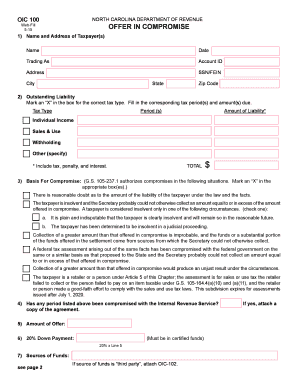
The NC OIC 100 form is a request for an offer in compromise through the North Carolina Department of Revenue. This guide provides a step-by-step approach to help you navigate the online filling process with ease.
Follow the steps to successfully complete the NC OIC 100 form online.
- Click 'Get Form' button to retrieve the NC OIC 100 form and open it in your web browser.
- Fill in the 'Name and Address of Taxpayer(s)' section. Enter your full name, the date, any 'trading as' names, your account ID, your address, and your SSN or FEIN, followed by the city, state, and zip code.
- Move to the 'Outstanding Liability' section. Mark an 'X' in the box corresponding to the correct tax type, and specify the tax period(s) along with the amounts due. Include tax, penalty, and interest to obtain the total amount.
- In the 'Basis for Compromise' section, select the appropriate reasons for your request by marking an 'X' in the relevant boxes that apply to your situation.
- Answer whether any period listed above has been compromised with the Internal Revenue Service. If you answer yes, be sure to attach a copy of the agreement.
- Record the 'Amount of Offer' in the designated field.
- Calculate the '20% Down Payment' based on the amount from step 6. This payment must be in certified funds and is crucial for your offer.
- Provide details in the 'Sources of Funds' section as requested. If any source of funds involves a third party, remember to attach the OIC-102 form.
- In the 'Explanation of Circumstances' section, explain the reasons for your offer in compromise. If claiming doubt about liability, detail your beliefs regarding the tax. Use additional sheets if necessary.
- Finally, review your completed document. Ensure all information is accurate, then sign and date the form. Include your telephone number for contact purposes.
Complete the NC OIC 100 form online now for a smoother resolution of your tax liabilities.
Get form
Experience a faster way to fill out and sign forms on the web. Access the most extensive library of templates available.
Related links form
North Carolina does not tax military retirement income, which can be a significant advantage for veterans. This tax exemption helps retired service members keep more of their hard-earned income. The NC OIC 100 can also assist those who have military retirement but face other tax liabilities in finding a manageable solution.
Get This Form Now!
Use professional pre-built templates to fill in and sign documents online faster. Get access to thousands of forms.