Loading
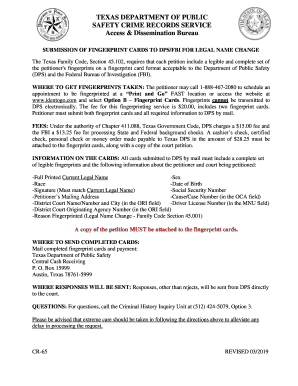
Get Tx Cr-65 2019-2026
How it works
-

Open form follow the instructions
-

Easily sign the form with your finger
-

Send filled & signed form or save
How to fill out the TX CR-65 online
This guide provides clear, step-by-step instructions for completing the Texas CR-65 form online. It aims to assist users with varying levels of legal experience in ensuring that their documentation is accurate and complete.
Follow the steps to successfully complete the TX CR-65 form.
- Click 'Get Form' button to obtain the form and open it in the editor.
- Begin by entering your full printed current legal name in the designated field. Make sure it matches the name on your identification documents.
- Fill in your sex and race as required. This information is necessary for the fingerprint record.
- Enter your date of birth accurately to ensure proper identification during processing.
- Provide your signature in the appropriate field. Ensure this signature matches your current legal name exactly.
- Input your social security number carefully, as it is crucial for your records and identification.
- Include your mailing address for correspondence related to the name change petition.
- In the OCA field, specify your cause/case number which links your petition to the correct court records.
- Indicate the district court name and number along with the city in the ORI field.
- Enter your driver license number in the MNU field accurately.
- Also in the ORI field, note the district court originating agency number as required.
- Specify the reason for fingerprinting as 'Legal Name Change - Family Code Section 45.001' in the designated section.
- Attach a copy of your court petition to the completed fingerprint cards.
- Review all information carefully to ensure accuracy before proceeding.
- Once complete, save your changes, and prepare to print or share the form as needed.
Take the next step and complete your documents online to ensure a smooth legal name change process.
To obtain a police report, start by visiting the website for your local police department to find out if you can request the report online. If you can't, check the website for a form that you can print, fill out, and mail to the police department to request the report.