Loading
Get Wi Be-009 2018
How it works
-

Open form follow the instructions
-

Easily sign the form with your finger
-

Send filled & signed form or save
How to fill out the WI BE-009 online
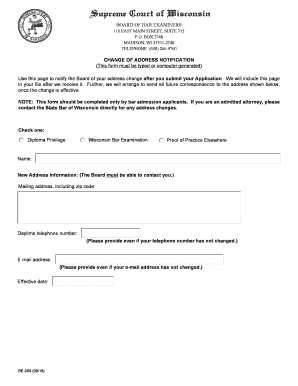
The WI BE-009 form is essential for notifying the Board of Bar Examiners about an address change. This guide provides clear, step-by-step instructions to help you complete the form accurately and efficiently.
Follow the steps to fill out the WI BE-009 online correctly.
- Click ‘Get Form’ button to obtain the form and open it in the editor.
- Select the appropriate category regarding your admission status by checking one of the boxes: Diploma Privilege, Wisconsin Bar Examination, or Proof of Practice Elsewhere.
- Enter your full name in the designated field to ensure accurate identification.
- Input your new address information, making sure to include the complete mailing address and zip code, as this will be crucial for future correspondence.
- Provide a daytime telephone number for contact purposes, even if it has not changed.
- Include your email address in the corresponding field, ensuring you maintain communication with the Board.
- Specify the effective date of the address change in the designated section.
- Review all entered information for accuracy to prevent processing delays or issues.
- Once completed, save your changes, and proceed to download, print, or share the form as necessary.
Complete your WI BE-009 online today to ensure timely updates to your address information.
Get form
Experience a faster way to fill out and sign forms on the web. Access the most extensive library of templates available.
In general, income that results from a W-9 arrangement is not subject to IRS withholding. Rather, it is the payee's responsibility to claim the income on his or her tax return, and to pay any appropriate taxes.
Get This Form Now!
Use professional pre-built templates to fill in and sign documents online faster. Get access to thousands of forms.