Loading
Get Ca Form 41-4 2021-2026
How it works
-

Open form follow the instructions
-

Easily sign the form with your finger
-

Send filled & signed form or save
How to fill out the CA Form 41-4 online
Filling out the CA Form 41-4 online is an essential step for educators seeking to obtain or renew their credentials in California. This guide will provide you with a clear, step-by-step approach to successfully complete the form while ensuring compliance with all requirements.
Follow the steps to complete the CA Form 41-4 online.
- Click ‘Get Form’ button to obtain the form and open it in the editor.
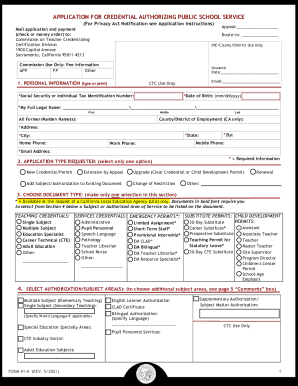
- Begin with section one, 'Personal Information'. Enter your date of birth, social security or individual tax identification number, and full legal name. Ensure all required fields marked with an asterisk (*) are filled out accurately.
- Provide your current contact details including your home address, city, state, zip code, and various phone numbers. Ensure your email address is also included in the specified section.
- In section two, choose the application type you are requesting. Only select one option that best fits your situation, such as 'New Credential/Permit' or 'Renewal'.
- Proceed to section three, where you will choose the document type. Make only one selection from the options listed, ensuring to follow the instructions pertaining to available services.
- Continue to section four to select additional authorization or subject areas if applicable. This step may require you to specify any specializations or languages.
- If you are renewing a Child Development Permit, complete section five regarding self-verification of professional growth activities, and provide the necessary details.
- Answer the professional fitness questions in section six truthfully. If you respond 'yes' to any question, complete the corresponding form as instructed.
- Review section seven regarding child abuse and neglect mandated reporting. Acknowledge your responsibilities as a mandated reporter by confirming your understanding.
- Fill out employing agency information in section eight if applicable to your credential type. Ensure all required agency identifiers are correctly entered.
- Before submission, review the application for completeness following the checklist provided, ensuring all required fields are populated.
- Complete the oath and affidavit section, sign and date the application, and prepare your payment (check or money order) to be attached.
- After ensuring everything is in order, save your changes, and proceed to download, print, or share the completed form as needed.
Complete your application for the CA Form 41-4 online to streamline your credential processing.
Related links form
CalStateTEACH Credential Program Earn your Preliminary Multiple Subject Credential through this mostly online program, qualifying you to teach in many general education classrooms in California.