Loading
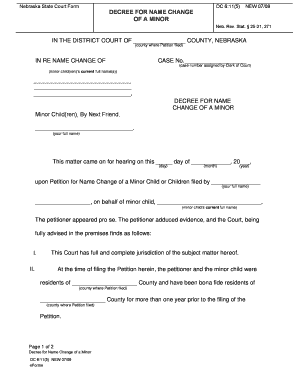
Get Ne Dc 6:11(5) 2009
How it works
-

Open form follow the instructions
-

Easily sign the form with your finger
-

Send filled & signed form or save
How to fill out the NE DC 6:11(5) online
Filling out the NE DC 6:11(5) online can be a straightforward process when you understand each section of the form. This guide is designed to provide clear, step-by-step instructions to assist you in completing the form accurately and efficiently.
Follow the steps to fill out the NE DC 6:11(5) online.
- Press the ‘Get Form’ button to obtain the NE DC 6:11(5) and open it for editing.
- Begin by filling in the county where the petition is filed in the designated space of the form.
- Insert the assigned case number, which will be provided by the Clerk of Court, in the appropriate field.
- List the current full name(s) of the minor child or children in the designated area.
- Enter your full name in the section that identifies the party acting as the next friend for the minor child or children.
- Indicate the date of the hearing by filling in the day, month, and year in the provided fields.
- Complete the section that states your name as the petitioner, ensuring it aligns with the full name noted earlier.
- In the section where a new name is requested, clearly state the preferred new full name of the minor child.
- Review all entered information for accuracy before finalizing your form.
- After completing the form, you can save your changes, download or print the document, and share it as needed.
Start filling out your documents online today to streamline your legal processes.
Get form
Experience a faster way to fill out and sign forms on the web. Access the most extensive library of templates available.
Get This Form Now!
Use professional pre-built templates to fill in and sign documents online faster. Get access to thousands of forms.