Loading
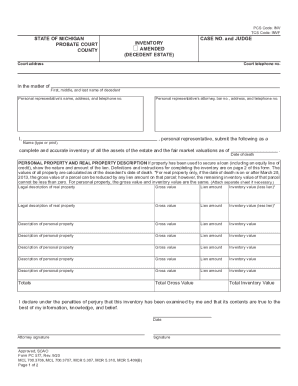
Get Mi Pc 577 2020-2026
How it works
-

Open form follow the instructions
-

Easily sign the form with your finger
-

Send filled & signed form or save
How to fill out the MI PC 577 online
The MI PC 577 form is essential for submitting a comprehensive inventory of assets for a decedent's estate. This guide provides clear, step-by-step instructions to assist users in accurately completing the form online.
Follow the steps to complete the MI PC 577 form online.
- Press the ‘Get Form’ button to retrieve the MI PC 577 and open it in your preferred online editor.
- Begin by entering the county and court address at the top of the form, followed by the relevant case number and judge's name.
- Provide the first, middle, and last name of the decedent, along with the personal representative’s name, address, and telephone number.
- In the inventory section, list each asset under the ‘Personal Property and Real Property Description’ column. Ensure to classify whether it is real or personal property.
- For each real property asset, include its legal description, gross value, lien amount (if applicable), and inventory value computed as gross value minus lien (if applicable). Ensure no inventory value is less than zero.
- When listing personal property, give detailed descriptions of each item and list them accordingly. Provide total gross value and inventory value for personal property as well.
- Complete the Totals section at the bottom by summing the total gross value and total inventory value.
- At the end of the form, the personal representative must sign and date the inventory, declaring the accuracy of the information under penalty of perjury.
- After reviewing the completed form for accuracy, you can save any changes, download, print, or share the document.
Start completing the MI PC 577 form online today for your estate inventory needs.