Loading
Get Ca Ciccs Qualification Card 2018-2026
How it works
-

Open form follow the instructions
-

Easily sign the form with your finger
-

Send filled & signed form or save
How to fill out the CA CICCS Qualification Card online
Filling out the CA CICCS Qualification Card online can streamline the process of documenting your qualifications and experiences in incident command. This guide will walk you through the necessary steps to complete the form accurately and efficiently.
Follow the steps to complete the form easily.
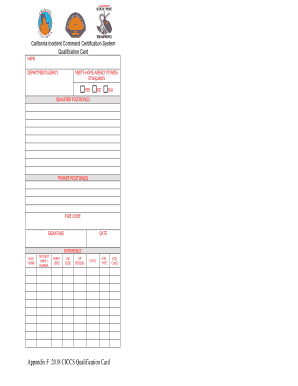
- Click ‘Get Form’ button to access the form and open it in the editor.
- Enter your name in the designated field. Ensure that your name matches official records for verification.
- Fill in the department or agency you are affiliated with. This can be either your current employer or the organization you represent.
- Indicate whether you meet the home agency fitness standards by selecting ‘Yes’ or ‘No’.
- List your qualified positions in the space provided. Be specific and include all relevant certifications.
- Document your trainee positions. This should detail any training roles you have undertaken toward becoming certified.
- Sign the form in the signature field to authenticate your submission.
- Enter the date when you completed the form to ensure accuracy in record-keeping.
- Provide your experience details, including the date of each experience recorded in the format of year and month.
- Describe the incident name or number related to your experience, ensuring clarity and precision.
- Fill in job level and code relevant to your experiences, as specified within your agency guidelines.
- Indicate state and fuel specifics pertaining to the incidents you have participated in.
- Specify the size and type of incidents where applicable, such as fire management or other classifications.
- Review all your entries for accuracy before finalizing the form.
- Once completed, you can save your changes, download, print, or share the form as needed.
Take the first step towards qualifications by completing your CA CICCS Qualification Card online today.