Loading
Get Sd Ujs-394 2018-2026
How it works
-

Open form follow the instructions
-

Easily sign the form with your finger
-

Send filled & signed form or save
How to fill out the SD UJS-394 online
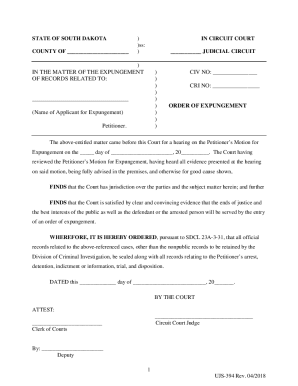
This guide provides clear and detailed instructions on how to successfully complete the SD UJS-394 online form. Understanding the components of the form is essential for a smooth filing process, regardless of your legal experience.
Follow the steps to fill out the SD UJS-394 online form effectively.
- Click ‘Get Form’ button to access the SD UJS-394 form and open it in the appropriate online editor.
- Begin by entering the name of the applicant for expungement in the designated area. This should be a complete name as it appears on official documents.
- In the 'CIV NO' section, input the civil number associated with the case. This number is critical for tracking and referencing the expungement proceedings.
- For the 'CRI NO' section, enter the criminal number linked to the applicant's case. Accurate information is vital for processing the expungement request.
- Complete the sections regarding the hearing date by entering the appropriate day, month, and year when the hearing for the motion occurred.
- Ensure that all statements reflecting the findings of the court regarding the expungement are clearly understood and acknowledged.
- Review the form for any missing or incorrect information before finalizing. Verify that all required fields are filled out completely.
- Once all sections are completed and verified, save the changes, and use the available options to download, print, or share the form as necessary.
Complete your SD UJS-394 online today to ensure your records are appropriately processed.