Loading
Get Ct Jd-es-286 2019-2026
How it works
-

Open form follow the instructions
-

Easily sign the form with your finger
-

Send filled & signed form or save
How to fill out the CT JD-ES-286 online
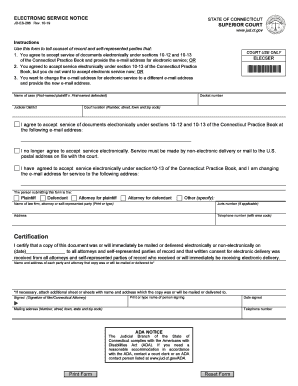
The CT JD-ES-286 form is used in Connecticut to indicate agreement to accept electronic service of documents or to change the email address for such service. This guide provides clear instructions to help you complete this form accurately and efficiently.
Follow the steps to accurately complete the CT JD-ES-286 form.
- Press the ‘Get Form’ button to access the CT JD-ES-286 form and open it in your preferred editor.
- Begin filling out the form by entering the docket number and the name of the case at the top section. Clearly indicate the first-named plaintiff against the first-named defendant.
- Select the judicial district from the available options. This information is essential for the court's records.
- Provide your email address in the designated field if you agree to accept service of documents electronically under sections 10-12 and 10-13 of the Connecticut Practice Book.
- If you no longer agree to accept electronic service, indicate this choice by selecting the appropriate option, which requires service to be made by non-electronic delivery or through mail.
- If you are changing your email address for electronic service, ensure you input the new email address in the specified location.
- Identify yourself by selecting your relationship to the case, such as plaintiff, defendant, or attorney for one of the parties.
- Complete the fields with your name, law firm (if applicable), and address. Provide a contact telephone number with the area code.
- In the certification section, date the document and confirm that a copy was mailed or delivered to all relevant parties. Ensure to list the names and addresses clearly.
- Finally, sign the form where indicated. Print your name and input the date of signing. Ensure that all required fields are filled before finalizing.
- Once completed, you can save the changes you've made, download the form, print it for your records, or share it as needed.
Complete your CT JD-ES-286 form online today to ensure efficient processing and communication.