Loading
Get Ca Fl-273 S 2020-2026
How it works
-

Open form follow the instructions
-

Easily sign the form with your finger
-

Send filled & signed form or save
How to fill out the CA FL-273 S online
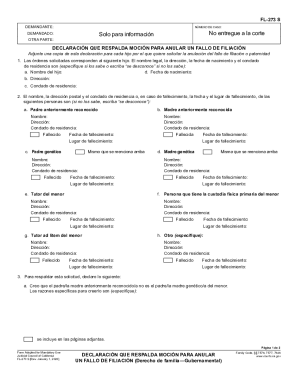
The CA FL-273 S form is required to support a motion to annul a parentage ruling in California. This guide will provide you with step-by-step instructions to help you complete the form online, ensuring you have all the necessary information at hand.
Follow the steps to accurately complete the CA FL-273 S form.
- Click ‘Get Form’ button to access the CA FL-273 S form and open it for online editing.
- Begin by entering your information as the petitioner in the designated fields, including your name and case number.
- Fill in the respondent's details under 'DEMANDADO' section, including the party's name and address.
- Provide information about the child for whom the annulment is being requested. Include the child's legal name, address, date of birth, and county of residence. If you do not have this information, note 'unknown'.
- Next, list the names and addresses of recognized parents, genetic parents, and guardians. Make sure to note if any parties are deceased and provide details when applicable.
- Complete section three by providing a statement of belief that the recognized parent is not the genetic parent, including specific reasons for this belief. Attach additional pages if necessary.
- Address whether there is another parentage ruling. Specify details if applicable.
- If there is a voluntary declaration of parentage, complete the relevant sections including whether a copy is attached and any associated court orders.
- Finally, sign and date the form at the designated area, confirming that the information provided is true and correct.
- Once completed, save any changes made, download the form for your records, or share it as needed.
Complete your CA FL-273 S form online to streamline your application process.