Loading
Get Ca Wv-116 2020-2026
How it works
-

Open form follow the instructions
-

Easily sign the form with your finger
-

Send filled & signed form or save
How to fill out the CA WV-116 online
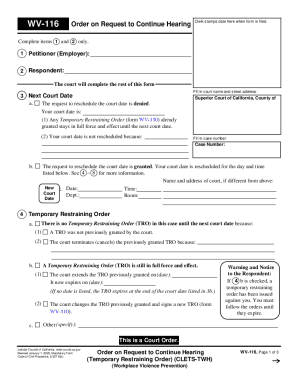
Filling out the CA WV-116 form online is an essential process for those needing to request a continuation of a hearing concerning a temporary restraining order. This guide provides straightforward step-by-step instructions to ensure that users can complete the form accurately and efficiently.
Follow the steps to fill out the CA WV-116 form online
- Press the ‘Get Form’ button to obtain the form and access it in the editor.
- In section 1, enter the name of the petitioner, which typically refers to the employer involved in the proceedings.
- In section 2, write the name of the respondent, who is the individual against whom the request for a restraining order is made.
- For section 3, fill in the relevant court name and street address, as well as your case number.
- Indicate whether the court date is rescheduled and fill out the new date, time, department, and room if applicable.
- Move to section 4 and clarify whether a Temporary Restraining Order is currently in effect. Provide dates and details as required.
- In section 5, specify the reasons why the court date is being rescheduled. Choose the applicable options that reflect the circumstances.
- In section 6, identify who made the request to reschedule — whether it was the petitioner, respondent, or the court.
- Fill out any necessary information regarding the serving of the order to other parties in section 7.
- Finally, review all entries for accuracy, save the changes, and determine whether to download, print, or share the completed form.
Complete your documents online today to ensure timely processing.