Loading
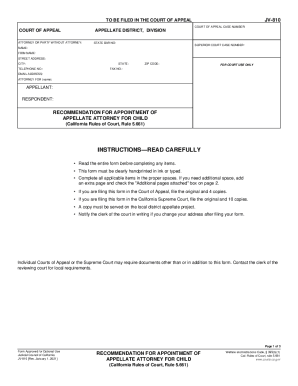
Get Ca Jv-810 2021-2026
How it works
-

Open form follow the instructions
-

Easily sign the form with your finger
-

Send filled & signed form or save
How to fill out the CA JV-810 online
The CA JV-810 is a vital form used for recommending the appointment of an appellate attorney for a child in court proceedings. This guide will help you navigate each section of the form, ensuring you complete it accurately and effectively. Follow the instructions carefully to facilitate a smooth submission process.
Follow the steps to fill out the CA JV-810 online:
- Press the ‘Get Form’ button to access the CA JV-810 form and open it in your selected editor.
- Begin by entering the case information. In the 'Court of Appeal Case Number' field, input the case number relevant to your appeal.
- Complete the next section with details of the attorney or party without an attorney. Fill in the 'Name,' 'Firm Name,' 'Street Address,' 'City,' 'State,' 'Telephone No.,' and 'Email Address.' Also, indicate whether you are the appellant or respondent.
- In the section for trial counsel or guardian ad litem, provide the name and address of the individual representing the child, including their telephone number.
- Proceed to state your recommendation for appointing an appellate attorney for the child. Clearly indicate the reasons that justify your recommendation, checking all that apply.
- In the next section, provide a detailed statement supporting your recommendation, referencing specific facts that justify the appointment.
- After finishing the form, review all entries for accuracy. Make sure to sign and date the declaration of truth at the bottom of the form.
- If you have additional pages, check the box indicating that extra information is attached.
- Lastly, when you are satisfied with your completion, you can save changes, download your form, print it, or share it as necessary.
Start filling out your documents online today!