Loading
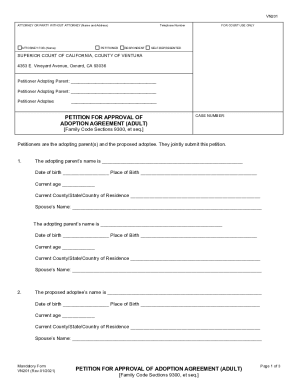
Get Ca Vn201 2021-2026
How it works
-

Open form follow the instructions
-

Easily sign the form with your finger
-

Send filled & signed form or save
How to fill out the CA VN201 online
Filling out the CA VN201 form for the adoption petition can be a straightforward process when you have clear guidance. This professional and user-friendly guide will walk you through each section of the form to ensure you provide all necessary information accurately.
Follow the steps to complete the CA VN201 form correctly.
- Click ‘Get Form’ button to obtain the form and open it in the editor.
- Start by entering the names and addresses of the adopting parents at the top of the form. Ensure that you include your contact information, including telephone numbers.
- In the section for the proposed adoptee, provide their full name, date of birth, place of birth, current age, and current county/state/country of residence.
- Describe the length and nature of the relationship between the adopting parents and the proposed adoptee in detail. Include any relevant kinship, and use additional pages if necessary.
- List the names and addresses of any living birth parents or adult children of the proposed adoptee. This includes sections for the birth mother, birth father, and adult children.
- Indicate whether the adopting parent(s) are a provider of services to individuals with developmental disabilities. If relevant, be sure to check the applicable boxes regarding the proposed adoptee’s status.
- Confirm whether the adopting parent or their spouse has adopted another unrelated adult within the past year, and provide necessary details if applicable.
- Add your agreement to assume the legal relationship of parent and child, including your obligations and responsibilities, as signed in the agreement attached with this petition.
- Explain why this adoption is in the best interest of both the adopting parent(s) and the adoptee, including reasons regarding legal rights and family support.
- Indicate if the proposed adoptee wishes to take the adopting parent(s)' family name and specify the new name requested.
- Finally, request the court to approve the adoption and affirm that the adopting parent(s) and the adoptee have the legal relationship of parent and child.
- Review the verification section. Sign and date the form at the bottom, ensuring that all adopting parents and the adoptee have printed their names and signed appropriately.
- Once the form is completed, save your changes, then you can download, print, or share the form as needed for your submission.
Start filling out the CA VN201 online today to take the next steps in your adoption process.
Related links form
Suggested clip Transferring a title from a private sale - YouTubeYouTubeStart of suggested clipEnd of suggested clip Transferring a title from a private sale - YouTube