Loading
Get Mi Pc 579 2017-2026
How it works
-

Open form follow the instructions
-

Easily sign the form with your finger
-

Send filled & signed form or save
How to fill out the MI PC 579 online
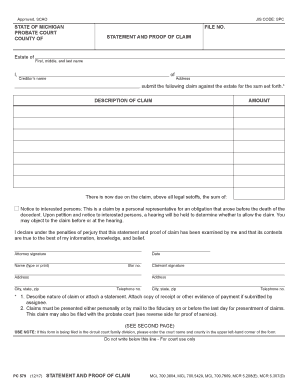
The MI PC 579 is a crucial form used in the probate court system to file a statement and proof of claim against an estate. Completing this form accurately is essential for creditors to assert their claims effectively and transparently.
Follow the steps to complete the MI PC 579 online.
- Press the ‘Get Form’ button to obtain the form and access it in your editor.
- Begin by entering your name clearly in the designated area for the creditor's name. This should include your first, middle, and last name.
- Next, fill in your address, ensuring accuracy as this information is vital for any correspondence regarding your claim.
- In the field labeled 'DESCRIPTION OF CLAIM', provide a concise explanation of the nature of your claim. It is recommended to describe the claim thoroughly or attach supporting documentation if available.
- Indicate the amount of the claim in the 'AMOUNT' section. Be clear and precise, and ensure it reflects the true sum due.
- Mark the date next to the claimant's signature and enter your contact information, including telephone number.
- If represented by an attorney, have them sign the form as required, including their name, bar number, address, and telephone number.
- After completing all sections, review your entries for accuracy before proceeding. You can then save changes, download, print, or share your final document.
Complete your documents online to streamline the process.