Loading
Get Ca Jv-595 2021-2026
How it works
-

Open form follow the instructions
-

Easily sign the form with your finger
-

Send filled & signed form or save
How to fill out the CA JV-595 online
The CA JV-595 form is an important document used to petition the juvenile court for sealing juvenile records. This guide will provide clear and step-by-step instructions on how to complete this form correctly and efficiently online.
Follow the steps to successfully fill out the CA JV-595 form.
- Click ‘Get Form’ button to obtain the form and open it in the editor.
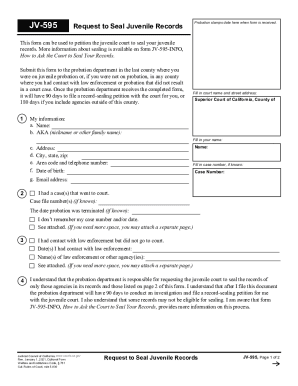
- Fill in the court name and street address in the appropriate section.
- Enter your name in the designated field labeled 'Name'. Include your case number if known.
- Under 'My information', provide your details such as name, nickname or other family name (AKA), address, city, state, zip, area code, telephone number, date of birth, and email address.
- If you had any cases that went to court, detail the case file numbers and the date probation was terminated if known. Indicate if you do not remember these details.
- If applicable, list any dates you had contact with law enforcement and the names of the law enforcement agencies involved.
- Acknowledge your understanding of the probation department's responsibilities regarding your records, including the timeframes for requesting to seal them and note any eligibility constraints.
- In the latter section, include all contacts with relevant agencies before your 18th birthday that might not be part of your probation records. Make sure to list them comprehensively.
- Once all fields are filled, declare that the information provided is true and correct to the best of your knowledge, and sign your name where indicated.
- Save your changes, and consider downloading, printing, or sharing the completed form as necessary.
Ensure you submit your completed CA JV-595 form online for a streamlined process.