Loading
Get Ca Cr-115 2020-2026
How it works
-

Open form follow the instructions
-

Easily sign the form with your finger
-

Send filled & signed form or save
How to fill out the CA CR-115 online
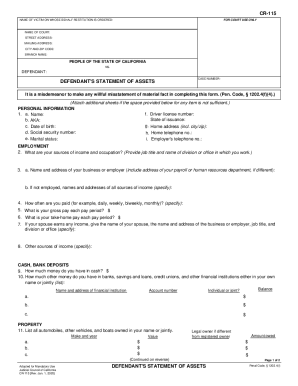
The CA CR-115 form, also known as the Defendant's Statement of Assets, is essential for disclosing financial information in restitution cases. This guide will provide you with a clear and supportive step-by-step approach to completing the form online.
Follow the steps to successfully complete the CA CR-115 online.
- Press the ‘Get Form’ button to access the form and open it in your editor.
- Begin by entering the name of the victim for whom restitution is ordered, as well as the name of the court and its mailing addresses.
- In the personal information section, provide your name, date of birth, social security number, driver license number, and contact details as specified.
- Detail your employment history, including job title, employer information, and other income sources. Be clear and specific about how often you are paid and the amounts.
- List any cash and bank deposits. Include the name of the financial institution, account number, and balance, indicating whether the account is individual or joint.
- Document any vehicles or real estate owned. Provide makes, year, value, and legal ownership details as required.
- Describe other personal property of value and any assets held by others on your behalf.
- Fill in details about any debts incurred, taxes owed, and other financial obligations.
- Sign and date the form at the end. If an interpreter was used, ensure they complete their section.
- After you have confirmed all entries are accurate, save the completed form, and consider printing or sharing it as necessary.
Complete your CA CR-115 online today and ensure all information is submitted correctly.
Related links form
Tells the other side the maximum amount of damages you are seeking in a personal injury or wrongful death case. It is not filed with the court except when the defendant defaults.