Loading
Form preview
  • US Legal Forms
  • Other Templates
  • Legal Forms
  • Wisconsin Legal Forms
  • Wi Fa-4176 2008

Get Wi Fa-4176 2008-2026

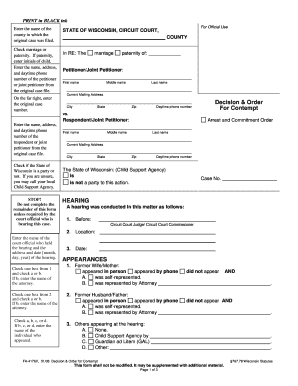
Number of the petitioner or joint petitioner from the original case file. For Official Use STATE OF WISCONSIN, CIRCUIT COURT, COUNTY In RE: The marriage paternity of: Petitioner/Joint Petitioner: First name Middle name Last name Current Mailing Address On the far right, enter the original case number. City State Zip Daytime phone number Decision & Order For Contempt vs. Respondent/Joint Petitioner: Enter the name, address, and daytime phone number of the respondent or joint peti.

How it works

  1. Open form

    Open form follow the instructions

  2. Easily sign form

    Easily sign the form with your finger

  3. Share form

    Send filled & signed form or save

How to fill out the WI FA-4176 online

The WI FA-4176 is a form used in Wisconsin for matters related to contempt decisions and orders. This guide will provide clear and supportive instructions on how to fill out the form accurately online.

Follow the steps to successfully complete the WI FA-4176 form online.

  1. Click the ‘Get Form’ button to access the form and open it in the editor.
  2. Enter the name of the county where the original case was filed. This information is crucial for proper jurisdiction.
  3. Select either 'marriage' or 'paternity.' If you are indicating paternity, please include the initials of the child involved.
  4. Provide the name, address, and daytime phone number of the petitioner or joint petitioner as listed in the original case file. This ensures that all parties are correctly identified.
  5. On the far right section, enter the original case number to tie this form back to the case file.
  6. Next, provide the necessary information for the respondent or joint petitioner, including their name, address, and daytime phone number.
  7. Indicate whether the State of Wisconsin is a party by checking the appropriate box. If unsure, it is advisable to contact your local Child Support Agency for guidance.
  8. Proceed to detail the hearing information, including the name of the court official, the location of the hearing, and the hearing date.
  9. List the appearances at the hearing, including how each party appeared, whether they were self-represented, and if represented by an attorney.
  10. Complete the findings and order sections, specifying the party found in contempt and the reasons for that finding, including any relevant details regarding payments or compliance.
  11. Finalize by filling out any additional orders made by the court and checking the appropriate boxes for future hearings, if required.
  12. Before submitting the form, review all entries for accuracy. Save changes, download, print, or share the completed form as necessary.

Complete your documents online to ensure efficient processing.

Get form

Experience a faster way to fill out and sign forms on the web. Access the most extensive library of templates available.
Get form

Related content

FA-4176V Decision and Order for Contempt
A. The above named party IS NOT found to be in Contempt. B. The above named party has...
Learn more
Verizon Hotspots and Wi-Fi Extenders | Joyner...
Joyner Library circulates Verizon hotspots and Wi-Fi extenders to ECU students for 7 days...
Learn more
HP DeskJet Ink Advantage 4170 All- in-One Printer...
This printer offers wireless, print, copy, scan, and mobile fax. It has a 35-page auto...
Learn more

Related links form

PH RKS Form 5 2010 UK VAF1A 2011 UK Environment Agency HWCN01v111 2005 Canada IMM 0008 Schedule 2 2011

Questions & Answers

Get answers to your most pressing questions about US Legal Forms API.

Contact support

Yes, you can file a motion for contempt in Wisconsin without an attorney, although it is typically recommended to seek legal advice. The WI FA-4176 form simplifies this process by offering a clear layout for your motion details. However, statutory procedures can be complex, and understanding the legal implications is essential to ensure that your motion is filed correctly.

Filing a motion of contempt in Wisconsin involves creating your motion using the WI FA-4176 form. This form guides you through providing all necessary details about the contempt situation. After completing the document, file it with the court and serve it to the opposing party, who must then respond. Properly following these steps is crucial for moving forward in your case.

Winning a contempt hearing often depends on providing clear evidence that the other party has not followed a court order. It’s important to present a well-structured case that includes the original order and specific examples of non-compliance, often using form WI FA-4176 to show your findings. Preparing thoroughly in advance and understanding the legal standards for contempt will significantly improve your chances of success.

The 5 day rule in Wisconsin court requires that any written response to a motion must be filed within five days of being served with the motion. Understanding this rule is vital for compliance, especially when utilizing forms like WI FA-4176. Missing this deadline can impact the outcome of your case and your ability to effectively present your arguments in court.

To file a motion of contempt in Wisconsin, you need to prepare the necessary documents that demonstrate how the other party has failed to comply with a court order. Use form WI FA-4176, which guides you through the process. Once completed, file the motion with the appropriate court and serve copies to the opposing party. This ensures that everyone involved is aware of the proceedings.

Yes, you can file a contempt of court motion without a lawyer, though it may be challenging. You will need to follow the court's guidelines closely and provide clear evidence of contempt. Resources like the WI FA-4176 can help you understand the requirements and simplify the filing process.

While you cannot simply say no to a court summons, you can contest the summons by filing a proper legal response. Ignoring it may lead to default judgment against you. It is essential to understand your rights and options, and the WI FA-4176 can guide you through this legal process.

To fill out Form Sum 100, start by entering the case information at the top. Fill in the specific details required, including names, addresses, and the nature of your claim. Ensure all sections are complete before signing the bottom. If you need further clarification, the WI FA-4176 can serve as a useful reference.

Filling out form pro 010 involves providing your personal information, including your name, address, and telephone number. Follow the instructions carefully, completing each section accurately. To avoid mistakes, consider downloading a guide or template like the WI FA-4176 from US Legal Forms, which offers step-by-step instructions.

When writing a response to a summons, start by clearly stating the case name and number. Outline your defenses or objections in numbered paragraphs. Be sure to sign and date the document before submitting it to court. To simplify this process, you can access the WI FA-4176 to ensure you include all required elements.

Get This Form Now!

Use professional pre-built templates to fill in and sign documents online faster. Get access to thousands of forms.
Get form
If you believe that this page should be taken down, please follow our DMCA take down processhere.
Get WI FA-4176
Get form
  • Adoption
  • Bankruptcy
  • Contractors
  • Divorce
  • Home Sales
  • Employment
  • Identity Theft
  • Incorporation
  • Landlord Tenant
  • Living Trust
  • Name Change
  • Personal Planning
  • Small Business
  • Wills & Estates
  • Packages A-Z
  • Affidavits
  • Bankruptcy
  • Bill of Sale
  • Corporate - LLC
  • Divorce
  • Employment
  • Identity Theft
  • Internet Technology
  • Landlord Tenant
  • Living Wills
  • Name Change
  • Power of Attorney
  • Real Estate
  • Small Estates
  • Wills
  • All Forms
  • Forms A-Z
  • Other Templates
  • Legal Hub
  • About Us
  • Help Portal
  • Legal Resources
  • Blog
  • Affiliates
  • Contact Us
  • Delete My Account
  • Site Map
  • Industries
  • Forms in Spanish
  • Localized Forms
  • State-specific Forms
  • Forms Kit
  • Real Estate Handbook
  • All Guides
  • Notarize
  • Incorporation services
  • For Consumers
  • For Small Business
  • For Attorneys
  • USLegal
  • FormsPass
  • pdfFiller
  • signNow
  • altaFlow
  • DocHub
  • Instapage
Form Packages
  • Adoption
  • Bankruptcy
  • Contractors
  • Divorce
  • Home Sales
  • Employment
  • Identity Theft
  • Incorporation
  • Landlord Tenant
  • Living Trust
  • Name Change
  • Personal Planning
  • Small Business
  • Wills & Estates
  • Packages A-Z
Form Categories
  • Affidavits
  • Bankruptcy
  • Bill of Sale
  • Corporate - LLC
  • Divorce
  • Employment
  • Identity Theft
  • Internet Technology
  • Landlord Tenant
  • Living Wills
  • Name Change
  • Power of Attorney
  • Real Estate
  • Small Estates
  • Wills
  • All Forms
  • Forms A-Z
  • Other Templates
Customer Service
  • Legal Hub
  • About Us
  • Help Portal
  • Legal Resources
  • Blog
  • Affiliates
  • Contact Us
  • Delete My Account
  • Site Map
  • Industries
  • Forms in Spanish
  • Localized Forms
  • State-specific Forms
  • Forms Kit
Legal Guides
  • Real Estate Handbook
  • All Guides
Prepared for you
  • Notarize
  • Incorporation services
Our Customers
  • For Consumers
  • For Small Business
  • For Attorneys
Our Sites
  • USLegal
  • FormsPass
  • pdfFiller
  • signNow
  • altaFlow
  • DocHub
  • Instapage
Social Media
Call us now toll free:
+1 833 426 79 33
As seen in:
© Copyright 1999-2026 airSlate Legal Forms, Inc. 17 Station Street, Suite 303, Brookline, MA 02445
  • Your Privacy Choices
  • Terms of Service
  • Privacy Notice
  • Content Takedown Policy
  • Bug Bounty Program