Loading
Get Ph Bir 1902 2008
How it works
-

Open form follow the instructions
-

Easily sign the form with your finger
-

Send filled & signed form or save
How to fill out the PH BIR 1902 online
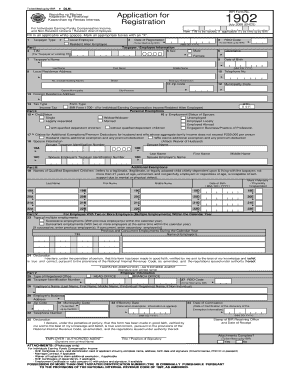
Filling out the PH BIR 1902 form online can simplify the registration process for individuals earning purely compensation income and non-resident citizens or resident alien employees. This guide will walk you through each section of the form to ensure a smooth completion.
Follow the steps to complete the PH BIR 1902 online.
- Click ‘Get Form’ button to obtain the form and open it in your preferred online editor.
- Begin with filling in your taxpayer type by marking the appropriate box: Local Employee or Resident Alien Employee.
- Enter the date of registration in the format MM/DD/YYYY in the designated field.
- Provide your Taxpayer Identification Number (TIN) if you have one; otherwise, leave it for the BIR to fill.
- Select your gender by checking the corresponding box for Male or Female.
- Fill in your citizenship and date of birth in the appropriate fields.
- Input your full name, starting with last name, followed by first name, and middle name as applicable.
- Provide your local residence address, including street, barangay/subdivision, municipality code, city/province, zip code, and telephone number.
- If applicable, enter your foreign residence address.
- Choose the tax type and form type appropriate to your situation and provide additional information as required.
- Complete Part II by marking your civil status, employment status of spouse, and providing spouse information, if applicable.
- In Part III, list any qualified dependent children with their respective details.
- If you have multiple employers, fill out Part IV by indicating the type of employment and providing information about previous or concurrent employers.
- Review your entries and declare the correctness of your information by signing in the designated area.
- Complete the employer information section, if required, by filling in the employer's name, address, and RDO code.
- Verify that you have attached all necessary documents as per the requirements listed at the bottom of the form.
- Once all sections are complete, save changes, and ensure you download or print the form for your records.
Complete your PH BIR 1902 online today for a seamless registration process.
Get form
Experience a faster way to fill out and sign forms on the web. Access the most extensive library of templates available.
You can download the BIR forms, including Form 1902, directly from the Bureau of Internal Revenue’s official website. Navigate to their forms section, where you will find various documents for tax purposes. Having the correct forms readily available simplifies your tax preparation process and ensures you meet your filing obligations.
Get This Form Now!
Use professional pre-built templates to fill in and sign documents online faster. Get access to thousands of forms.