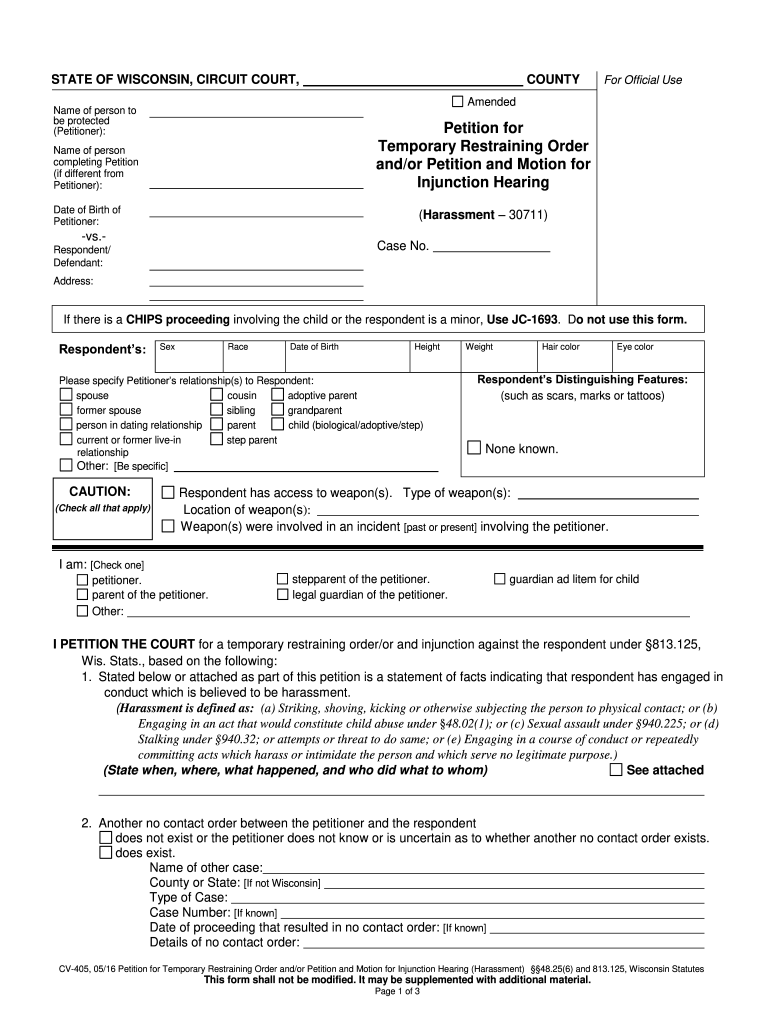
Aring Name of person completing Petition (if different from Petitioner): Date of Birth of Petitioner: (Harassment 30711) -vs.- Case No. Respondent/ Defendant: Address: If there is a CHIPS proceeding involving the child or the respondent is a minor, Use JC-1693. Do not use this form. Respondent s: Sex Race Date of Birth Height Name Please specify Petitioner s relationship(s) to Respondent: spouse cousin adoptive parent former spouse sibling grandparent person in dating relati.
Loading

Open form follow the instructions

Easily sign the form with your finger

Send filled & signed form or save
How to fill out the WI CV-405 online
The WI CV-405 is a crucial form used for filing a petition for a temporary restraining order and motion for an injunction hearing. This guide provides clear, step-by-step instructions on how to effectively complete the form online.
Follow the steps to accurately fill out the WI CV-405 online
- Click the ‘Get Form’ button to access the WI CV-405. This will allow you to open the form in the online editor.
- Fill in the name of the person who is to be protected, referred to as the 'Petitioner.' If this differs from the individual completing the petition, specify their name in the appropriate field.
- Enter the date of birth of the Petitioner to provide personal identification and context for the petition.
- Complete the 'Respondent/Defendant' section by entering the name and address of the individual against whom the petition is filed. Be sure to include their sex, race, date of birth, height, weight, hair color, eye color, and any distinguishing features.
- Clearly indicate the relationship of the Petitioner to the Respondent by checking the relevant boxes or providing specific details if the relationship is not listed.
- If applicable, clarify whether the Respondent has access to any weapons by filling in the necessary details about the types and locations of the weapons.
- In the statement section, provide a detailed account describing the harassment, including when, where, and what occurred. Attach any additional information if needed.
- Select any existing no contact orders involving the petitioner and the respondent by checking the appropriate box, and provide details of those orders if necessary.
- Review the requested court actions and check any applicable boxes to specify what you are asking the court to do regarding the restraining order and injunction.
- Complete the service on the respondent section, ensuring to verify that all documents are served and proof of service is filed accordingly.
- Once you have filled out all fields accurately, review your entries for completeness and accuracy before proceeding to save changes, download, print, or share the form as needed.
Complete your documents online today to ensure prompt handling of your petition.
Experience a faster way to fill out and sign forms on the web. Access the most extensive library of templates available.
Related content
I PETITION THE COURT for a Temporary Restraining Order and/or Injunction against the...
This is a theory course designed to introduce the student to basic heat engine types...
Podem ser utilizado para um projeto específico ou localmen- te para nova aplicação ou...
Get answers to your most pressing questions about US Legal Forms API.
How to get a no contact order in Wisconsin?
To obtain a no contact order in Wisconsin, follow the process established under WI CV-405 by filing a request with the court. You'll need to provide details about the individual you wish to keep away, along with the reasons for your request. This process often includes presenting evidence that supports your claim. US Legal Forms can assist you in navigating this procedure with ease and ensuring you have all the required documentation at hand.
What is the 72 hour rule in Wisconsin?
The 72 hour rule in Wisconsin refers to the time frame in which law enforcement must appear before a court to request a temporary restraining order. This rule is crucial for ensuring that individuals receive prompt protection when in danger. The time limit helps to expedite the legal process, allowing for quicker implementation of a no contact order like WI CV-405 in urgent situations. Being aware of this rule can be beneficial if you find yourself in a critical situation.
How do I renew my restraining order in Wisconsin?
Renewing a restraining order in Wisconsin requires submitting a new petition before the original order expires, under the guidelines of WI CV-405. You will need to provide evidence that the situation still warrants the protection. Courts typically require a hearing to assess your petition for renewal. Using US Legal Forms can help guide you through this process and ensure you complete all necessary paperwork correctly.
How does a no contact order work in Wisconsin?
A no contact order in Wisconsin functions as a legal directive forbidding one individual from contacting another. Under the WI CV-405 framework, this order can include various forms of communication, such as calls, messages, or even physical presence. Violating this order can lead to serious legal consequences, including potential criminal charges. Understanding the specifics of this order can help ensure your safety and rights are upheld.
What do you need to place a no contact order?
To place a no contact order in Wisconsin, known as WI CV-405, you typically need to file a petition in the appropriate court. This process often requires identifying the individual you want the order against and providing reasons for your request. It's crucial to gather any supporting evidence that demonstrates the need for protection. You can simplify this process by utilizing platforms like US Legal Forms for guidance and access to necessary documents.
Is a show cause hearing good or bad?
A show cause hearing can be seen as an opportunity to present your side of the situation before a judge. Whether it is perceived as good or bad depends on the context of the case and the arguments presented. Preparing adequately with insights into WI CV-405 can make the process more favorable, helping you navigate the legal landscape confidently.
What happens after an Order to Show Cause?
After an Order to Show Cause is issued, the involved parties must appear in court on the scheduled date to present their cases. The court will review the arguments and evidence and then make a decision regarding the requested action. To prepare effectively, understanding the steps and documentation required by WI CV-405 can be invaluable, and resources like US Legal Forms can guide you.
What is the purpose of the show cause?
The primary purpose of a show cause order is to ensure that all parties have the opportunity to present their arguments in court for a particular action. It creates a legal framework for addressing urgent issues when immediate decisions are necessary. By following the procedures outlined in WI CV-405, you can ensure you adhere to legal standards, promoting timely and effective resolutions.
What is an order to show cause in Wisconsin?
An Order to Show Cause is a court document that compels a party to appear and explain their reasons for or against a specific request. This order is crucial when immediate action is needed, such as in cases of injunctions or temporary restraining orders. Understanding the process surrounding WI CV-405 can empower you in legal proceedings, making it essential to consult relevant resources.
How serious is an Order to Show Cause?
An Order to Show Cause in Wisconsin is a significant legal document that requires the recipient to appear in court and explain why the requested action should not occur. It usually accompanies certain requests for urgent relief, which means the court views the matter seriously. Ignoring this order may result in unfavorable decisions against you. Understanding the implications of WI CV-405 can help navigate this critical situation.
Use professional pre-built templates to fill in and sign documents online faster. Get access to thousands of forms.
If you believe that this page should be taken down, please follow our DMCA take down process here.
This form is available in several versions. Select the version you need from the drop-down list below.