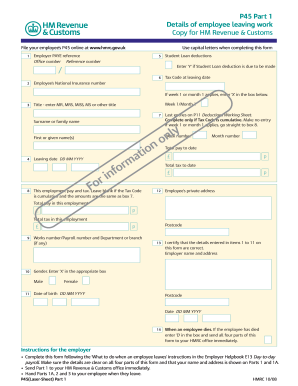
P45 Part 1 Details of employee leaving work Copy for HM Revenue & Customs File your employee's P45 online at www.hmrc.gov.uk 1 Use capital letters when completing this form Employer PAYE reference.
Open form follow the instructions
Easily sign the form with your finger
Send filled & signed form or save
How to fill out the UK HMRC Form P45 online
Filling out the UK HMRC Form P45 online is an important task for anyone leaving employment. This form provides essential information regarding your employment and tax status, which is necessary for continuity in your financial affairs.
Follow the steps to complete the online P45 form successfully.
- Press the ‘Get Form’ button to access the online form and display it in the editor.
- Enter the employer PAYE reference in the designated field. Ensure it is accurate to avoid complications.
- Provide the employee's personal information, including their title, surname, first name, and National Insurance number.
- Input the leaving date in the format DD MM YYYY. Double-check that this date is correct.
- Fill in the employee's total pay to date and the total tax to date. Verify these amounts from the payroll records.
- If applicable, enter the tax code at the leaving date. If the week 1 or month 1 tax code applies, mark the appropriate box.
- Indicate if student loan deductions should be made by entering 'Y' if applicable.
- Confirm all details entered are correct by certifying the information as specified in the form.
- Once all fields are completed, review the information for accuracy. Correct any errors if necessary.
- Finalize the process by saving changes, and choose to download, print, or share the completed form as needed.
Complete the form online today to ensure a smooth transition in your employment process.
Experience a faster way to fill out and sign forms on the web. Access the most extensive library of templates available.
Related content
Jun 26, 2018 — HMRC New Starter Checklist (if you have your P45 that will suffice so...
You will normally receive this within two months of the end of each tax year (5 April);...
The document is not a text book on digitisation; nor is it about digital preservation per...
Get answers to your most pressing questions about US Legal Forms API.
How to get a copy of your P45 UK?
To obtain a copy of your UK HMRC Form P45, reach out to your previous employer directly. They are responsible for providing this document and must have records of your employment. If needed, platforms like uslegalforms can also help you find resources for employment documentation if you experience delays.
What is P11D UK?
The P11D is a form used in the UK to report benefits and expenses provided to employees, similar in importance to the UK HMRC Form P45 for tax purposes. While the P45 shows your income and tax deductions upon leaving a job, the P11D details additional earnings not processed through payroll. It's crucial to understand both forms to manage your tax situation properly.
How to get P45 online in Ireland?
To obtain your UK HMRC Form P45 while in Ireland, you still need to reach out to your former UK employer. They should provide a digital copy if they manage payroll through compatible online systems. If you require assistance, consider using platforms like uslegalforms for organized access to employment records.
What is the alternative to a P45?
If you do not have a UK HMRC Form P45, the alternative is a P60 or your last payslip from your employer. These documents provide similar information about your earnings and tax deductions. However, it is always ideal to have a P45 for tax purposes when starting a new job.
How do I get my P45 from an old job UK?
If you need to obtain your UK HMRC Form P45 from an old job, start by contacting your former employer's HR department. They are legally required to provide you with this document upon request. If you encounter difficulties, you might also explore options through a payroll service or check your online tax account.
How do I get my UK P45 online?
To retrieve your UK HMRC Form P45 online, your employer must upload it to the HMRC portal. You can then access this document through your personal tax account on the HMRC website. If you haven’t registered yet, consider doing so to streamline the process of securing your P45.
How long does it take to get a P45 UK?
Typically, you should receive your UK HMRC Form P45 shortly after leaving your job. Employers are required to provide it on your last working day, or shortly thereafter. If you haven't received it within a few weeks, follow up with your employer to check the status. This ensures that your tax records remain updated.
How do I ask for P45?
When asking for your UK HMRC Form P45, it’s best to contact your previous employer directly. You can send a polite email or make a phone call to their HR department, clearly stating that you need your P45. Remember to include relevant details like your full name and dates of employment to make the process easier.
Where can I get a copy of my P45 UK?
You can obtain a copy of your UK HMRC Form P45 from your employer if you recently left your job. If the document is not available, reaching out directly to your employer or human resources department is a good next step. Alternatively, you can request a duplicate through the UK government's website if required.
What can I do if my employer won't give me my P45 UK?
If your employer refuses to provide your UK HMRC Form P45, you have several options. First, politely remind them of their legal obligation to furnish the form upon your departure. If they still do not comply, consider filing a complaint with the Advisory, Conciliation and Arbitration Service (ACAS) for guidance. Furthermore, using services like US Legal Forms can help you navigate this issue more effectively.
Use professional pre-built templates to fill in and sign documents online faster. Get access to thousands of forms.
If you believe that this page should be taken down, please follow our DMCA take down process here.
This form is available in several versions. Select the version you need from the drop-down list below.