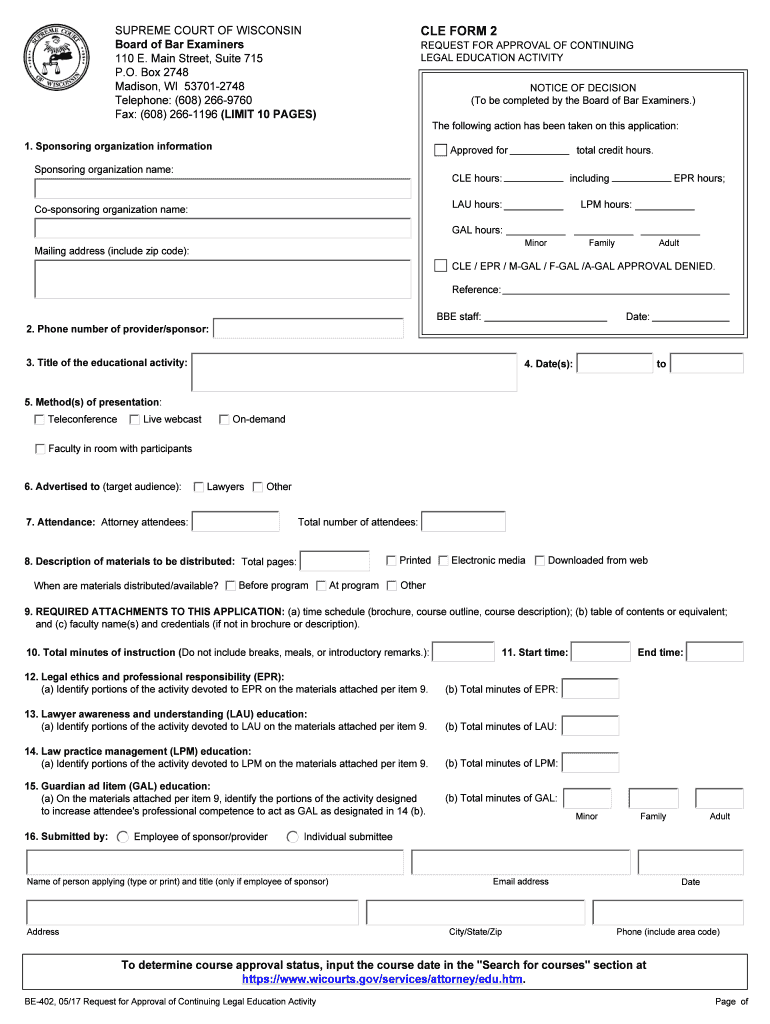
REQUEST FOR APPROVAL OF CONTINUING LEGAL EDUCATION ACTIVITY NOTICE OF DECISION (To be completed by the Board of Bar Examiners.) The following action has been taken on this application: 1. Sponsoring organization information Approved for Sponsoring organization name: total credit hours. CLE hours: including LAU hours: Co-sponsoring organization name: EPR hours; LPM hours: GAL hours: Minor Mailing address (include zip code): Family Adult CLE / EPR / M-GAL / F-GAL /A-GAL APPROVAL.
Loading

Open form follow the instructions

Easily sign the form with your finger

Send filled & signed form or save
How to fill out the WI BE-402 online
The WI BE-402 form is a pivotal document for requesting approval of continuing legal education activities in Wisconsin. This guide aims to assist users in accurately completing the form online, ensuring compliance with the Wisconsin mandatory continuing legal education requirements.
Follow the steps to complete the WI BE-402 form online.
- Click ‘Get Form’ button to obtain the form and open it in the editor.
- Begin by providing the sponsoring organization information. This includes the name of the sponsoring organization and its address. Specify the total credit hours being requested, detailing CLE hours as well as hours for any co-sponsoring organizations.
- Input the phone number of the provider or sponsor to ensure communication regarding the application process.
- Fill in the title of the educational activity and the dates it will occur. Be sure to include the range of dates from start to finish.
- Indicate the method of presentation, selecting one or more options from teleconference, live webcast, on-demand, or faculty present with participants.
- Identify the target audience for the activity. Check the appropriate box for whether it is aimed primarily at lawyers or another group.
- Record the attendance size, specifying the number of attorney attendees as well as the total number of attendees expected for the program.
- Describe the materials that will be distributed, including total pages and when they will be made available (before, at, or after the program).
- Attach the required materials with your application. This includes a time schedule, table of contents, and faculty credentials. Ensure you are marking all necessary fields clearly.
- Document the total minutes of instruction, omitting any breaks, meals, or introductory remarks to provide an accurate accounting.
- Input the start time of the activity accurately, followed by necessary sections addressing legal ethics, lawyer awareness education, law practice management education, and guardian ad litem education.
- In the final section, provide the name and title of the person submitting the form, along with complete contact details. Ensure all information is typed or printed clearly.
- Once you have reviewed all entries for accuracy, save your changes, and consider downloading, printing, or sharing the completed form as necessary.
Start filling out the WI BE-402 online today to ensure your continuing legal education activities are recognized!
Experience a faster way to fill out and sign forms on the web. Access the most extensive library of templates available.
Related content
Monitoring location number · 402113075562201 ; Supporting agency · U.S. Geological...
The study of materials and their use in medical implants, including metal, ceramics...
1 Para garantir o melhor desempenho, leia atentamente este manual. Mantenha este manual em...
Get answers to your most pressing questions about US Legal Forms API.
What is the 402 code?
The WI BE-402 code serves as an indicator for specific payment-related scenarios within digital platforms. This code often highlights when transactions require completion for service access. Understanding what the 402 code implies will help you navigate payment systems more effectively. Being aware of these codes can enhance your overall experience.
What is the 402 access code?
The 402 access code relates to securing payment processing within systems like WI BE-402. This code restricts access until payment is confirmed, ensuring transaction security. Familiarizing yourself with access codes helps in troubleshooting issues more efficiently. Always verify payment status to avoid access denial.
What does 402 code mean?
The 402 code in the context of WI BE-402 is often associated with payment processing errors. It indicates that payment must be made to gain access to certain features or services. Properly interpreting this code allows for quicker problem-solving related to access issues. Staying informed helps maintain seamless service access.
What is the 402 billing code?
The 402 billing code in the context of WI BE-402 refers to a specific payment issue within billing systems. It signifies the requirement for payment before accessing a service or feature. Understanding this code can help you manage your billing processes better. Ensure that your payments are current to avoid interruptions.
How to fix error 402 payment required?
To fix the WI BE-402 error indicating payment required, start by checking your payment details and subscription status. Make sure that your billing information is accurate and up to date. If the problem persists, consider reaching out to the service provider’s customer support for assistance. This proactive approach will help you resolve the issue quickly.
What does 402 Access Denied mean?
The WI BE-402 Access Denied error typically occurs when a user tries to access a resource they do not have permission to view. This can happen due to incorrect configurations or security settings. It's essential to review user permissions and settings to resolve this issue effectively. Overall, understanding this error helps enhance your experience with WI BE-402.
Do I claim 0 or 1 on my W-4?
Deciding whether to claim 0 or 1 on your W-4 can impact how much tax is withheld from your paycheck. Claiming 0 means more tax will be withheld, while claiming 1 means less. Generally, if you want a larger refund or anticipate owing taxes, you may consider claiming 0. Carefully evaluate your financial situation and let uslegalforms assist you in completing the WI BE-402 to suit your needs.
How do I fill out a withholding exemption?
To fill out a withholding exemption, begin by assessing your eligibility based on your income and filing status. You will need to provide details on the WI BE-402 form, indicating your reasons for claiming an exemption. If you believe you will owe no federal tax or you meet specific criteria, be sure to include your rationale on the form. For additional support, uslegalforms provides helpful guides to navigate this process smoothly.
How to fill out W-2 box 12?
2 box 12 requires you to report specific types of compensation or benefits as identified by codes. To fill it out correctly, identify the type of compensation, such as health savings accounts or retirement plan contributions, and enter the corresponding code and amount in the designated box. Familiarize yourself with the codes provided by the IRS to ensure accurate reporting on your I BE402 submission and tax return. Consulting uslegalforms can give you extra clarity on how to handle any specific entries.
How to fill out a withholding allowance certificate?
Filling out a withholding allowance certificate like the WI BE-402 requires clarity and precision. You will need to provide your personal information, such as your name and Social Security number, along with the number of allowances you are claiming. Make sure to follow the instructions carefully and review your entries to ensure accuracy. If you need guidance, uslegalforms offers templates that can help you fill out the form correctly.
Use professional pre-built templates to fill in and sign documents online faster. Get access to thousands of forms.
If you believe that this page should be taken down, please follow our DMCA take down process here.