Loading
Form preview
  • US Legal Forms
  • Other Templates
  • Legal Forms
  • Wisconsin Legal Forms
  • Wi Be-008 2017

Get Wi Be-008 2017

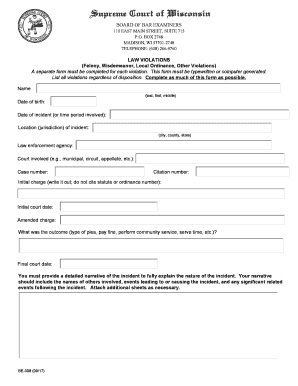
S) A separate form must be completed for each violation. This form must be typewritten or computer generated. List all violations regardless of disposition. Complete as much of this form as possible. Name (last, first, middle) Date of birth: Date of incident (or time period involved): Location (jurisdiction) of incident: (city, county, state) Law enforcement agency: Court involved (e.g., municipal, circuit, appellate, etc.): Case number: Citation number: Initial charge (write it out; do not.

How it works

  1. Open form

    Open form follow the instructions

  2. Easily sign form

    Easily sign the form with your finger

  3. Share form

    Send filled & signed form or save

How to fill out the WI BE-008 online

Filling out the WI BE-008 form is an essential step for individuals reporting law violations. This guide will walk you through each section of the form, ensuring you provide accurate and thorough information online.

Follow the steps to complete the WI BE-008 form successfully.

  1. Click the ‘Get Form’ button to obtain the form and open it in your chosen online editor.
  2. Begin with your name. Enter your last name, followed by your first name and middle name in the designated fields.
  3. Next, provide your date of birth in the specified format, allowing the reviewer to accurately identify your age.
  4. Indicate the date of the incident or the relevant time period in the appropriate section.
  5. Fill in the location of the incident by specifying the city, county, and state.
  6. Identify the law enforcement agency that was involved with the incident.
  7. In the next field, specify the court involved, whether it was a municipal, circuit, appellate court, or another type.
  8. Record the case number associated with the court proceedings.
  9. Provide the citation number related to the violation.
  10. Clearly write out the initial charge without citing any statute or ordinance number.
  11. Indicate the initial court date for when the charge was brought before a court.
  12. Mention any amended charges, if applicable, in the provided space.
  13. Describe the outcome of the case, outlining the type of plea, whether a fine was paid, community service was performed, or if time was served.
  14. Complete the final court date section to summarize the conclusion of your case.
  15. You must provide a detailed narrative of the incident. This narrative should include names of others involved, events leading to the incident, and any significant related events following the incident. Attach additional sheets if necessary.
  16. Once all information has been entered, you can save your changes, download, print, or share the completed form as needed.

Take the first step in completing your documentation by filling out the WI BE-008 online today.

Get form

Experience a faster way to fill out and sign forms on the web. Access the most extensive library of templates available.

Related content

application for exemption of waste treatment...
See Section A. 3. Applications received after the January 15 deadline cannot be accepted...
Learn more
Wi-Fi Remote
The Wi-Fi Remote gives you remote access to all your GoPro camera settings, power ON/OFF...
Learn more
Manual do usuário
A lâmpada LED Wi-Fi smart é utilizada na iluminação de ambientes residenciais e co...
Learn more

Related links form

Canada IMM 5707 E 2018 AU ASIC Form 484 2011 AU 40SP 2014 AU Statutory Declaration Partner Visa

Questions & Answers

Get answers to your most pressing questions about US Legal Forms API.

Contact support

To file a Wisconsin tax return, you can use the Wisconsin Department of Revenue's online portal, or submit a paper return to the designated address listed on their website. If you use tax software, it typically guides you through the filing process step by step. For more tailored options and resources, consult the information available in WI BE-008.

Claiming 0 on your W-4 results in higher withholding, which may lead to a bigger tax refund, while claiming 1 allows for a larger paycheck during the year but may reduce your refund amount. The choice ultimately depends on your financial situation and whether you prefer larger regular payments or a substantial refund at tax time. To better understand your withholding options, refer to the guidance surrounding WI BE-008.

Filing income tax effectively often involves selecting the right method based on your comfort level and the complexity of your finances. Many individuals choose to e-file due to its convenience and speed, particularly with reliable services like USLegalForms. Engaging a tax professional may be beneficial for complicated situations. Make sure to consult the WI BE-008 information for comprehensive filing options.

To maximize your tax refund, begin by ensuring you claim all eligible deductions and credits. Common credits include the Earned Income Tax Credit and education-related credits. It may also be beneficial to keep meticulous records of your expenses throughout the year. Utilizing calculators or guidance, such as that provided within WI BE-008, can help you understand what you might be missing.

The best method to file taxes typically depends on your individual situation. Many find e-filing through secure platforms like USLegalForms efficient, as it often speeds up the processing time for refunds. Additionally, using tax software can help ensure you don’t miss deductions while keeping your information organized. To explore your options, consider the guidance provided in WI BE-008 for a smooth filing experience.

You can obtain a Wisconsin sales tax ID number by visiting the Wisconsin Department of Revenue website. There, you will find the application form that you can complete online. Once you submit your application, you will receive your sales tax ID number, essential for conducting business and collecting sales tax in Wisconsin. Consider using the WI BE-008 resources for additional guidance.

Yes, a W-8ECI does expire. The form is valid for up to three years from the date of signing unless there are changes in your circumstances that require you to submit a new form. It is essential to stay updated with your tax filings to maintain compliance and avoid issues with the IRS. Regularly reviewing your forms and using services like uslegalforms can help you manage these requirements effectively.

Use form W-8ECI when a foreign individual or entity earns income that is effectively connected with a U.S. trade or business. This form allows them to report income subject to U.S. taxation, which is critical for accurately fulfilling tax obligations. Submitting W-8ECI helps to minimize withholding taxes because it allows the income to be taxed at graduated rates rather than a flat withholding rate. Understanding when to use W-8ECI can prevent complications down the line.

Form W-8BEN-E should be filled out by foreign entities that receive income from U.S. sources. This includes corporations, partnerships, and other organizations that are not U.S. citizens or residents. By completing this form, they can claim a reduced withholding tax rate under applicable U.S. tax treaties. Using W-8BEN-E effectively ensures proper tax compliance and helps avoid unnecessary taxation.

Completing W-8BEN involves several clear steps. First, provide your name and address, ensuring all details are accurate and up-to-date. Next, indicate your foreign status by checking the appropriate boxes and provide your taxpayer identification number. Finally, sign and date the form, then submit it to the withholding agent. Platforms like uslegalforms can guide you through this process to make it simpler and less stressful.

Get This Form Now!

Use professional pre-built templates to fill in and sign documents online faster. Get access to thousands of forms.
If you believe that this page should be taken down, please follow our DMCA take down processhere.
Get WI BE-008
  • Adoption
  • Bankruptcy
  • Contractors
  • Divorce
  • Home Sales
  • Employment
  • Identity Theft
  • Incorporation
  • Landlord Tenant
  • Living Trust
  • Name Change
  • Personal Planning
  • Small Business
  • Wills & Estates
  • Packages A-Z
  • Affidavits
  • Bankruptcy
  • Bill of Sale
  • Corporate - LLC
  • Divorce
  • Employment
  • Identity Theft
  • Internet Technology
  • Landlord Tenant
  • Living Wills
  • Name Change
  • Power of Attorney
  • Real Estate
  • Small Estates
  • Wills
  • All Forms
  • Forms A-Z
  • Other Templates
  • Legal Hub
  • About Us
  • Help Portal
  • Legal Resources
  • Blog
  • Affiliates
  • Contact Us
  • Delete My Account
  • Site Map
  • Industries
  • Forms in Spanish
  • Localized Forms
  • State-specific Forms
  • Forms Kit
  • Real Estate Handbook
  • All Guides
  • Notarize
  • Incorporation services
  • For Consumers
  • For Small Business
  • For Attorneys
  • USLegal
  • FormsPass
  • pdfFiller
  • signNow
  • altaFlow
  • DocHub
  • Instapage
Form Packages
  • Adoption
  • Bankruptcy
  • Contractors
  • Divorce
  • Home Sales
  • Employment
  • Identity Theft
  • Incorporation
  • Landlord Tenant
  • Living Trust
  • Name Change
  • Personal Planning
  • Small Business
  • Wills & Estates
  • Packages A-Z
Form Categories
  • Affidavits
  • Bankruptcy
  • Bill of Sale
  • Corporate - LLC
  • Divorce
  • Employment
  • Identity Theft
  • Internet Technology
  • Landlord Tenant
  • Living Wills
  • Name Change
  • Power of Attorney
  • Real Estate
  • Small Estates
  • Wills
  • All Forms
  • Forms A-Z
  • Other Templates
Customer Service
  • Legal Hub
  • About Us
  • Help Portal
  • Legal Resources
  • Blog
  • Affiliates
  • Contact Us
  • Delete My Account
  • Site Map
  • Industries
  • Forms in Spanish
  • Localized Forms
  • State-specific Forms
  • Forms Kit
Legal Guides
  • Real Estate Handbook
  • All Guides
Prepared for you
  • Notarize
  • Incorporation services
Our Customers
  • For Consumers
  • For Small Business
  • For Attorneys
Our Sites
  • USLegal
  • FormsPass
  • pdfFiller
  • signNow
  • altaFlow
  • DocHub
  • Instapage
Social Media
Call us now toll free:
+1 833 426 79 33
As seen in:
© Copyright 1999-2026 airSlate Legal Forms, Inc. 17 Station Street, Ste. 203, Brookline, MA 02445
  • Your Privacy Choices
  • Terms of Service
  • Privacy Notice
  • Content Takedown Policy
  • Bug Bounty Program
WI BE-008
This form is available in several versions.
Select the version you need from the drop-down list below.
2022 WI BE-008
Select form
  • 2022 WI BE-008
  • 2018 WI BE-008
  • 2017 WI BE-008
Select form