Loading
Form preview
  • US Legal Forms
  • Other Templates
  • Legal Forms
  • Wisconsin Legal Forms
  • Wi 1-2003 2003

Get Wi 1-2003 2003-2026

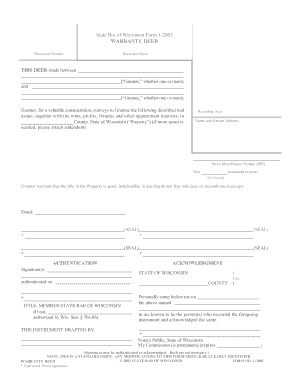
Uable consideration, conveys to Grantee the following described real estate, together with the rents, profits, fixtures and other appurtenant interests, in County, State of Wisconsin ( Property ) (if more space is needed, please attach addendum): Recording Area Name and Return Address Parcel Identification Number (PIN) This homestead property. (is) (is not) Grantor warrants that the title to the Property is good, indefeasible in fee simple and free and clear of encumbrances except: Date.

How it works

  1. Open form

    Open form follow the instructions

  2. Easily sign form

    Easily sign the form with your finger

  3. Share form

    Send filled & signed form or save

How to fill out the WI 1-2003 online

Filling out the WI 1-2003, also known as the Warranty Deed, is an important process for transferring property ownership in Wisconsin. This guide provides a clear, step-by-step approach to help users complete the form online efficiently.

Follow the steps to complete the WI 1-2003 online.

  1. Use the ‘Get Form’ button to acquire the document and open it in the designated editor.
  2. Identify the grantor(s) and grantee(s). Input the names in the appropriate fields, indicating if there are multiple parties involved.
  3. Describe the real estate being conveyed. Include pertinent details about the property location in the designated space, and attach an addendum if additional space is needed.
  4. Fill in the county and state where the property is located. This information is crucial for the legal effectiveness of the deed.
  5. Provide the parcel identification number (PIN) for the property. This number helps identify the property accurately within public records.
  6. Indicate if the property is homestead property by checking the appropriate box.
  7. Include the date of execution in the specified field. This date represents the official signing of the warranty deed.
  8. Collect the signatures of all grantors. Ensure that each signer includes their name beneath their signature.
  9. Enter the details for the notary public, including the acknowledgment date and their commission expiration, if applicable.
  10. Review all filled information for accuracy. Make any necessary corrections before concluding the process.
  11. Once finalized, save your changes, download the document, print it for physical storage, or share it as needed.

Complete your documents online today to ensure efficient property management.

Get form

Experience a faster way to fill out and sign forms on the web. Access the most extensive library of templates available.
Get form

Related content

2003 I-010 Form 1 Wisconsin income tax
Assemble your return (pages 1-4) and withholding statements in the order listed on page...
Learn more
WI Constitution: History & Revisions
This bibliography lists selective resources on the history and revisions of the Wisconsin...
Learn more
Participações dos clubes no Campeonato...
1 (2003). São Paulo União Barbarense, 1 (2004). São Paulo Grêmio Barueri, 1 (2006)...
Learn more

Related links form

CC 104-R 2013 UK VAF4A - Appendix 2 2012 Canada TBS/SCT 330-60E 2006 VA 21-0958 2015

Questions & Answers

Get answers to your most pressing questions about US Legal Forms API.

Contact support

WI Form 3K 1 is a Wisconsin tax form used by partnerships to report their partnership income, deductions, and credits. This form informs partners of their share of income for accurate reporting on individual tax returns. It's important to complete this form correctly to ensure compliance with state regulations. For assistance relating to WI 1-2003 and the completion of WI Form 3K 1, visit US Legal Forms for valuable resources.

Form K-3 is not universally required but is necessary for certain partnerships and S corporations that have foreign activities. If you fall under this category, make sure to file this form along with your tax return to avoid penalties. For tax clarity regarding WI 1-2003, you can find tools and templates at US Legal Forms.

The Schedule 3K 1 form in Wisconsin is used to report income, deductions, and credits from partnerships and corporations. This form is crucial for partners and shareholders to ensure they accurately report their share of income on their tax returns. Understanding this form can streamline your tax filing process. For expert assistance related to WI 1-2003 and Schedule 3K 1, explore US Legal Forms.

You should file your WI Form 1 with the Wisconsin Department of Revenue. You can submit the form either by mail or electronically, depending on your preference. Ensure that you complete the form correctly to avoid delays or issues. For more guidance related to WI 1-2003 filing, US Legal Forms offers reliable templates and filing advice.

To fill out an EZ tax form, begin by entering your personal information, such as your name, address, and social security number. Next, report your income sources, ensuring that you total everything accurately. Remember, deductions and credits should be minimal, as the EZ form is designed for straightforward filing. For clarity on WI 1-2003 tax requirements, check out the resources on US Legal Forms.

1 tax form reports income, deductions, and credits from partnerships and S corporations. It's essential for individuals who receive income from these entities as it ensures accurate tax reporting. If you receive a K1, include its details on your tax return, specifically referring to WI 12003 for specific Wisconsin tax regulations. US Legal Forms provides templates and assistance for handling K1 forms effectively.

To fill out box 1 on your W-2 form, start by inputting your total taxable income for the year. This amount includes wages, tips, and other compensation from your employer. Make sure to exclude any pre-tax contributions, such as retirement plan contributions. For further guidance, consider visiting US Legal Forms, which offers comprehensive resources related to WI 1-2003.

Throughout history, May 1st has been marked by various significant events. Beyond George W. Bush's 2003 address, this date has seen historical proclamations and cultural celebrations, such as May Day. It serves as a reminder of the various ways societies interact with themes of freedom and struggle. Exploring WI 1-2003 reveals how historical narratives intertwine and influence present-day discussions.

On December 1, 2003, the U.S. captured Saddam Hussein, marking a significant moment in the Iraq War. His arrest had ramifications for the political landscape in Iraq and the strategy used by the United States in the region. This pivotal event highlighted the complexities of post-war governance and conflict resolution. By examining WI 1-2003, one can better appreciate the full scope of challenges faced during this time.

On , George W. Bush famously proclaimed the end of major combat operations in Iraq during his address aboard the USS Abraham Lincoln. This declaration followed weeks of military engagement and set off a series of national discussions. The statement affected both domestic and foreign policies in the years to come, reminding us of the lasting echoes of WI 1-2003. Understanding these occurrences can frame current discussions of military and foreign affairs.

Get This Form Now!

Use professional pre-built templates to fill in and sign documents online faster. Get access to thousands of forms.
Get form
If you believe that this page should be taken down, please follow our DMCA take down processhere.
Get WI 1-2003
Get form
  • Adoption
  • Bankruptcy
  • Contractors
  • Divorce
  • Home Sales
  • Employment
  • Identity Theft
  • Incorporation
  • Landlord Tenant
  • Living Trust
  • Name Change
  • Personal Planning
  • Small Business
  • Wills & Estates
  • Packages A-Z
  • Affidavits
  • Bankruptcy
  • Bill of Sale
  • Corporate - LLC
  • Divorce
  • Employment
  • Identity Theft
  • Internet Technology
  • Landlord Tenant
  • Living Wills
  • Name Change
  • Power of Attorney
  • Real Estate
  • Small Estates
  • Wills
  • All Forms
  • Forms A-Z
  • Other Templates
  • Legal Hub
  • About Us
  • Help Portal
  • Legal Resources
  • Blog
  • Affiliates
  • Contact Us
  • Delete My Account
  • Site Map
  • Industries
  • Forms in Spanish
  • Localized Forms
  • State-specific Forms
  • Forms Kit
  • Real Estate Handbook
  • All Guides
  • Notarize
  • Incorporation services
  • For Consumers
  • For Small Business
  • For Attorneys
  • USLegal
  • FormsPass
  • pdfFiller
  • signNow
  • altaFlow
  • DocHub
  • Instapage
Form Packages
  • Adoption
  • Bankruptcy
  • Contractors
  • Divorce
  • Home Sales
  • Employment
  • Identity Theft
  • Incorporation
  • Landlord Tenant
  • Living Trust
  • Name Change
  • Personal Planning
  • Small Business
  • Wills & Estates
  • Packages A-Z
Form Categories
  • Affidavits
  • Bankruptcy
  • Bill of Sale
  • Corporate - LLC
  • Divorce
  • Employment
  • Identity Theft
  • Internet Technology
  • Landlord Tenant
  • Living Wills
  • Name Change
  • Power of Attorney
  • Real Estate
  • Small Estates
  • Wills
  • All Forms
  • Forms A-Z
  • Other Templates
Customer Service
  • Legal Hub
  • About Us
  • Help Portal
  • Legal Resources
  • Blog
  • Affiliates
  • Contact Us
  • Delete My Account
  • Site Map
  • Industries
  • Forms in Spanish
  • Localized Forms
  • State-specific Forms
  • Forms Kit
Legal Guides
  • Real Estate Handbook
  • All Guides
Prepared for you
  • Notarize
  • Incorporation services
Our Customers
  • For Consumers
  • For Small Business
  • For Attorneys
Our Sites
  • USLegal
  • FormsPass
  • pdfFiller
  • signNow
  • altaFlow
  • DocHub
  • Instapage
Social Media
Call us now toll free:
+1 833 426 79 33
As seen in:
© Copyright 1999-2026 airSlate Legal Forms, Inc. 17 Station Street, Ste. 203, Brookline, MA 02445
  • Your Privacy Choices
  • Terms of Service
  • Privacy Notice
  • Content Takedown Policy
  • Bug Bounty Program