Loading
Form preview
  • US Legal Forms
  • Other Templates
  • Legal Forms
  • Texas Legal Forms
  • Tx Police Alarm Permit Application

Get Tx Police Alarm Permit Application

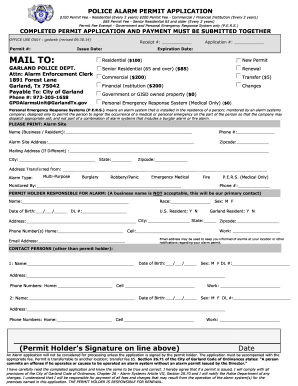
Sex: M F DL #: Address: Phone Numbers: Home: Cell (Permit Holder's Signature on line above) Work: Date An Alarm application will not be considered for processing unless the application is signed by the permit holder. The application must be accompanied with the appropriate fee. Permit is transferrab.

How it works

  1. Open form

    Open form follow the instructions

  2. Easily sign form

    Easily sign the form with your finger

  3. Share form

    Send filled & signed form or save

How to fill out the TX Police Alarm Permit Application online

Filling out the TX Police Alarm Permit Application online is an essential step for individuals and businesses to ensure compliance with local regulations for alarm systems. This guide will provide clear and thorough instructions on how to complete the application accurately and efficiently.

Follow the steps to fill out the TX Police Alarm Permit Application online.

  1. Press the ‘Get Form’ button to access the TX Police Alarm Permit Application and open it in your preferred editor.
  2. Start by selecting the type of permit you need: Residential, Senior Residential, Commercial, Financial Institution, Transfer, or Government. Each option has a corresponding fee and eligibility requirements.
  3. Provide the Alarm Site Name, which could be your business or residence name, along with the Site Phone Number.
  4. Fill in the Alarm Site Address, ensuring to include the full street address, city, state, and zipcode.
  5. If your mailing address is different from your alarm site address, include it in the provided section.
  6. Indicate the address you are transferring from, if applicable.
  7. Select the type of alarm from the available options: Multi-Purpose, Burglary, Robbery/Panic, Emergency Medical, or Fire, and specify who monitors the alarm.
  8. Enter the permit holder's details. This should be an individual’s name (not a business name), including their race, date of birth, and U.S. residency status.
  9. Fill out the driver's license number, sex, Garland residency status, and the address of the permit holder, including city, state, and zipcode.
  10. Input the phone numbers for the permit holder, including home, cell, and work numbers, as well as an email address for notifications.
  11. List additional contact persons other than the permit holder, including their names, dates of birth, sex, and contact details.
  12. Ensure that the permit holder signs the application at the designated line, confirming accuracy and agreement to comply with the local code of ordinances.
  13. Review the entire application for accuracy. After verifying that all information is correct, you can save the changes, download, or print the application for submission.

Complete your TX Police Alarm Permit Application online today and ensure your alarm system is compliant.

Get form

Experience a faster way to fill out and sign forms on the web. Access the most extensive library of templates available.
Get form

Related content

Apply for an alarm permit | AustinTexas. ...
The City of Austin requires an alarm permit for each alarm system activated within the...
Learn more
False Burglar Alarms 2nd Edition
by PSG Series — Many ordinances also require alarm owners to obtain a permit. In theory...
Learn more
4 of 6
I agree to pay all construction/alarm use permit fees; all directly or indirectly imposed...
Learn more

Related links form

PA McKean County Emergency Petition for Custody PA Motion for Continuance - Pike County PA Notary Public Application 2007 PA Notice and Order to Appear

Questions & Answers

Get answers to your most pressing questions about US Legal Forms API.

Contact support

To determine if your car has an alarm, check the owner's manual or consult the dealership where you purchased the vehicle. Additionally, you can look for flashing lights on the dashboard or an audible sound when locking or unlocking the doors. Knowing your car's alarm features can be essential, especially if you're applying for any related permits.

To find out your house alarm code, check your alarm system manual, as it usually contains default codes. If you have forgotten the code, you may need to contact the alarm company for assistance. Sometimes, providing them with basic identification helps them to reset your code. Maintaining access to your alarm code is vital for ensuring your home's safety.

To qualify for an alarm system, you typically need to show proof of residency and provide information about your property. Additionally, some local jurisdictions may require background checks or training certifications. It's wise to check your area's regulations on alarm systems to ensure compliance, and US Legal Forms can help make this process straightforward.

To obtain a Texas fire alarm license, you must complete specific training and education requirements. You should also apply through the appropriate state agency, ensuring that you meet all prerequisites. For a smooth application process, consider using US Legal Forms to access essential documents and guidance when applying for your Texas Fire Alarm License.

Yes, you must obtain a license to sell alarms in Texas. This requirement ensures that sellers meet specific standards and regulations. By following these regulations, you help maintain a safe environment for consumers looking to protect their property. Consider using US Legal Forms to simplify the application process for obtaining the necessary licenses.

Alarm site locations within the City of Houston city limits and areas receiving Houston Police response are required to have a valid alarm permit.

To prevent valuable resources being tied up in responding to these calls, any person or business operating an alarm system with the intent to summon an emergency service is required to register an alarm system. An alarm permit must be obtained within 30 days of an alarm system installation.

Excessive False Alarms If the alarm site does not have an alarm permit (through non-registration or through having been revoked), the alarm system user will be subject to a fine of between $300 and $500, for each separate occurrence.

You must meet one of the following requirements: Have a current Electronic Security Association (ESA) Level III Fire Alarm Designer certification. Pass the National Institute for Certification in Engineering Technologies (NICET) Level III Fire Alarm Systems test. Be a licensed Texas Professional Engineer.

Burglar And Panic Alarms Permitting Online: Apply online and submit full electronic payment at .houstonburglaralarmpermits.org. By Mail: Send completed application and full payment to City of Houston - Burglar Alarm Administration, P.O. Box 203887, Houston, Texas 77216-3887.

Get This Form Now!

Use professional pre-built templates to fill in and sign documents online faster. Get access to thousands of forms.
Get form
If you believe that this page should be taken down, please follow our DMCA take down processhere.
Get TX Police Alarm Permit Application
Get form
  • Adoption
  • Bankruptcy
  • Contractors
  • Divorce
  • Home Sales
  • Employment
  • Identity Theft
  • Incorporation
  • Landlord Tenant
  • Living Trust
  • Name Change
  • Personal Planning
  • Small Business
  • Wills & Estates
  • Packages A-Z
  • Affidavits
  • Bankruptcy
  • Bill of Sale
  • Corporate - LLC
  • Divorce
  • Employment
  • Identity Theft
  • Internet Technology
  • Landlord Tenant
  • Living Wills
  • Name Change
  • Power of Attorney
  • Real Estate
  • Small Estates
  • Wills
  • All Forms
  • Forms A-Z
  • Other Templates
  • Legal Hub
  • About Us
  • Help Portal
  • Legal Resources
  • Blog
  • Affiliates
  • Contact Us
  • Delete My Account
  • Site Map
  • Industries
  • Forms in Spanish
  • Localized Forms
  • State-specific Forms
  • Forms Kit
  • Real Estate Handbook
  • All Guides
  • Notarize
  • Incorporation services
  • For Consumers
  • For Small Business
  • For Attorneys
  • USLegal
  • FormsPass
  • pdfFiller
  • signNow
  • altaFlow
  • DocHub
  • Instapage
Form Packages
  • Adoption
  • Bankruptcy
  • Contractors
  • Divorce
  • Home Sales
  • Employment
  • Identity Theft
  • Incorporation
  • Landlord Tenant
  • Living Trust
  • Name Change
  • Personal Planning
  • Small Business
  • Wills & Estates
  • Packages A-Z
Form Categories
  • Affidavits
  • Bankruptcy
  • Bill of Sale
  • Corporate - LLC
  • Divorce
  • Employment
  • Identity Theft
  • Internet Technology
  • Landlord Tenant
  • Living Wills
  • Name Change
  • Power of Attorney
  • Real Estate
  • Small Estates
  • Wills
  • All Forms
  • Forms A-Z
  • Other Templates
Customer Service
  • Legal Hub
  • About Us
  • Help Portal
  • Legal Resources
  • Blog
  • Affiliates
  • Contact Us
  • Delete My Account
  • Site Map
  • Industries
  • Forms in Spanish
  • Localized Forms
  • State-specific Forms
  • Forms Kit
Legal Guides
  • Real Estate Handbook
  • All Guides
Prepared for you
  • Notarize
  • Incorporation services
Our Customers
  • For Consumers
  • For Small Business
  • For Attorneys
Our Sites
  • USLegal
  • FormsPass
  • pdfFiller
  • signNow
  • altaFlow
  • DocHub
  • Instapage
Social Media
Call us now toll free:
+1 833 426 79 33
As seen in:
© Copyright 1999-2026 airSlate Legal Forms, Inc. 17 Station Street, Ste. 203, Brookline, MA 02445
  • Your Privacy Choices
  • Terms of Service
  • Privacy Notice
  • Content Takedown Policy
  • Bug Bounty Program